鸿蒙PC用Electron框架——记忆学习模式进度条与歌词进度同步技术深度解析
·
欢迎加入开源鸿蒙PC社区:
https://harmonypc.csdn.net/
atomgit仓库地址:https://atomgit.com/Math_teacher_fan/jingdiangeci
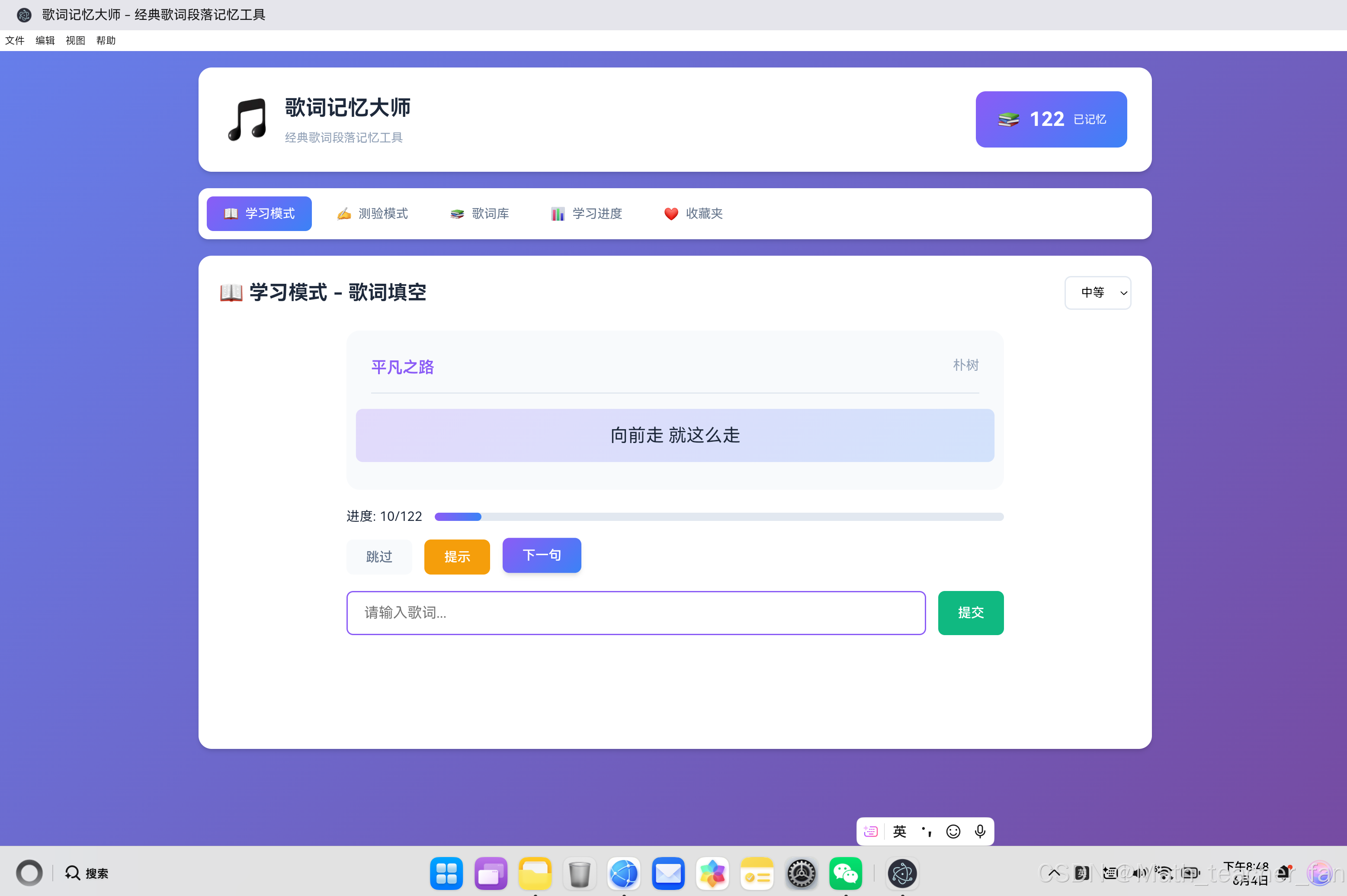
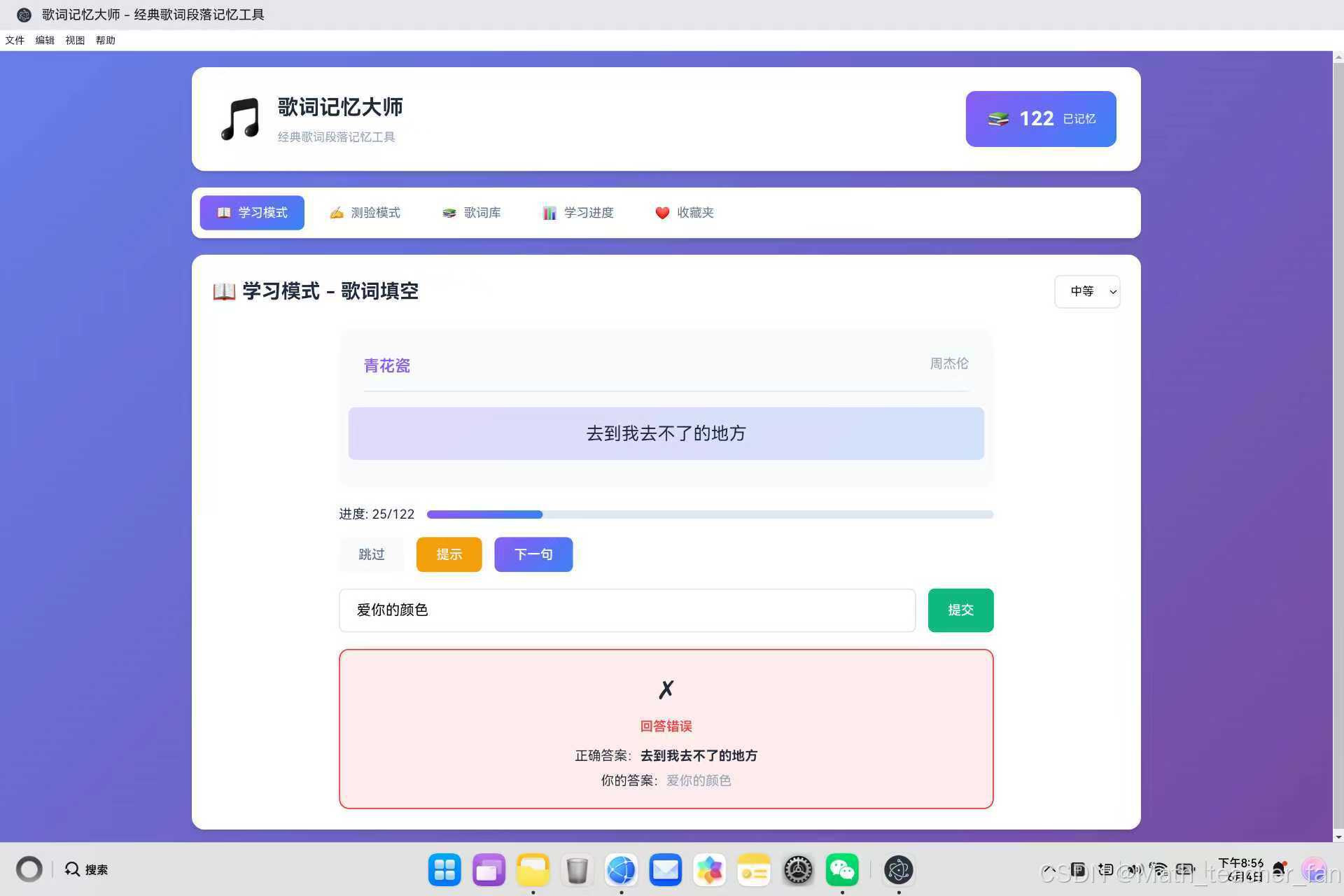
一、进度同步概述
1.1 核心概念
在歌词记忆学习应用中,进度条与歌词进度的同步是一个关键的用户体验问题。它涉及两个核心组件的协同工作:
| 组件 | 职责 | 更新时机 |
|---|---|---|
| 进度条 | 显示整体学习进度 | 学习队列变化时 |
| 歌词显示 | 展示当前学习内容 | 切换歌词时 |
同步机制的核心目标:
- 实时反映:进度条实时反映当前学习位置
- 视觉反馈:用户能直观看到学习进度
- 状态同步:进度条与歌词内容保持一致
1.2 同步架构
┌─────────────────────────────────────────────────────┐
│                     同步架构                        │
├─────────────────────────────────────────────────────┤
│                                                     │
│   学习队列 (studyQueue)                              │
│         │                                           │
│         ▼                                           │
│   ┌───────────────┐                                 │
│   │ DataManager   │ ← 数据持久化                    │
│   └───────┬───────┘                                 │
│           │                                         │
│           ▼                                         │
│   ┌─────────────────────────────────────────┐       │
│   │              同步管理器                  │       │
│   │  ┌─────────────┐    ┌─────────────┐    │       │
│   │  │ 进度计算    │───▶│ UI更新      │    │       │
│   │  │ Progress    │    │ Update      │    │       │
│   │  └─────────────┘    └───────┬─────┘    │       │
│   └─────────────────────────────┼─────────┘       │
│                                 │                 │
│              ┌──────────────────┼──────────┐      │
│              ▼                  ▼          ▼      │
│        ┌─────────┐      ┌─────────┐  ┌─────────┐ │
│        │进度条   │      │歌词显示 │  │统计信息 │ │
│        │Progress │      │Lyrics   │  │Stats    │ │
│        │Bar      │      │Display  │  │Panel    │ │
│        └─────────┘      └─────────┘  └─────────┘ │
│                                                     │
└─────────────────────────────────────────────────────┘
二、进度条实现技术
2.1 HTML结构
<div class="progress-info">
    <span>进度: <span id="progressText">0/0</span></span>
    <div class="progress-bar">
        <div class="progress-fill" id="progressFill" style="width: 0%"></div>
    </div>
</div>
2.2 CSS样式
.progress-info {
    display: flex;
    align-items: center;
    gap: 15px;
}

.progress-bar {
    flex: 1;
    height: 10px;
    background: #e2e8f0;
    border-radius: 5px;
    overflow: hidden;
}

.progress-fill {
    height: 100%;
    background: linear-gradient(90deg, #8b5cf6, #3b82f6);
    border-radius: 5px;
    transition: width 0.3s ease;
}
样式要点:
- flex布局:进度文本和进度条并排显示
- overflow:hidden:隐藏超出进度条的填充部分
- transition:平滑过渡动画
- 渐变色:从紫色到蓝色的渐变效果
2.3 进度计算逻辑
updateProgress() {
    // 获取当前学习队列
    const total = studyQueue.length;
    const current = currentLineIndex + 1;

    // 更新文本显示
    document.getElementById('progressText').textContent = `${current}/${total}`;

    // 计算百分比
    const percentage = total > 0 ? (current / total) * 100 : 0;

    // 更新进度条宽度
    document.getElementById('progressFill').style.width = `${percentage}%`;

    // 更新已记忆统计
    document.getElementById('totalCount').textContent = total;
}
计算逻辑说明:
进度百分比 = (当前位置 / 队列总长度) × 100

示例:
当前学习第3句,队列共10句:
percentage = (3 / 10) × 100 = 30%
三、歌词进度同步机制
3.1 学习队列数据结构
studyQueue = [
    {
        lyricsId: 1,           // 歌词ID
        song: '平凡之路',      // 歌曲名
        artist: '朴树',       // 歌手
        lineIndex: 0,          // 歌词行索引
        text: '徘徊着的 在路上的', // 歌词内容
        priority: 4            // 优先级
    },
    // ... 更多歌词对象
];
3.2 队列管理与进度同步
const StudyModule = {
    buildStudyQueue() {
        const allLyrics = [...lyricsDatabase, ...DataManager.getLyrics()];
        const progress = DataManager.getProgress();
        studyQueue = [];

        // 构建学习队列
        allLyrics.forEach(lyrics => {
            lyrics.lyrics.forEach((line, index) => {
                const lineProgress = progress[lyrics.id]?.lines[index];
                const wrongCount = lineProgress?.wrong || 0;
                const correctCount = lineProgress?.correct || 0;

                // 计算优先级
                const priority = wrongCount - correctCount + (correctCount < 3 ? 2 : 0);

                studyQueue.push({
                    lyricsId: lyrics.id,
                    song: lyrics.song,
                    artist: lyrics.artist,
                    lineIndex: index,
                    text: line,
                    priority: priority
                });
            });
        });

        // 按优先级排序
        studyQueue.sort((a, b) => b.priority - a.priority);

        // 重置当前索引
        currentLineIndex = 0;
    },

    loadCurrentLyric() {
        if (studyQueue.length === 0) {
            document.getElementById('lyricsContent').innerHTML =
                '<p style="text-align:center;color:#94a3b8;">暂无待学习内容</p>';
            return;
        }

        // 获取当前歌词
        const current = studyQueue[currentLineIndex];

        // 更新歌曲信息显示
        document.getElementById('currentSongName').textContent = current.song;
        document.getElementById('currentArtist').textContent = current.artist;

        // 根据难度生成填空歌词
        const difficulty = document.getElementById('difficultySelect').value;
        const displayText = this.hideCharacters(current.text, this.getHideCount(difficulty));

        // 更新歌词显示
        document.getElementById('lyricsContent').innerHTML = `
            <div class="lyric-line current">${displayText}</div>
        `;

        // 重置输入框
        document.getElementById('userAnswer').value = '';
        document.getElementById('userAnswer').focus();

        // 同步更新进度条
        this.updateProgress();
    },

    submitAnswer() {
        const userAnswer = document.getElementById('userAnswer').value.trim();
        const current = studyQueue[currentLineIndex];

        if (!userAnswer) {
            UIManager.showToast('请输入歌词');
            return;
        }

        // 判断答案是否正确
        const isCorrect = this.checkAnswer(userAnswer, current.text);

        // 更新学习进度数据
        DataManager.updateProgress(current.lyricsId, current.lineIndex, isCorrect);

        // 显示反馈
        this.showFeedback(isCorrect, current.text, userAnswer);

        // 调整队列(答对则移除,答错则重新排序)
        if (isCorrect) {
            studyQueue.splice(currentLineIndex, 1);
            // 调整当前索引
            if (currentLineIndex >= studyQueue.length) {
                currentLineIndex = Math.max(0, studyQueue.length - 1);
            }
        } else {
            // 答错时提高优先级并重新排序
            current.priority += 2;
            studyQueue.sort((a, b) => b.priority - a.priority);
            // 找到新位置
            currentLineIndex = studyQueue.findIndex(item => item.lyricsId === current.lyricsId &&
                                                           item.lineIndex === current.lineIndex);
        }

        // 延迟加载下一句
        setTimeout(() => {
            if (studyQueue.length > 0) {
                this.loadCurrentLyric();
            } else {
                UIManager.showToast('恭喜!已完成所有歌词记忆');
                this.updateProgress();
            }
        }, 1500);
    }
};
3.3 同步流程详解
同步流程时序图

用户操作          学习模块          数据管理器          UI更新
   │                 │                  │                  │
   │ 输入答案并提交   │                  │                  │
   ├────────────────▶│                  │                  │
   │                 │  checkAnswer()   │                  │
   │                 │                  │                  │
   │                 │  updateProgress()│                  │
   │                 │─────────────────▶│                  │
   │                 │                  │ 保存到localStorage│
   │                 │                  │                  │
   │                 │  showFeedback()  │                  │
   │                 │───────────────────────────────────▶│
   │                 │                  │                  │
   │                 │  更新队列        │                  │
   │                 │                  │                  │
   │                 │  loadCurrentLyric│                  │
   │                 │───────────────────────────────────▶│
   │                 │                  │                  │
   │                 │  updateProgress()│                  │
   │                 │───────────────────────────────────▶│
   │                 │                  │                  │
四、实时同步技术
4.1 双向绑定机制
// 实现一个简易的响应式系统
class ProgressBinder {
    constructor() {
        this.listeners = [];
        this._progress = { current: 0, total: 0 };
    }

    get progress() {
        return this._progress;
    }

    set progress(value) {
        this._progress = value;
        this.notify();
    }

    subscribe(listener) {
        this.listeners.push(listener);
    }

    notify() {
        this.listeners.forEach(listener => listener(this._progress));
    }
}

// 使用示例
const progressBinder = new ProgressBinder();

// 订阅进度变化
progressBinder.subscribe((progress) => {
    document.getElementById('progressText').textContent =
        `${progress.current}/${progress.total}`;
    document.getElementById('progressFill').style.width =
        `${progress.total > 0 ? (progress.current / progress.total) * 100 : 0}%`;
});

// 更新进度
progressBinder.progress = { current: 3, total: 10 };
4.2 状态管理模式
// 集中式状态管理
const AppState = {
    studyQueue: [],
    currentLineIndex: 0,
    difficulty: 'medium',
    quizStats: { correct: 0, wrong: 0 },

    updateStudyQueue(newQueue) {
        this.studyQueue = newQueue;
        this.currentLineIndex = 0;
        this.notify('queueChanged');
    },

    nextLine() {
        if (this.currentLineIndex < this.studyQueue.length - 1) {
            this.currentLineIndex++;
            this.notify('lineChanged');
        }
    },

    removeCurrentLine() {
        this.studyQueue.splice(this.currentLineIndex, 1);
        if (this.currentLineIndex >= this.studyQueue.length) {
            this.currentLineIndex = Math.max(0, this.studyQueue.length - 1);
        }
        this.notify('queueChanged');
    },

    notify(event) {
        // 触发事件通知所有监听者
        document.dispatchEvent(new CustomEvent(event, { detail: this }));
    }
};

// 监听队列变化
document.addEventListener('queueChanged', (e) => {
    const state = e.detail;
    updateProgressDisplay(state.currentLineIndex, state.studyQueue.length);
});

// 监听行变化
document.addEventListener('lineChanged', (e) => {
    const state = e.detail;
    loadLyric(state.studyQueue[state.currentLineIndex]);
});
五、性能优化策略
5.1 节流更新
// 节流函数
function throttle(func, limit) {
    let inThrottle = false;
    return function() {
        if (!inThrottle) {
            func.apply(this, arguments);
            inThrottle = true;
            setTimeout(() => inThrottle = false, limit);
        }
    };
}

// 应用节流
const throttledUpdateProgress = throttle(() => {
    updateProgress();
}, 100);

// 使用
studyQueue.forEach(() => {
    throttledUpdateProgress();
});
5.2 批量DOM更新
// 批量更新DOM
function batchUpdateUI(updates) {
    // 使用requestAnimationFrame合并更新
    requestAnimationFrame(() => {
        updates.forEach(update => {
            document.getElementById(update.id)[update.property] = update.value;
        });
    });
}

// 使用示例
batchUpdateUI([
    { id: 'progressText', property: 'textContent', value: '3/10' },
    { id: 'progressFill', property: 'style', value: { width: '30%' } },
    { id: 'currentSongName', property: 'textContent', value: '平凡之路' },
    { id: 'currentArtist', property: 'textContent', value: '朴树' }
]);
5.3 虚拟滚动(大数据量优化)
// 虚拟滚动实现(适用于大量歌词)
class VirtualScroll {
    constructor(container, items, itemHeight = 60) {
        this.container = container;
        this.items = items;
        this.itemHeight = itemHeight;
        this.visibleCount = Math.ceil(container.clientHeight / itemHeight) + 2;
        this.startIndex = 0;

        this.render();
        this.container.addEventListener('scroll', () => this.handleScroll());
    }

    render() {
        const visibleItems = this.items.slice(
            this.startIndex,
            this.startIndex + this.visibleCount
        );

        this.container.innerHTML = `
            <div style="height: ${this.items.length * this.itemHeight}px; position: relative;">
                <div style="position: absolute; top: ${this.startIndex * this.itemHeight}px;">
                    ${visibleItems.map((item, index) => `
                        <div style="height: ${this.itemHeight}px;">
                            ${item.text}
                        </div>
                    `).join('')}
                </div>
            </div>
        `;
    }

    handleScroll() {
        this.startIndex = Math.floor(this.container.scrollTop / this.itemHeight);
        this.render();
    }
}
六、进度条动画效果
6.1 平滑过渡
.progress-fill {
    transition: width 0.3s cubic-bezier(0.4, 0, 0.2, 1);
}

/* 动画曲线说明:
   cubic-bezier(0.4, 0, 0.2, 1)
   - 开始缓慢加速
   - 中间快速
   - 结束缓慢减速
*/
6.2 脉冲效果
@keyframes pulse {
    0%, 100% {
        opacity: 1;
    }
    50% {
        opacity: 0.7;
    }
}

.progress-fill.active {
    animation: pulse 2s ease-in-out infinite;
}
6.3 渐变动画
.progress-fill {
    background: linear-gradient(
        90deg,
        #8b5cf6 0%,
        #3b82f6 50%,
        #10b981 100%
    );
    background-size: 200% 100%;
    animation: gradientShift 3s ease infinite;
}

@keyframes gradientShift {
    0% {
        background-position: 0% 50%;
    }
    50% {
        background-position: 100% 50%;
    }
    100% {
        background-position: 0% 50%;
    }
}
七、多模块进度同步
7.1 学习进度与统计面板同步
// 同步学习进度到统计面板
function syncProgressToStats() {
    const progress = DataManager.getProgress();
    let mastered = 0;
    let total = 0;

    Object.values(progress).forEach(songProgress => {
        mastered += songProgress.mastered || 0;
        // 需要记录总行数
    });

    document.getElementById('masteredCount').textContent = mastered;
    document.getElementById('learningCount').textContent = total - mastered;
}

// 监听学习完成事件
document.addEventListener('learningComplete', () => {
    syncProgressToStats();
});
7.2 跨页面进度同步
// 使用localStorage事件监听跨页面变化
window.addEventListener('storage', (e) => {
    if (e.key === 'lyrics_progress') {
        // 其他页面更新了进度,同步更新当前页面
        const newProgress = JSON.parse(e.newValue);
        updateProgressFromStorage(newProgress);
    }
});
八、完整实现示例
8.1 进度条组件
<!DOCTYPE html>
<html>
<head>
<style>
    .progress-container {
        width: 100%;
        max-width: 600px;
        margin: 20px auto;
    }

    .progress-header {
        display: flex;
        justify-content: space-between;
        margin-bottom: 10px;
        font-size: 0.9rem;
        color: #64748b;
    }

    .progress-bar-wrapper {
        height: 12px;
        background: #e2e8f0;
        border-radius: 6px;
        overflow: hidden;
    }

    .progress-bar-fill {
        height: 100%;
        background: linear-gradient(90deg, #8b5cf6, #3b82f6);
        border-radius: 6px;
        transition: width 0.3s ease;
    }

    .progress-info {
        display: flex;
        justify-content: space-between;
        margin-top: 10px;
        font-size: 0.85rem;
        color: #94a3b8;
    }
</style>
</head>
<body>
    <div class="progress-container">
        <div class="progress-header">
            <span>学习进度</span>
            <span id="progressText">0/0</span>
        </div>
        <div class="progress-bar-wrapper">
            <div class="progress-bar-fill" id="progressBar"></div>
        </div>
        <div class="progress-info">
            <span>已掌握: <span id="masteredText">0</span></span>
            <span>正确率: <span id="accuracyText">0%</span></span>
        </div>
    </div>

    <script>
        class ProgressBar {
            constructor() {
                this.progressBar = document.getElementById('progressBar');
                this.progressText = document.getElementById('progressText');
                this.masteredText = document.getElementById('masteredText');
                this.accuracyText = document.getElementById('accuracyText');

                this.current = 0;
                this.total = 0;
                this.mastered = 0;
                this.correct = 0;
                this.wrong = 0;
            }

            update(current, total, mastered = null, correct = null, wrong = null) {
                this.current = current;
                this.total = total;

                if (mastered !== null) this.mastered = mastered;
                if (correct !== null) this.correct = correct;
                if (wrong !== null) this.wrong = wrong;

                this.render();
            }

            render() {
                const percentage = this.total > 0 ? (this.current / this.total) * 100 : 0;
                const accuracy = (this.correct + this.wrong) > 0
                    ? Math.round((this.correct / (this.correct + this.wrong)) * 100)
                    : 0;

                this.progressBar.style.width = `${percentage}%`;
                this.progressText.textContent = `${this.current}/${this.total}`;
                this.masteredText.textContent = this.mastered;
                this.accuracyText.textContent = `${accuracy}%`;
            }

            increment() {
                if (this.current < this.total) {
                    this.current++;
                    this.render();
                }
            }
        }

        // 使用示例
        const progressBar = new ProgressBar();

        // 初始化
        progressBar.update(0, 10, 0, 0, 0);

        // 模拟学习进度
        setTimeout(() => progressBar.update(3, 10, 1, 3, 0), 1000);
        setTimeout(() => progressBar.update(5, 10, 2, 4, 1), 2000);
        setTimeout(() => progressBar.update(8, 10, 4, 6, 2), 3000);
        setTimeout(() => progressBar.update(10, 10, 6, 8, 2), 4000);
    </script>
</body>
</html>
九、总结
9.1 同步机制要点
进度同步核心要点

┌─────────────────────────────────────────────────────┐
│                                                     │
│  1. 数据源单一                                      │
│     └─ studyQueue 作为唯一数据源                    │
│                                                     │
│  2. 更新时机                                        │
│     ├─ 队列构建完成时                              │
│     ├─ 用户提交答案后                              │
│     ├─ 切换歌词时                                  │
│     └─ 用户跳过当前歌词时                          │
│                                                     │
│  3. 同步流程                                        │
│     ├─ 数据更新 → 队列调整 → UI更新                │
│     ├─ 使用事件驱动解耦                            │
│     └─ 批量更新优化性能                            │
│                                                     │
│  4. 视觉反馈                                        │
│     ├─ 进度条宽度变化                              │
│     ├─ 进度文本更新                                │
│     └─ 动画效果增强体验                            │
│                                                     │
└─────────────────────────────────────────────────────┘
9.2 最佳实践
| 实践 | 说明 |
|---|---|
| 单一数据源 | 所有UI从同一数据源获取,避免数据不一致 |
| 事件驱动 | 使用事件系统解耦模块间依赖 |
| 批量更新 | 合并多个DOM操作,减少重绘 |
| 节流控制 | 防止频繁更新导致性能问题 |
| 动画优化 | 使用CSS动画而非JavaScript动画 |
9.3 技术价值
进度条与歌词进度同步技术是学习类应用的核心功能,其实现涉及:
- 数据管理:状态管理和持久化
- UI同步:实时更新和视觉反馈
- 性能优化:批量更新和节流控制
- 用户体验:动画效果和交互反馈
掌握这些技术可以帮助开发者构建更加流畅、响应迅速的学习应用。

赋能鸿蒙PC开发者,共建全场景原生生态,共享一次开发多端部署创新价值。
更多推荐
 60
60 0
0- 0


 已为社区贡献30条内容

所有评论(0)