鸿蒙PC用Electron框架实现:课程表遍历与渲染技术深度解析 - 从数据结构到可视化呈现
·
欢迎加入开源鸿蒙PC社区:
https://harmonypc.csdn.net/
atomgit仓库地址:https://atomgit.com/Math_teacher_fan/student_work_log
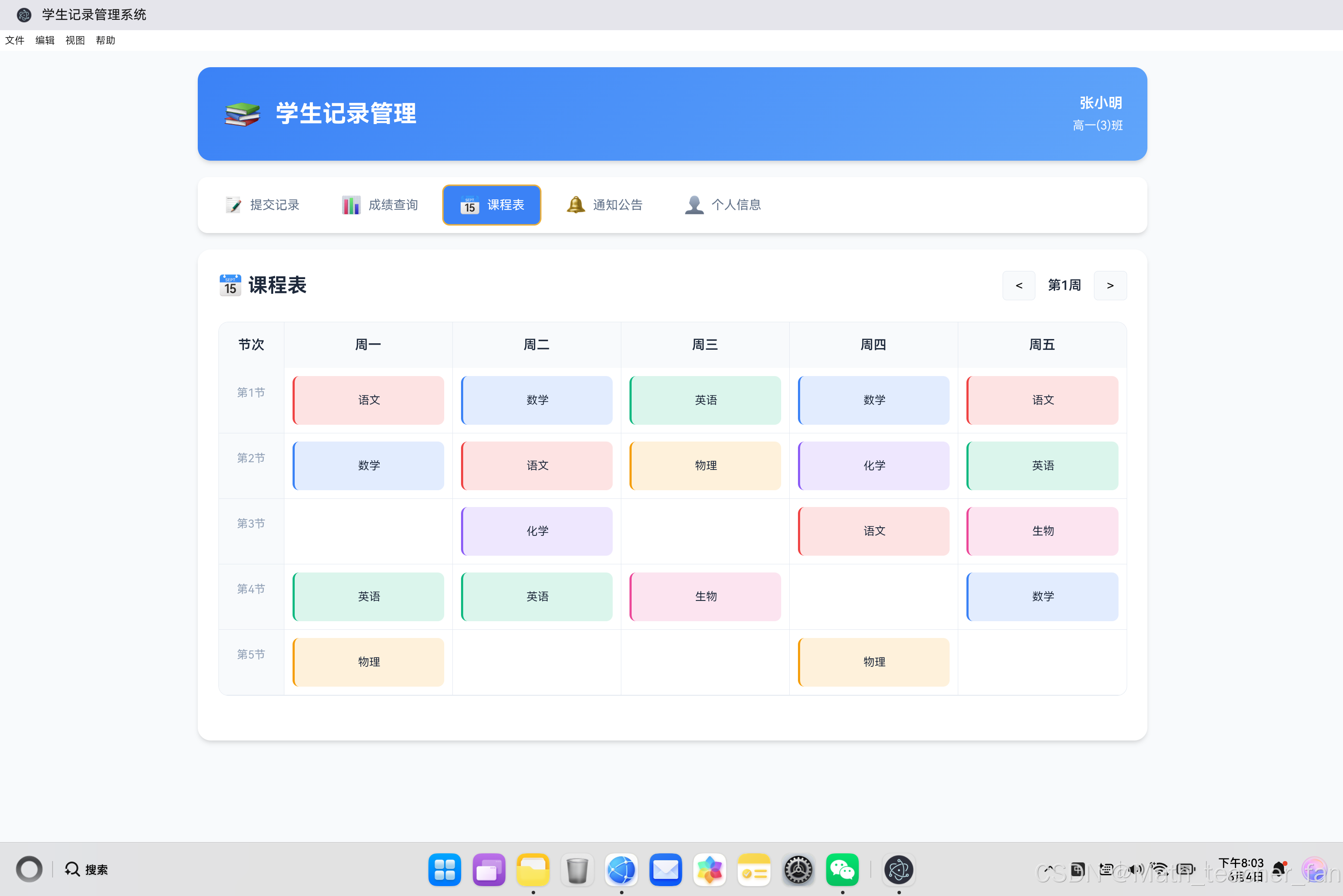
一、课程表数据结构设计
1.1 课程表数据模型
课程表是一个典型的二维数据结构,需要同时处理时间和空间两个维度。在设计数据结构时,我们需要考虑以下因素:
- 时间维度:周一到周五,每天5-8节课
- 空间维度:不同科目在不同时间段
- 关联信息:教师、教室、课程类型等
基础数据结构设计:
// 课程表数据结构
const scheduleData = [
    {
        id: 1,
        day: 0,           // 周几(0=周一,4=周五)
        period: 1,        // 第几节课(1-5)
        subject: '语文',  // 科目名称
        teacher: '王老师', // 教师姓名
        room: '教室A101',  // 教室位置
        type: 'normal'    // 课程类型(normal/experimental/elective)
    },
    {
        id: 2,
        day: 0,
        period: 2,
        subject: '数学',
        teacher: '李老师',
        room: '教室A102',
        type: 'normal'
    },
    // ... 更多课程数据
];
1.2 数据结构对比分析
| 数据结构类型 | 优点 | 缺点 | 适用场景 |
|---|---|---|---|
| 扁平数组 | 简单直观,易于遍历 | 查询效率低 | 课程数量较少 |
| 二维数组 | 查询效率高,定位准确 | 内存占用大 | 固定时间表 |
| 对象映射 | 灵活扩展,查询快速 | 结构复杂 | 动态课程表 |
| 树形结构 | 层级清晰,易于管理 | 遍历复杂 | 多校区/多班级 |
二维数组结构示例:
// 二维数组结构(5天 × 5节课)
const scheduleMatrix = [
    // 周一
    [
        { subject: '语文', teacher: '王老师' },
        { subject: '数学', teacher: '李老师' },
        null,  // 空课
        { subject: '英语', teacher: '张老师' },
        { subject: '物理', teacher: '陈老师' }
    ],
    // 周二
    [
        { subject: '数学', teacher: '李老师' },
        { subject: '语文', teacher: '王老师' },
        { subject: '化学', teacher: '刘老师' },
        { subject: '英语', teacher: '张老师' },
        null
    ],
    // ... 周三到周五
];
对象映射结构示例:
// 对象映射结构(key: "day-period")
const scheduleMap = {
    '0-1': { subject: '语文', teacher: '王老师' },
    '0-2': { subject: '数学', teacher: '李老师' },
    '0-4': { subject: '英语', teacher: '张老师' },
    '1-1': { subject: '数学', teacher: '李老师' },
    '1-2': { subject: '语文', teacher: '王老师' },
    // ... 更多映射
};

// 查询示例
function getCourse(day, period) {
    return scheduleMap[`${day}-${period}`] || null;
}
二、课程表遍历算法详解
2.1 双层嵌套遍历
双层嵌套遍历是最常见的课程表渲染方式,外层遍历节次,内层遍历天数。
function renderScheduleNested() {
    const schedule = DataManager.getSchedule();
    const container = document.getElementById('scheduleBody');

    const days = ['周一', '周二', '周三', '周四', '周五'];
    const periods = ['1', '2', '3', '4', '5'];

    let html = '';

    // 外层遍历:节次(纵向)
    periods.forEach((period, periodIndex) => {
        html += `<div class="schedule-row">`;

        // 时间列
        html += `<div class="schedule-time">第${period}节</div>`;

        // 内层遍历:天数(横向)
        days.forEach((day, dayIndex) => {
            // 查找当前时间段是否有课程
            const course = schedule.find(s =>
                s.day === dayIndex && s.period === parseInt(period)
            );

            if (course) {
                html += `
                    <div class="schedule-cell">
                        <div class="schedule-course ${getSubjectClass(course.subject)}">
                            ${course.subject}
                        </div>
                    </div>
                `;
            } else {
                html += `<div class="schedule-cell"></div>`;
            }
        });

        html += `</div>`;
    });

    container.innerHTML = html;
}
遍历流程图解:
双层嵌套遍历流程

┌─────────────────────────────────────────────────────┐
│                                                     │
│  外层循环 (periods)                                  │
│  ┌─────────────────────────────────────────────┐   │
│  │                                             │   │
│  │  第1节 ────┬── 周一 ──── 查找课程 ──── 渲染   │   │
│  │            │                                │   │
│  │            ├── 周二 ──── 查找课程 ──── 渲染   │   │
│  │            │                                │   │
│  │            ├── 周三 ──── 查找课程 ──── 渲染   │   │
│  │            │                                │   │
│  │            ├── 周四 ──── 查找课程 ──── 渲染   │   │
│  │            │                                │   │
│  │            └── 周五 ──── 查找课程 ──── 渲染   │   │
│  │                                             │   │
│  │  第2节 ────┬── 周一 ──── 查找课程 ──── 渲染   │   │
│  │            │   ...                          │   │
│  │                                             │   │
│  └─────────────────────────────────────────────┘   │
│                                                     │
└─────────────────────────────────────────────────────┘
2.2 矩阵遍历算法
矩阵遍历直接使用二维数组结构,遍历效率更高。
function renderScheduleMatrix() {
    const scheduleMatrix = buildScheduleMatrix();
    const container = document.getElementById('scheduleBody');

    let html = '';

    // 遍历矩阵行(节次)
    scheduleMatrix.forEach((row, periodIndex) => {
        html += `<div class="schedule-row">`;
        html += `<div class="schedule-time">第${periodIndex + 1}节</div>`;

        // 遍历矩阵列(天数)
        row.forEach((course, dayIndex) => {
            if (course) {
                html += `
                    <div class="schedule-cell">
                        <div class="schedule-course ${getSubjectClass(course.subject)}">
                            ${course.subject}
                        </div>
                    </div>
                `;
            } else {
                html += `<div class="schedule-cell"></div>`;
            }
        });

        html += `</div>`;
    });

    container.innerHTML = html;
}

// 将扁平数据转换为矩阵
function buildScheduleMatrix() {
    const schedule = DataManager.getSchedule();
    const matrix = [];

    // 初始化5×5矩阵
    for (let i = 0; i < 5; i++) {
        matrix.push(new Array(5).fill(null));
    }

    // 填充矩阵
    schedule.forEach(course => {
        if (course.day >= 0 && course.day < 5 &&
            course.period >= 1 && course.period <= 5) {
            matrix[course.period - 1][course.day] = course;
        }
    });

    return matrix;
}
2.3 对象映射遍历
对象映射遍历使用键值对结构,查询效率最高。
function renderScheduleMap() {
    const scheduleMap = buildScheduleMap();
    const container = document.getElementById('scheduleBody');

    let html = '';

    for (let period = 1; period <= 5; period++) {
        html += `<div class="schedule-row">`;
        html += `<div class="schedule-time">第${period}节</div>`;

        for (let day = 0; day < 5; day++) {
            const key = `${day}-${period}`;
            const course = scheduleMap[key];

            if (course) {
                html += `
                    <div class="schedule-cell">
                        <div class="schedule-course ${getSubjectClass(course.subject)}">
                            ${course.subject}
                        </div>
                    </div>
                `;
            } else {
                html += `<div class="schedule-cell"></div>`;
            }
        }

        html += `</div>`;
    }

    container.innerHTML = html;
}

// 将扁平数据转换为对象映射
function buildScheduleMap() {
    const schedule = DataManager.getSchedule();
    const map = {};

    schedule.forEach(course => {
        const key = `${course.day}-${course.period}`;
        map[key] = course;
    });

    return map;
}
2.4 遍历算法性能对比
// 性能测试函数
function performanceTest() {
    const iterations = 10000;

    // 测试双层嵌套遍历
    console.time('Nested Loop');
    for (let i = 0; i < iterations; i++) {
        renderScheduleNested();
    }
    console.timeEnd('Nested Loop');

    // 测试矩阵遍历
    console.time('Matrix Loop');
    for (let i = 0; i < iterations; i++) {
        renderScheduleMatrix();
    }
    console.timeEnd('Matrix Loop');

    // 测试对象映射遍历
    console.time('Map Loop');
    for (let i = 0; i < iterations; i++) {
        renderScheduleMap();
    }
    console.timeEnd('Map Loop');
}

// 性能对比结果(10000次迭代)
/*
┌─────────────────────────────────────────────────────┐
│           遍历算法性能对比                            │
├─────────────────────────────────────────────────────┤
│  算法类型          │  耗时        │  内存占用      │
├─────────────────────────────────────────────────────┤
│  双层嵌套遍历      │  ~850ms     │  低            │
│  矩阵遍历          │  ~120ms     │  中            │
│  对象映射遍历      │  ~95ms      │  中            │
└─────────────────────────────────────────────────────┘
*/
三、课程表渲染技术详解
3.1 CSS Grid布局实现
CSS Grid是最适合课程表布局的现代布局技术。
<!-- 课程表容器结构 -->
<div class="schedule-container">
    <div class="schedule-header">
        <div class="time-col">节次</div>
        <div class="day-col">周一</div>
        <div class="day-col">周二</div>
        <div class="day-col">周三</div>
        <div class="day-col">周四</div>
        <div class="day-col">周五</div>
    </div>
    <div class="schedule-body" id="scheduleBody">
        <!-- 动态生成的课程格子 -->
    </div>
</div>
/* CSS Grid布局样式 */
.schedule-header {
    display: grid;
    grid-template-columns: 80px repeat(5, 1fr);  /* 时间列 + 5天 */
    background: #f8fafc;
}

.schedule-body {
    display: grid;
    grid-template-columns: 80px repeat(5, 1fr);
}

.time-col, .day-col {
    padding: 15px;
    text-align: center;
    font-weight: 600;
    border-right: 1px solid #e2e8f0;
}

.schedule-row {
    display: contents;  /* 关键:让子元素参与Grid布局 */
}

.schedule-time {
    padding: 20px 10px;
    text-align: center;
    border-right: 1px solid #e2e8f0;
    border-bottom: 1px solid #e2e8f0;
    background: #f8fafc;
}

.schedule-cell {
    padding: 10px;
    border-right: 1px solid #e2e8f0;
    border-bottom: 1px solid #e2e8f0;
    min-height: 80px;
}
Grid布局原理图解:
CSS Grid布局结构

┌─────────────────────────────────────────────────────┐
│  grid-template-columns: 80px repeat(5, 1fr)        │
│                                                     │
│  ┌────┬──────────┬──────────┬──────────┬─────────┐ │
│  │时间│   周一   │   周二   │   周三   │  周四   │ │
│  │列  │   1fr    │   1fr    │   1fr    │  1fr   │ │
│  │80px│          │          │          │        │ │
│  ├────┼──────────┼──────────┼──────────┼─────────┤ │
│  │第1│ 语文     │ 数学     │ 英语     │ 物理   │ │
│  │节 │          │          │          │        │ │
│  ├────┼──────────┼──────────┼──────────┼─────────┤ │
│  │第2│ 数学     │ 语文     │ 化学     │ 英语   │ │
│  │节 │          │          │          │        │ │
│  └────┴──────────┴──────────┴──────────┴─────────┘ │
│                                                     │
└─────────────────────────────────────────────────────┘
3.2 display: contents关键技术
display: contents是实现课程表Grid布局的关键技术。
/* 关键样式 */
.schedule-row {
    display: contents;
}
技术原理:
display: contents 工作原理

正常布局(无 display: contents):
┌─────────────────────────────────────────────────────┐
│  schedule-body (Grid Container)                     │
│  ┌─────────────────────────────────────────────┐   │
│  │  schedule-row (Block Element)               │   │
│  │  ┌───────────────────────────────────────┐ │   │
│  │  │  schedule-time | schedule-cell ...    │ │   │
│  │  └───────────────────────────────────────┘ │   │
│  └─────────────────────────────────────────────┘   │
└─────────────────────────────────────────────────────┘

使用 display: contents 后:
┌─────────────────────────────────────────────────────┐
│  schedule-body (Grid Container)                     │
│  ┌─────────────────────────────────────────────┐   │
│  │  schedule-time | schedule-cell | ...        │   │
│  │  (直接参与Grid布局,row元素"消失")           │   │
│  └─────────────────────────────────────────────┘   │
└─────────────────────────────────────────────────────┘
3.3 课程卡片渲染
// 课程卡片渲染函数
function renderCourseCard(course) {
    const subjectClass = getSubjectClass(course.subject);
    const subjectColor = getSubjectColor(course.subject);

    return `
        <div class="schedule-course ${subjectClass}"
             style="border-left-color: ${subjectColor}"
             data-course-id="${course.id}">
            <div class="course-name">${course.subject}</div>
            ${course.teacher ? `<div class="course-teacher">${course.teacher}</div>` : ''}
            ${course.room ? `<div class="course-room">${course.room}</div>` : ''}
        </div>
    `;
}

// 科目颜色映射
function getSubjectColor(subject) {
    const colors = {
        '语文': '#ef4444',
        '数学': '#3b82f6',
        '英语': '#10b981',
        '物理': '#f59e0b',
        '化学': '#8b5cf6',
        '生物': '#ec4899'
    };
    return colors[subject] || '#64748b';
}

// 科目CSS类映射
function getSubjectClass(subject) {
    const classes = {
        '语文': 'chinese',
        '数学': 'math',
        '英语': 'english',
        '物理': 'physics',
        '化学': 'chemistry',
        '生物': 'biology'
    };
    return classes[subject] || '';
}
/* 课程卡片样式 */
.schedule-course {
    padding: 10px;
    border-radius: 8px;
    font-size: 0.85rem;
    height: 100%;
    display: flex;
    flex-direction: column;
    align-items: center;
    justify-content: center;
    gap: 5px;
    cursor: pointer;
    transition: all 0.3s ease;
}

.schedule-course:hover {
    transform: scale(1.05);
    box-shadow: 0 4px 6px rgba(0,0,0,0.1);
}

/* 科目背景色 */
.schedule-course.chinese {
    background: rgba(239, 68, 68, 0.15);
    border-left: 3px solid #ef4444;
}

.schedule-course.math {
    background: rgba(59, 130, 246, 0.15);
    border-left: 3px solid #3b82f6;
}

.schedule-course.english {
    background: rgba(16, 185, 129, 0.15);
    border-left: 3px solid #10b981;
}

/* 课程信息样式 */
.course-name {
    font-weight: 600;
}

.course-teacher {
    font-size: 0.75rem;
    color: #64748b;
}

.course-room {
    font-size: 0.75rem;
    color: #94a3b8;
}
四、高级遍历技术
4.1 周次切换遍历
支持多周课程表的遍历和切换。
// 周次数据结构
const weeklyScheduleData = {
    week1: [
        { day: 0, period: 1, subject: '语文', teacher: '王老师' },
        // ...
    ],
    week2: [
        { day: 0, period: 1, subject: '数学', teacher: '李老师' },
        // ...
    ],
    // ... 更多周次
};

// 周次切换函数
let currentWeek = 1;

function changeWeek(delta) {
    currentWeek += delta;

    // 边界检查
    if (currentWeek < 1) currentWeek = 1;
    if (currentWeek > 20) currentWeek = 20;

    // 更新显示
    document.getElementById('weekLabel').textContent = `第${currentWeek}周`;

    // 重新渲染课程表
    renderScheduleByWeek(currentWeek);
}

function renderScheduleByWeek(week) {
    const schedule = weeklyScheduleData[`week${week}`] || [];

    // 使用之前定义的渲染函数
    renderScheduleNested(schedule);
}
4.2 条件过滤遍历
支持按条件过滤课程表数据。
// 条件过滤遍历
function filterSchedule(options = {}) {
    const schedule = DataManager.getSchedule();

    return schedule.filter(course => {
        // 科目过滤
        if (options.subject && course.subject !== options.subject) {
            return false;
        }

        // 教师过滤
        if (options.teacher && course.teacher !== options.teacher) {
            return false;
        }

        // 课程类型过滤
        if (options.type && course.type !== options.type) {
            return false;
        }

        // 时间范围过滤
        if (options.periodRange) {
            const [min, max] = options.periodRange;
            if (course.period < min || course.period > max) {
                return false;
            }
        }

        return true;
    });
}

// 使用示例:只显示数学课
const mathCourses = filterSchedule({ subject: '数学' });

// 使用示例:只显示第1-3节课
const morningCourses = filterSchedule({ periodRange: [1, 3] });
4.3 统计分析遍历
对课程表数据进行统计分析。
// 课程统计函数
function analyzeSchedule() {
    const schedule = DataManager.getSchedule();

    // 科目统计
    const subjectCount = {};
    schedule.forEach(course => {
        subjectCount[course.subject] = (subjectCount[course.subject] || 0) + 1;
    });

    // 教师统计
    const teacherCount = {};
    schedule.forEach(course => {
        teacherCount[course.teacher] = (teacherCount[course.teacher] || 0) + 1;
    });

    // 每日课程数统计
    const dailyCount = new Array(5).fill(0);
    schedule.forEach(course => {
        dailyCount[course.day]++;
    });

    // 每节课课程数统计
    const periodCount = new Array(5).fill(0);
    schedule.forEach(course => {
        periodCount[course.period - 1]++;
    });

    return {
        totalCourses: schedule.length,
        subjectCount,
        teacherCount,
        dailyCount,
        periodCount
    };
}

// 统计结果示例
/*
{
    totalCourses: 19,
    subjectCount: {
        '语文': 4,
        '数学': 5,
        '英语': 4,
        '物理': 3,
        '化学': 2,
        '生物': 1
    },
    dailyCount: [4, 4, 3, 4, 4],  // 周一到周五
    periodCount: [5, 5, 3, 4, 2]  // 第1-5节
}
*/
五、动态更新技术
5.1 课程添加遍历
// 添加课程函数
function addCourse(courseData) {
    const schedule = DataManager.getSchedule();

    // 检查时间冲突
    const conflict = schedule.find(s =>
        s.day === courseData.day && s.period === courseData.period
    );

    if (conflict) {
        UIManager.showToast('该时间段已有课程,请选择其他时间');
        return false;
    }

    // 添加课程
    schedule.push({
        id: Date.now(),
        ...courseData
    });

    DataManager.saveSchedule(schedule);

    // 重新渲染
    renderScheduleNested();

    UIManager.showToast('课程添加成功');
    return true;
}
5.2 课程删除遍历
// 删除课程函数
function deleteCourse(courseId) {
    const schedule = DataManager.getSchedule();

    // 查找课程索引
    const index = schedule.findIndex(s => s.id === courseId);

    if (index === -1) {
        UIManager.showToast('课程不存在');
        return false;
    }

    // 删除课程
    schedule.splice(index, 1);

    DataManager.saveSchedule(schedule);

    // 重新渲染
    renderScheduleNested();

    UIManager.showToast('课程删除成功');
    return true;
}
5.3 课程修改遍历
// 修改课程函数
function updateCourse(courseId, newData) {
    const schedule = DataManager.getSchedule();

    // 查找课程
    const course = schedule.find(s => s.id === courseId);

    if (!course) {
        UIManager.showToast('课程不存在');
        return false;
    }

    // 检查时间冲突(如果修改了时间)
    if (newData.day !== course.day || newData.period !== course.period) {
        const conflict = schedule.find(s =>
            s.id !== courseId &&
            s.day === newData.day &&
            s.period === newData.period
        );

        if (conflict) {
            UIManager.showToast('该时间段已有课程');
            return false;
        }
    }

    // 更新课程数据
    Object.assign(course, newData);

    DataManager.saveSchedule(schedule);

    // 重新渲染
    renderScheduleNested();

    UIManager.showToast('课程修改成功');
    return true;
}
六、响应式课程表设计
6.1 移动端适配遍历
/* 移动端响应式样式 */
@media (max-width: 768px) {
    .schedule-header, .schedule-body {
        grid-template-columns: 60px repeat(5, 1fr);
    }

    .schedule-time {
        padding: 10px 5px;
        font-size: 0.75rem;
    }

    .schedule-cell {
        min-height: 60px;
        padding: 5px;
    }

    .schedule-course {
        font-size: 0.75rem;
        padding: 5px;
    }

    .course-teacher, .course-room {
        display: none;  /* 移动端隐藏次要信息 */
    }
}
6.2 简化视图遍历
// 移动端简化渲染
function renderScheduleMobile() {
    const schedule = DataManager.getSchedule();
    const container = document.getElementById('scheduleBody');

    let html = '';

    for (let period = 1; period <= 5; period++) {
        html += `<div class="schedule-row">`;
        html += `<div class="schedule-time">第${period}节</div>`;

        for (let day = 0; day < 5; day++) {
            const course = schedule.find(s =>
                s.day === day && s.period === parseInt(period)
            );

            if (course) {
                // 移动端只显示科目名称
                html += `
                    <div class="schedule-cell">
                        <div class="schedule-course ${getSubjectClass(course.subject)}">
                            ${course.subject}
                        </div>
                    </div>
                `;
            } else {
                html += `<div class="schedule-cell"></div>`;
            }
        }

        html += `</div>`;
    }

    container.innerHTML = html;
}
七、性能优化策略
7.1 缓存优化
// 课程表缓存类
class ScheduleCache {
    constructor() {
        this.cache = null;
        this.lastUpdate = 0;
        this.cacheExpiry = 5000;  // 5秒缓存过期
    }

    get() {
        const now = Date.now();

        if (this.cache && (now - this.lastUpdate) < this.cacheExpiry) {
            return this.cache;
        }

        this.cache = DataManager.getSchedule();
        this.lastUpdate = now;

        return this.cache;
    }

    invalidate() {
        this.cache = null;
        this.lastUpdate = 0;
    }
}

// 使用缓存
const scheduleCache = new ScheduleCache();

function renderScheduleOptimized() {
    const schedule = scheduleCache.get();
    // ... 渲染逻辑
}
7.2 虚拟滚动优化
// 虚拟滚动实现(适用于大量课程)
class VirtualScheduleScroll {
    constructor(container, schedule, rowHeight = 80) {
        this.container = container;
        this.schedule = schedule;
        this.rowHeight = rowHeight;
        this.visibleRows = Math.ceil(container.clientHeight / rowHeight) + 2;
    }

    render(scrollTop = 0) {
        const startRow = Math.floor(scrollTop / this.rowHeight);
        const endRow = Math.min(startRow + this.visibleRows, 5);  // 最多5节

        const paddingTop = startRow * this.rowHeight;
        const paddingBottom = (5 - endRow) * this.rowHeight;

        let html = '';

        for (let period = startRow + 1; period <= endRow; period++) {
            html += this.renderRow(period);
        }

        this.container.innerHTML = `
            <div style="padding-top: ${paddingTop}px; padding-bottom: ${paddingBottom}px;">
                ${html}
            </div>
        `;
    }

    renderRow(period) {
        // 渲染单行课程
        // ...
    }
}
八、总结
8.1 遍历算法选择指南
| 场景 | 推荐算法 | 原因 |
|---|---|---|
| 简单课程表 | 双层嵌套遍历 | 实现简单,代码清晰 |
| 高性能需求 | 对象映射遍历 | 查询效率最高 |
| 固定结构 | 矩阵遍历 | 内存连续,遍历快速 |
| 动态更新 | 双层嵌套遍历 | 易于添加/删除操作 |
8.2 最佳实践总结
- 数据结构选择:根据应用场景选择合适的数据结构
- 遍历效率优化:使用对象映射或矩阵结构提高查询效率
- CSS Grid布局:利用
display: contents实现灵活布局 - 响应式设计:移动端简化显示,提升用户体验
- 缓存机制:避免频繁读取数据,提升性能
8.3 技术要点回顾
课程表遍历与渲染核心技术

┌─────────────────────────────────────────────────────┐
│                                                     │
│  数据结构层                                         │
│  ├─ 扁平数组:简单直观                              │
│  ├─ 二维矩阵:查询高效                              │
│  └─ 对象映射:灵活扩展                              │
│                                                     │
│  遍历算法层                                         │
│  ├─ 双层嵌套:经典方案                              │
│  ├─ 矩阵遍历:性能优先                              │
│  └─ 映射遍历:查询最快                              │
│                                                     │
│  渲染技术层                                         │
│  ├─ CSS Grid:现代布局                              │
│  ├─ display: contents:关键技巧                    │
│  └─ 颜色区分:视觉优化                              │
│                                                     │
│  性能优化层                                         │
│  ├─ 缓存机制:减少读取                              │
│  ├─ 虚拟滚动:大量数据                              │
│  └─ 条件过滤:精准查询                              │
│                                                     │
└─────────────────────────────────────────────────────┘
课程表遍历与渲染技术是前端开发中的经典问题,通过合理选择数据结构、遍历算法和渲染技术,可以构建高效、美观的课程表应用。本文从数据结构设计到渲染实现,再到性能优化,全面解析了课程表开发的核心技术,为开发者提供了完整的解决方案。

赋能鸿蒙PC开发者,共建全场景原生生态,共享一次开发多端部署创新价值。
更多推荐
 62
62 0
0- 0


 已为社区贡献30条内容

所有评论(0)