篮球集训班器具管理系统 - 鸿蒙PC Electron框架完整技术实现指南
·
欢迎加入开源鸿蒙PC社区:
https://harmonypc.csdn.net/
atomgit仓库地址: https://atomgit.com/xiaomei11/shiqilanqiuqicaiguanli
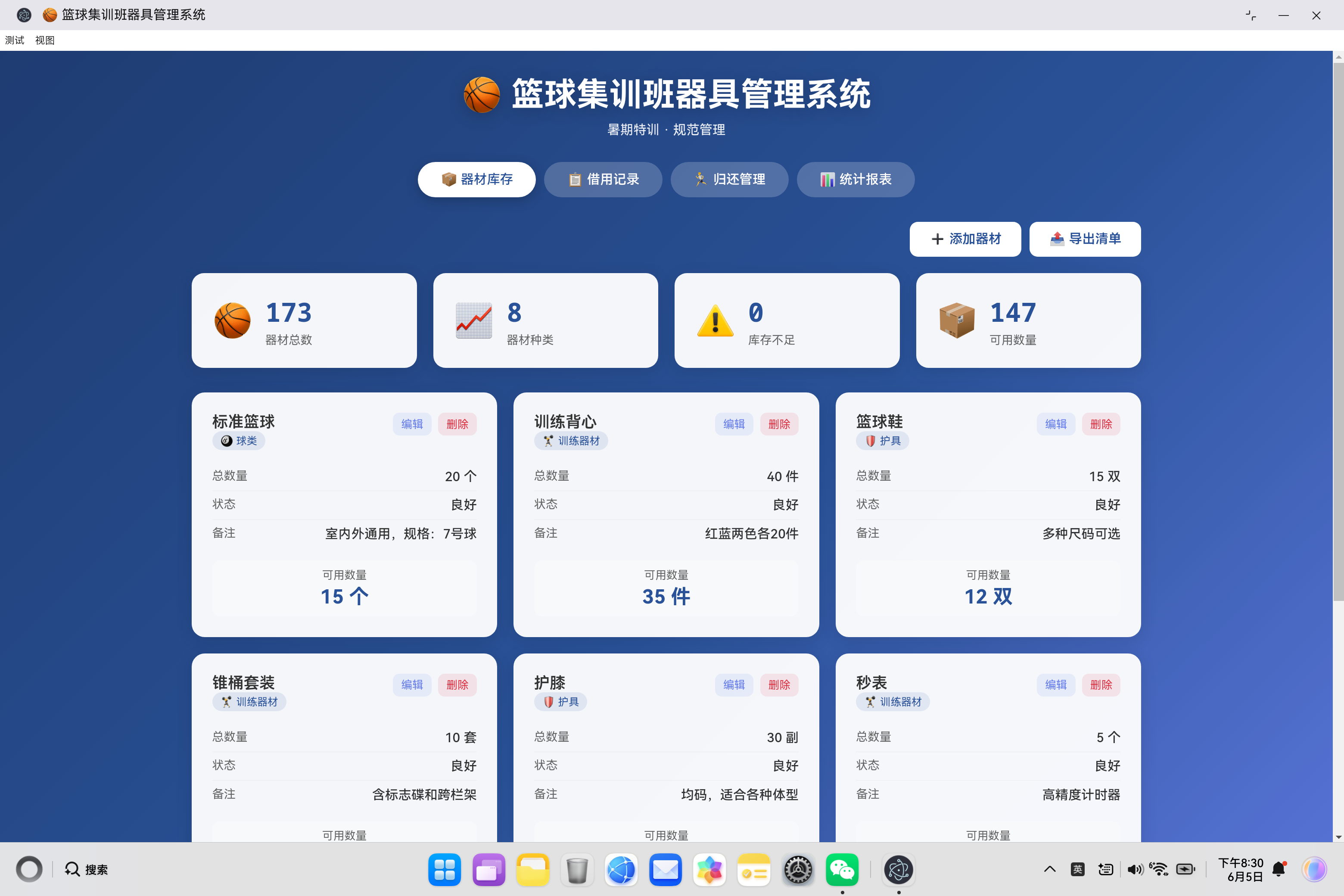
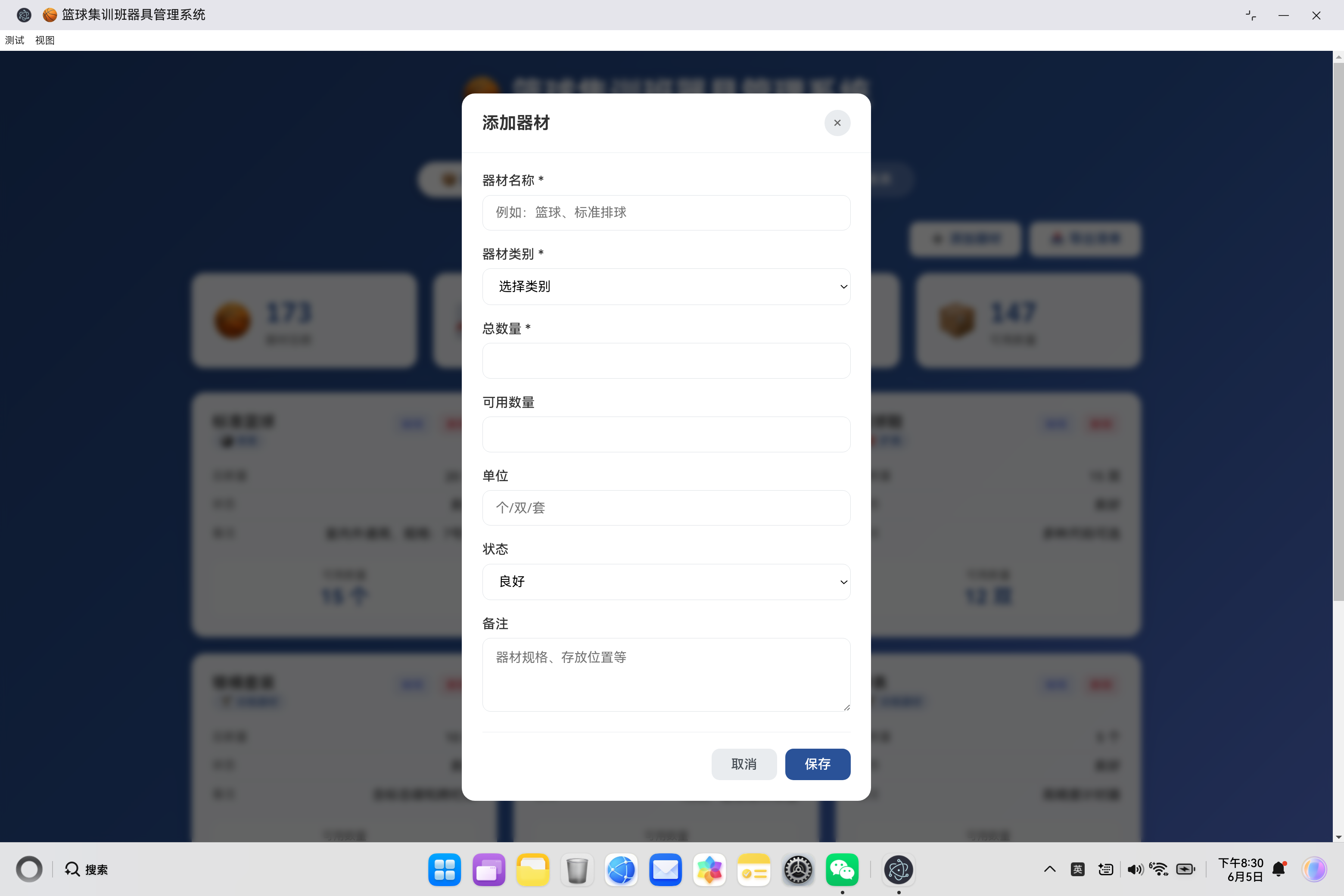
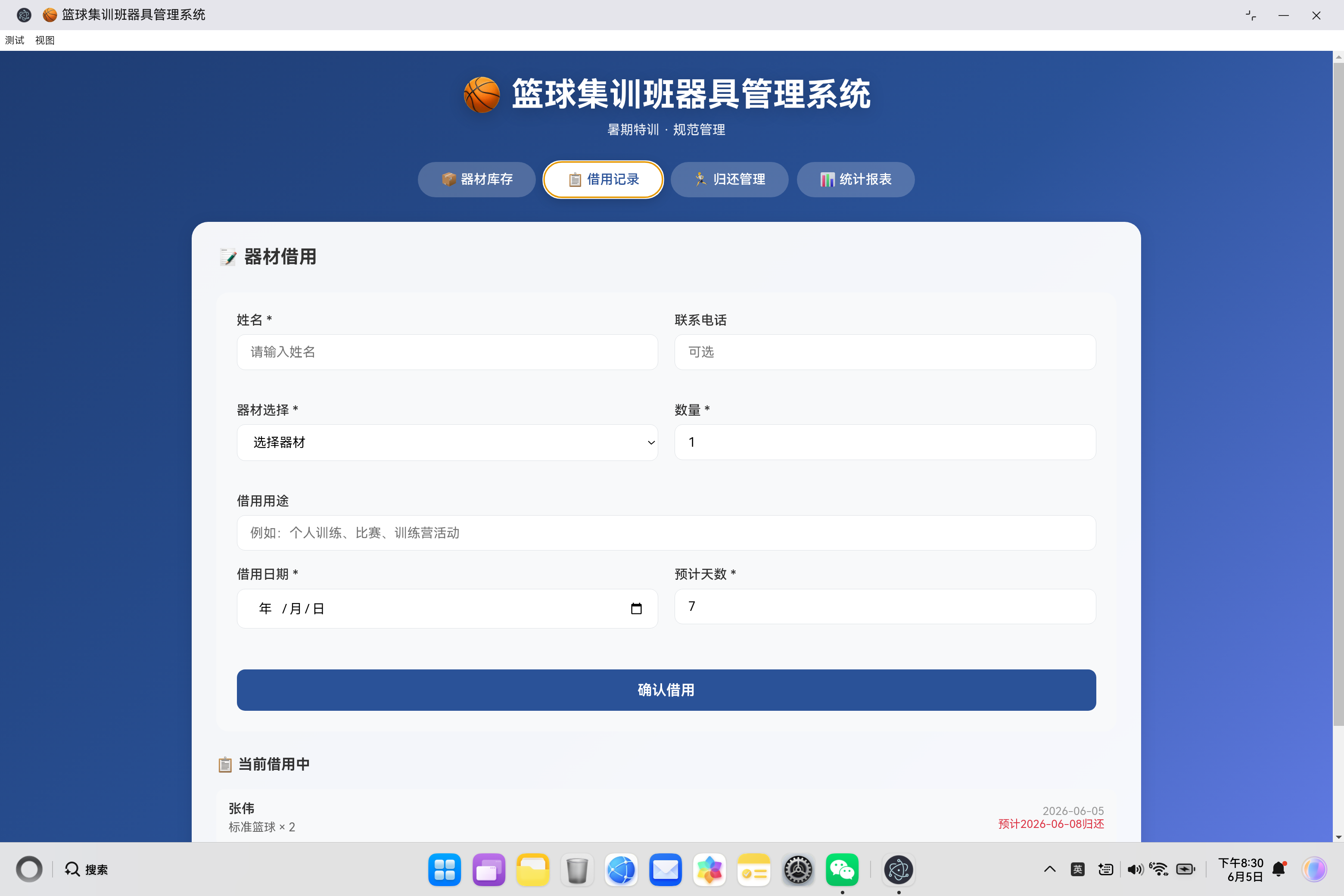
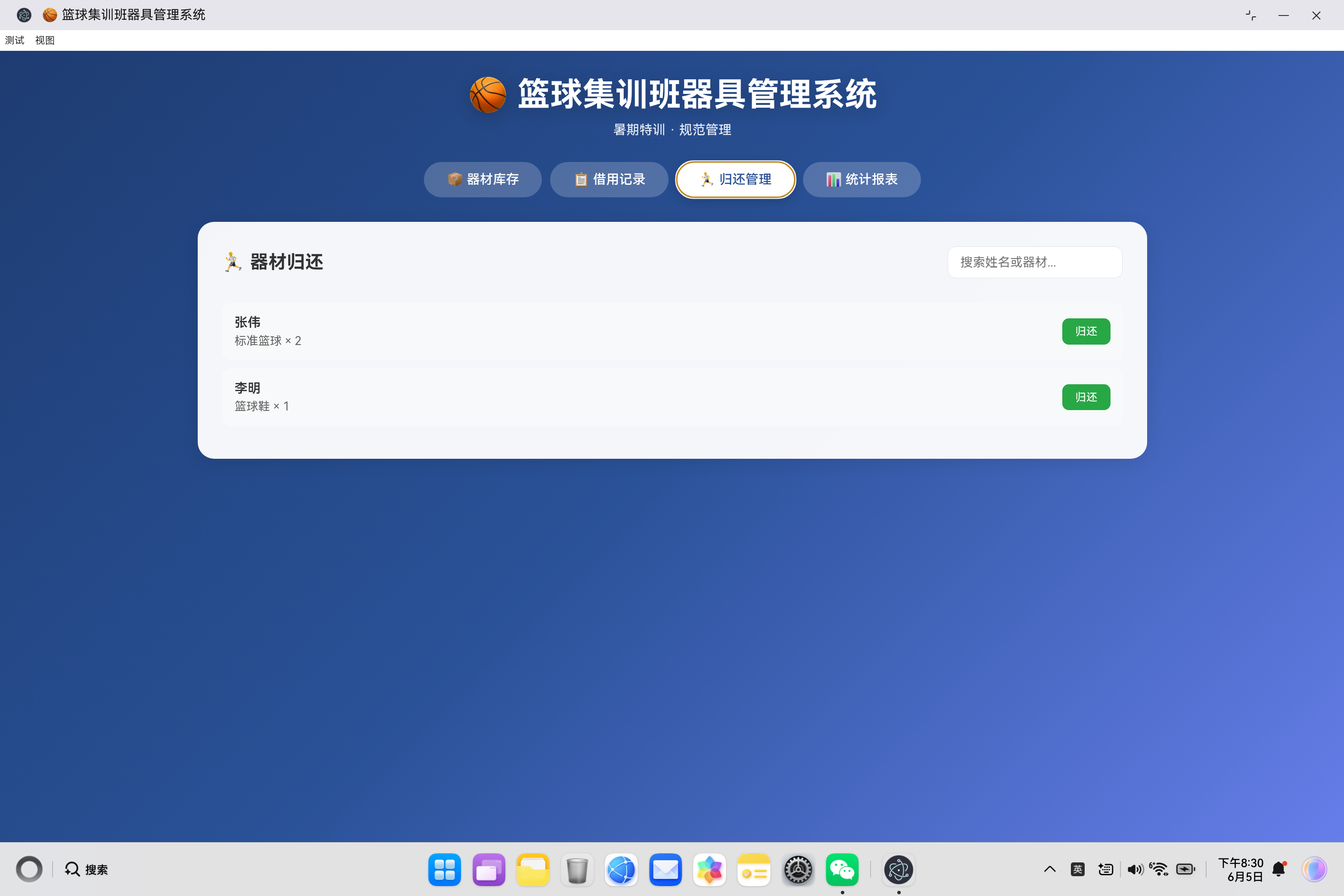
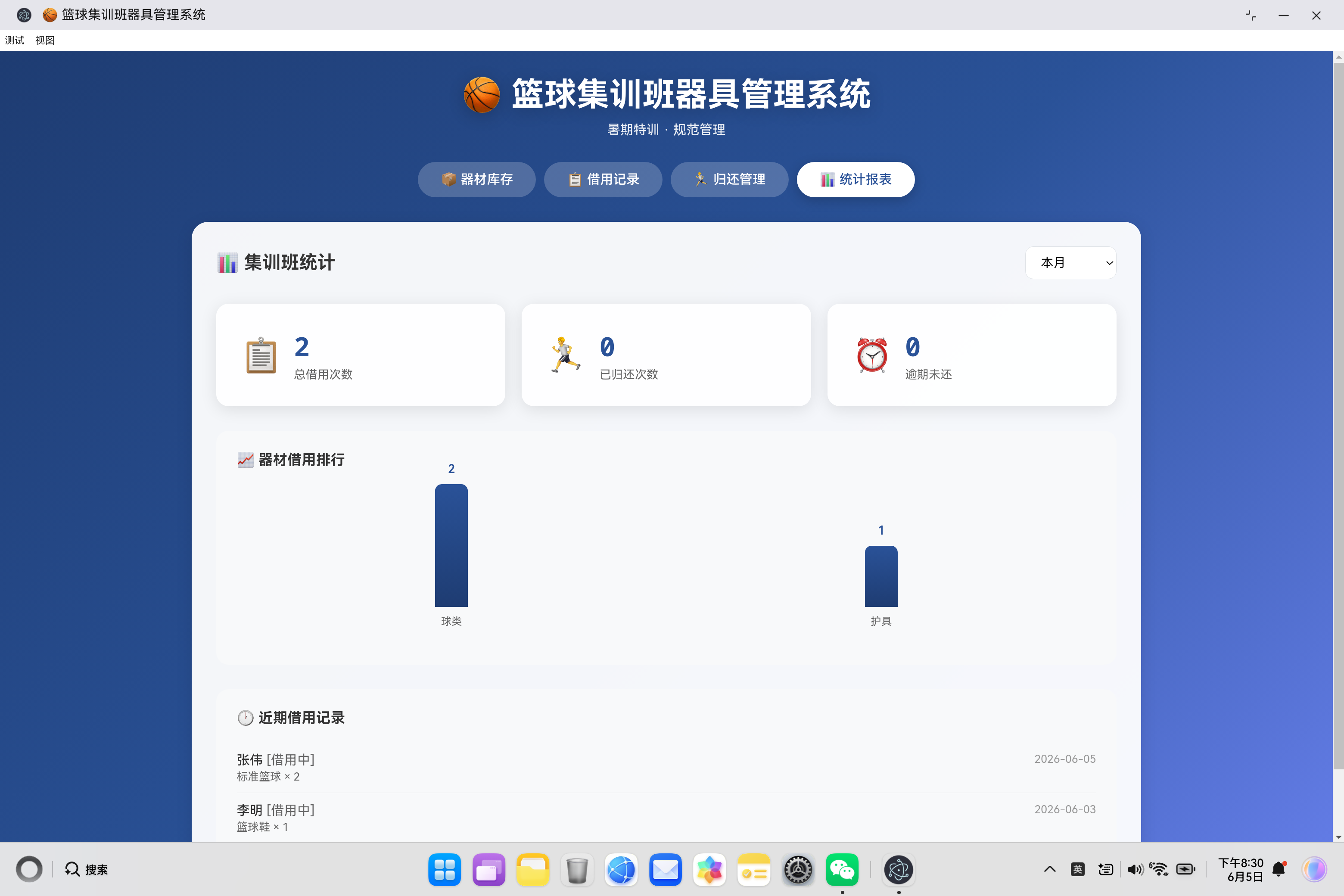
🏀 篮球集训班器具管理系统 - 完整技术实现指南
一、项目概述
暑期篮球集训班是青少年体育培训的重要组成部分,器材管理的高效性直接影响集训效果和运营成本。本系统旨在为集训班管理者提供一个便捷、高效的器材管理工具,覆盖器材入库、借用追踪、归还管理和统计分析全流程。
1.1 系统架构设计
本系统采用经典的三层架构设计,将用户界面、业务逻辑与数据存储分离,确保代码结构清晰、职责明确,并具有良好的可维护性和扩展性。
1. 表现层 (UI Layer)
- 实现文件:
index.html - 核心职责:负责与用户进行交互,提供直观、友好的操作界面。
- 主要模块:
- 器材库存管理:提供器材的增、删、改、查及导出功能。
- 借用记录管理:处理学员的器材借用登记、查询与状态追踪。
- 归还管理:处理器材归还确认、状态检查及逾期提醒。
- 统计报表:以图表形式展示多周期的器材使用数据排行与分析。
2. 业务逻辑层 (Application Layer)
- 实现文件:
app.js - 核心职责:作为系统的“大脑”,处理所有核心业务流程和数据操作。
- 主要模块:
- 库存管理模块:负责器材库存的实时计算、预警逻辑(如低库存提示)以及库存状态的更新。
- 借用流程模块:处理从表单验证、库存校验到创建借用记录、扣减库存的完整借用逻辑。
- 统计报表模块:根据用户选择的时间周期(本周、本月、集训期间)筛选数据,并进行聚合计算,为图表渲染提供数据支持。
3. 数据持久层 (Data Persistence Layer)
- 存储技术:浏览器
LocalStorage - 核心职责:在用户浏览器本地安全、持久地存储所有业务数据。
- 数据集合:
equipment(器材数据):存储所有器材的详细信息,包括ID、名称、分类、总量、可用量、状态等。borrowRecords(借用记录):存储每一笔借用记录,包含借用人、器材、数量、借用及预计归还日期、状态等。returnRecords(归还记录):存储每一笔归还记录,继承自借用记录,并增加归还日期、器材状况等字段。
架构优势:
- 松耦合:各层之间通过清晰的接口通信,修改某一层(如更换UI框架或存储方案)不会影响其他层。
- 可维护性:代码按功能模块组织,便于定位问题和进行功能迭代。
- 离线可用:基于
LocalStorage,系统无需网络连接即可运行,非常适合集训班等现场环境。 - 响应迅速:业务逻辑在前端处理,避免了与后端服务器的网络延迟,操作反馈即时。
1.2 核心功能模块
| 模块 | 功能描述 | 技术要点 |
|---|---|---|
| 器材库存 | 添加、编辑、删除、导出器材 | CRUD操作、库存预警 |
| 借用记录 | 借用登记、数量校验、日期计算 | 表单验证、实时库存更新 |
| 归还管理 | 归还确认、状态检查、逾期提醒 | 状态管理、搜索过滤 |
| 统计报表 | 多周期统计、图表展示、数据排行 | 时间段筛选、柱状图渲染 |
二、数据模型设计
2.1 器材数据结构
{
    id: 1,
    name: '标准篮球',
    category: 'ball',
    totalQuantity: 20,
    available: 15,
    unit: '个',
    status: 'good',
    note: '室内外通用,规格:7号球'
}
设计要点:
| 字段 | 设计说明 |
|---|---|
| id | 唯一标识符,使用自增ID |
| name | 器材名称 |
| category | 枚举值:ball/training/protective/accessories/venue |
| totalQuantity | 采购总量 |
| available | 当前可用数量(实时更新) |
| unit | 计量单位:个/双/套/件 |
| status | 器材状态:good/damaged/retired |
| note | 备注信息 |
2.2 借用记录数据结构
{
    id: 1,
    name: '张伟',
    phone: '13812345678',
    equipmentId: 1,
    quantity: 2,
    purpose: '周末训练',
    borrowDate: '2024-07-15',
    expectedReturnDate: '2024-07-18',
    status: 'borrowing'
}
状态流转:
创建记录 ──→ borrowing(借用中) ──→ returned(已归还)
                 ↑
                 │
            逾期检测提醒
2.3 归还记录数据结构
{
    ...borrowRecord,
    returnDate: '2024-07-17',
    condition: 'good',
    note: ''
}
器材状态分类:
| 状态 | 归还处理 |
|---|---|
| good | 数量100%返还可用库存 |
| minor | 数量80%返还可用库存 |
| major | 不返还,标记损坏 |
2.4 器材分类体系
| 分类ID | 分类名称 | 包含器材 |
|---|---|---|
| ball | 🎱 球类 | 篮球、足球、排球 |
| training | 🏋️ 训练器材 | 背心、锥桶、秒表、阻力带 |
| protective | 🛡️ 护具 | 护膝、护踝、护腕 |
| accessories | 🎒 配件 | 篮球袜、水壶、毛巾 |
| venue | 🏟️ 场地器材 | 记分牌、球车、标志桶 |
三、核心代码实现详解
3.1 数据持久化机制
loadData() {
    const saved = localStorage.getItem('basketballAppData');
    if (saved) {
        try {
            this.data = JSON.parse(saved);
        } catch (e) {
            this.data = this.getDefaultData();
        }
    } else {
        this.data = this.getDefaultData();
        this.saveData();
    }
}

saveData() {
    localStorage.setItem('basketballAppData', JSON.stringify(this.data));
}
数据存储策略:
| 技术要点 | 实现方式 | 设计考虑 |
|---|---|---|
| 数据序列化 | JSON.stringify | 统一格式,便于存储和传输 |
| 异常处理 | try-catch | 防止数据损坏导致系统崩溃 |
| 默认数据 | getDefaultData() | 首次使用提供示例数据 |
| 存储时机 | 每次数据变更后调用 | 确保数据实时持久化 |
默认数据初始化:
getDefaultData() {
    const today = new Date().toISOString().split('T')[0];
    return {
        equipment: [
            { id: 1, name: '标准篮球', category: 'ball', totalQuantity: 20, available: 15, unit: '个', status: 'good', note: '室内外通用' },
            { id: 2, name: '训练背心', category: 'training', totalQuantity: 40, available: 35, unit: '件', status: 'good', note: '红蓝两色' },
            { id: 3, name: '篮球鞋', category: 'protective', totalQuantity: 15, available: 12, unit: '双', status: 'good', note: '多种尺码' },
            { id: 4, name: '锥桶套装', category: 'training', totalQuantity: 10, available: 8, unit: '套', status: 'good', note: '含标志碟' },
            { id: 5, name: '护膝', category: 'protective', totalQuantity: 30, available: 25, unit: '副', status: 'good', note: '均码' },
            { id: 6, name: '秒表', category: 'training', totalQuantity: 5, available: 4, unit: '个', status: 'good', note: '高精度' },
            { id: 7, name: '记分牌', category: 'venue', totalQuantity: 3, available: 3, unit: '个', status: 'good', note: '电子式' },
            { id: 8, name: '篮球袜', category: 'accessories', totalQuantity: 50, available: 45, unit: '双', status: 'good', note: '吸汗防滑' }
        ],
        borrowRecords: [],
        returnRecords: []
    };
}
3.2 库存统计与预警
updateStatsRow() {
    const totalItems = this.data.equipment.reduce((sum, e) => sum + e.totalQuantity, 0);
    const totalTypes = this.data.equipment.length;
    const lowStock = this.data.equipment.filter(e => e.available < 3).length;
    const availableItems = this.data.equipment.reduce((sum, e) => sum + e.available, 0);

    this.totalItemsEl.textContent = totalItems;
    this.totalTypesEl.textContent = totalTypes;
    this.lowStockEl.textContent = lowStock;
    this.availableItemsEl.textContent = availableItems;
}
统计指标计算:
| 指标 | 计算方式 | 展示位置 |
|---|---|---|
| 器材总数 | sum(totalQuantity) | 统计卡片 |
| 器材种类 | equipment.length | 统计卡片 |
| 库存不足 | filter(available < 3).length | 预警提示 |
| 可用数量 | sum(available) | 实时可用 |
库存预警逻辑:
const quantityClass = item.available === 0 ? 'unavailable' : item.available < 3 ? 'low' : '';
| 可用数量 | CSS类 | 视觉效果 |
|---|---|---|
| = 0 | unavailable | 灰色显示 |
| 1-2 | low | 红色显示 |
| ≥ 3 | (默认) | 蓝色正常显示 |
3.3 借用流程处理
handleBorrow() {
    const name = document.getElementById('borrowName').value.trim();
    const phone = document.getElementById('borrowPhone').value.trim();
    const equipmentId = parseInt(this.borrowEquipmentSelect.value);
    const quantity = parseInt(document.getElementById('borrowQuantity').value);
    const borrowDate = document.getElementById('borrowDate').value;
    const days = parseInt(document.getElementById('borrowDays').value);

    // 表单验证
    if (!name || !equipmentId || !quantity || !borrowDate || !days) {
        this.showToast('请填写完整信息', 'warning');
        return;
    }

    // 库存校验
    const equipment = this.data.equipment.find(e => e.id === equipmentId);
    if (equipment.available < quantity) {
        this.showToast(`可用数量不足,当前可用: ${equipment.available}`, 'warning');
        return;
    }

    // 创建借用记录
    this.data.borrowRecords.push({
        id: newId,
        name,
        phone,
        equipmentId,
        quantity,
        borrowDate,
        expectedReturnDate: this.getExpectedDate(borrowDate, days),
        status: 'borrowing'
    });

    // 更新库存
    equipment.available -= quantity;

    this.saveData();
    this.showToast('借用成功', 'success');
}
借用流程时序图:
用户输入 ──→ 表单验证 ──→ 库存校验 ──→ 创建记录 ──→ 更新库存 ──→ 保存数据
   │           │             │            │            │           │
  失败      通过          通过          成功        扣减       持久化
             │             │             │            │           │
             ↓             ↓             ↓            ↓           ↓
         Toast提示    可用数量>=需求?   生成唯一ID   available   localStorage
                                     expectedDate   -=quantity
3.4 归还确认流程
confirmReturn() {
    const condition = document.getElementById('returnConditionSelect').value;
    const note = document.getElementById('returnNote').value.trim();

    // 添加归还记录
    this.data.returnRecords.push({
        ...record,
        returnDate: new Date().toISOString().split('T')[0],
        condition,
        note
    });

    // 根据器材状态更新库存
    if (condition === 'good') {
        equipment.available += record.quantity;  // 100%返还
    } else if (condition === 'minor') {
        equipment.available += Math.floor(record.quantity * 0.8);  // 80%返还
    }

    record.status = 'returned';
    this.saveData();
}
归还处理策略:
| 归还状态 | 返还比例 | 库存更新 | 备注 |
|---|---|---|---|
| good | 100% | available += quantity | 完好无损 |
| minor | 80% | available += floor(quantity × 0.8) | 轻微磨损 |
| major | 0% | 无更新 | 严重损坏需维修 |
3.5 逾期检测机制
isOverdue(expectedDate) {
    const today = new Date().toISOString().split('T')[0];
    return today > expectedDate;
}

updateReturnList() {
    // ...
    activeRecords.map(record => {
        const overdue = this.isOverdue(record.expectedReturnDate);
        return `
            <div class="return-item ${overdue ? 'overdue' : ''}">
                ...
                ${overdue ? '<span class="return-item-overdue">已逾期</span>' : ''}
            </div>
        `;
    });
}
逾期判定逻辑:
逾期 = 当前日期 > 预计归还日期

示例:
- 预计归还:2024-07-20
- 当前日期:2024-07-21
- 判定结果:已逾期(显示红色边框和标签)
3.6 多周期统计实现
updateStats() {
    const period = this.statsPeriodSelect.value;
    let startDate, endDate;

    const today = new Date();
    endDate = today.toISOString().split('T')[0];

    if (period === 'week') {
        const weekAgo = new Date(today);
        weekAgo.setDate(weekAgo.getDate() - 7);
        startDate = weekAgo.toISOString().split('T')[0];
    } else if (period === 'month') {
        const monthAgo = new Date(today);
        monthAgo.setMonth(monthAgo.getMonth() - 1);
        startDate = monthAgo.toISOString().split('T')[0];
    } else {
        startDate = this.campStartDate;  // 集训开始日期
        endDate = this.campEndDate;      // 集训结束日期
    }

    const periodRecords = this.data.borrowRecords.filter(r => {
        return r.borrowDate >= startDate && r.borrowDate <= endDate;
    });
    // ... 统计计算
}
时间段筛选逻辑:
| 时间段 | 起始日期 | 结束日期 |
|---|---|---|
| 本周 | 7天前 | 今天 |
| 本月 | 30天前 | 今天 |
| 集训期间 | 2024-07-01 | 2024-08-31 |
四、UI交互设计
4.1 标签页切换机制
switchTab(tab) {
    this.tabInventory.classList.remove('active');
    this.tabBorrow.classList.remove('active');
    this.tabReturn.classList.remove('active');
    this.tabStats.classList.remove('active');

    this.inventoryTab.classList.remove('active');
    this.borrowTab.classList.remove('active');
    this.returnTab.classList.remove('active');
    this.statsTab.classList.remove('active');

    document.getElementById(`tab${tab.charAt(0).toUpperCase() + tab.slice(1)}`).classList.add('active');
    document.getElementById(`${tab}Tab`).classList.add('active');

    // 按需加载数据
    if (tab === 'borrow') {
        this.updateBorrowEquipmentSelect();
        this.updateActiveBorrowList();
    } else if (tab === 'return') {
        this.updateReturnList();
    } else if (tab === 'stats') {
        this.updateStats();
    }
}
交互优化:
- 惰性加载:切换标签时才加载对应数据
- 状态重置:先移除所有active类,再激活目标
- ID动态拼接:
tab + capitalize(tab) + 'Tab'
4.2 模态框管理
openEditEquipmentModal(id) {
    const equipment = this.data.equipment.find(e => e.id === id);
    if (!equipment) return;

    document.getElementById('modalTitle').textContent = '编辑器材';
    document.getElementById('equipmentId').value = equipment.id;
    document.getElementById('equipmentName').value = equipment.name;
    // ... 填充其他字段
    this.equipmentModal.classList.add('active');
}

closeEquipmentModal() {
    this.equipmentModal.classList.remove('active');
}

// 点击外部关闭
this.equipmentModal.addEventListener('click', (e) => {
    if (e.target === this.equipmentModal) this.closeEquipmentModal();
});
模态框样式:
.modal {
    display: none;
    position: fixed;
    top: 0;
    left: 0;
    width: 100%;
    height: 100%;
    background: rgba(0, 0, 0, 0.6);
    backdrop-filter: blur(4px);
    z-index: 1000;
    align-items: center;
    justify-content: center;
}

.modal.active {
    display: flex;
}
4.3 Toast消息提示
showToast(message, type = 'success') {
    this.toastMessage.textContent = message;
    this.toast.className = 'toast';
    if (type) this.toast.classList.add(type);
    this.toast.classList.add('show');

    setTimeout(() => {
        this.toast.classList.remove('show');
    }, 3000);
}
消息类型:
| 类型 | 背景色 | 使用场景 |
|---|---|---|
| success | #28a745 | 操作成功 |
| warning | #ffc107 | 验证失败、库存不足 |
| error | #dc3545 | 系统错误 |
五、响应式布局设计
5.1 断点设计
/* 桌面端 */
@media (max-width: 768px) {
    .stats-row { grid-template-columns: 1fr; }
    .equipment-list { grid-template-columns: 1fr; }
    .form-row { grid-template-columns: 1fr; }
}

/* 移动端 */
@media (max-width: 480px) {
    .toolbar { flex-direction: column; }
    .add-btn, .export-btn { width: 100%; }
}
布局适配表:
| 断点 | 屏幕宽度 | 布局策略 |
|---|---|---|
| 桌面 | >768px | 多列网格 |
| 平板 | 481-768px | 单列卡片 |
| 手机 | ≤480px | 全宽堆叠 |
5.2 视觉主题
body {
    background: linear-gradient(135deg, #1e3c72 0%, #2a5298 50%, #667eea 100%);
}

.tab-btn.active {
    background: #fff;
    color: #2a5298;
}

.stat-value {
    color: #2a5298;
}

.bar-chart-bar {
    background: linear-gradient(180deg, #2a5298 0%, #1e3c72 100%);
}
配色方案:
| 颜色 | 用途 | 含义 |
|---|---|---|
| #1e3c72 → #667eea | 背景渐变 | 运动、专业 |
| #2a5298 | 主色调 | 稳重可靠 |
| #fff | 卡片背景 | 内容清晰 |
| #dc3545 | 警示色 | 逾期、库存不足 |
六、数据导出功能
6.1 文本导出实现
exportInventory() {
    let content = '篮球集训班器材清单\n';
    content += '导出时间: ' + new Date().toISOString().split('T')[0] + '\n\n';

    // 按分类分组
    const grouped = {};
    this.data.equipment.forEach(e => {
        if (!grouped[e.category]) grouped[e.category] = [];
        grouped[e.category].push(e);
    });

    // 生成文本内容
    Object.keys(grouped).forEach(cat => {
        content += `【${categoryNames[cat]}】\n`;
        grouped[cat].forEach(e => {
            content += `  - ${e.name}: 总数 ${e.totalQuantity}${e.unit}, 可用 ${e.available}${e.unit}\n`;
        });
        content += '\n';
    });

    // 下载文件
    const blob = new Blob([content], { type: 'text/plain;charset=utf-8' });
    const url = URL.createObjectURL(blob);
    const a = document.createElement('a');
    a.href = url;
    a.download = `器材清单_${new Date().toISOString().split('T')[0]}.txt`;
    a.click();
    URL.revokeObjectURL(url);
}
导出文件格式:
篮球集训班器材清单
导出时间: 2024-07-15

【🎱 球类】
  - 标准篮球: 总数 20个, 可用 15个
  - 训练用球: 总数 10个, 可用 8个

【🏋️ 训练器材】
  - 训练背心: 总数 40件, 可用 35件
  - 锥桶套装: 总数 10套, 可用 8套

...
七、性能优化策略
7.1 DOM引用缓存
initDOMReferences() {
    this.totalItemsEl = document.getElementById('totalItems');
    this.totalTypesEl = document.getElementById('totalTypes');
    this.lowStockEl = document.getElementById('lowStock');
    this.availableItemsEl = document.getElementById('availableItems');
    // ... 缓存所有DOM引用
}
**优化效果:
- DOM引用缓存:在应用初始化阶段(
initDOMReferences)一次性获取并缓存所有高频访问的DOM元素引用(如统计卡片、表单输入框、列表容器等),将document.getElementById的调用次数从O(n)降至O(1),彻底消除重复查询开销。 - 减少重排与重绘:通过缓存引用,避免了在频繁的UI更新(如列表渲染、数据统计)中反复进行DOM查询,从而减少了浏览器的重排(Reflow)与重绘(Repaint)计算,显著提升了界面响应速度。
- 内存与性能提升:缓存的引用存储在应用实例变量中,生命周期内可重复使用,不仅降低了垃圾回收(GC)压力,还使得后续所有针对这些元素的操作(如更新内容、添加事件监听器)都变得极为高效,整体渲染性能得到系统性优化。- 提升渲染性能
7.2 数据过滤优化
updateReturnList() {
    const searchText = this.returnSearchEl.value.toLowerCase();
    const activeRecords = this.data.borrowRecords.filter(r => {
        if (r.status !== 'borrowing') return false;
        if (!searchText) return true;
        const equipment = this.data.equipment.find(e => e.id === r.equipmentId);
        return r.name.toLowerCase().includes(searchText) ||
               (equipment && equipment.name.toLowerCase().includes(searchText));
    });
}
搜索策略:
- 支持按姓名搜索
- 支持按器材名搜索
- 大小写不敏感
- 实时过滤响应
八、扩展性设计
8.1 器材分类扩展
const categoryNames = {
    ball: '🎱 球类',
    training: '🏋️ 训练器材',
    protective: '🛡️ 护具',
    accessories: '🎒 配件',
    venue: '🏟️ 场地器材'
    // 添加新分类
};
8.2 统计周期扩展
const periodOptions = {
    week: '本周',
    month: '本月',
    camp: '集训期间',
    custom: '自定义'  // 扩展选项
};
九、测试验证
9.1 功能测试用例
| 测试场景 | 输入 | 预期结果 |
|---|---|---|
| 添加器材 | 填写完整表单 | 器材添加到列表 |
| 借用器材 | 选择器材A(库存5)借3 | 库存变为2 |
| 借用失败 | 借10(库存不足) | 提示库存不足 |
| 归还完好 | 归还2个 | 库存+2 |
| 归还损坏 | 归还2个(轻微损坏) | 库存+1(80%) |
| 逾期检测 | 预计7-20还,今日7-21 | 显示已逾期标签 |
9.2 边界条件测试
| 场景 | 处理方式 |
|---|---|
| 空器材列表 | 显示空状态提示 |
| 库存为0 | 不可借用,提示库存不足 |
| 搜索无结果 | 显示"暂无待归还记录" |
| 数据损坏 | 使用默认数据恢复 |
十、总结
篮球集训班器具管理系统通过模块化设计,实现了器材管理全流程的数字化管理:
核心优势:
- 库存实时管控:自动扣减和返还,避免人工统计错误
- 借用流程规范:完整的借用-归还闭环,支持状态追踪
- 逾期预警机制:自动标记逾期记录,及时提醒归还
- 多维统计分析:支持多周期统计,便于管理决策
- 数据导出功能:一键导出清单,便于存档和对账
- 响应式设计:适配多种设备,教练随时可用
技术亮点:
- LocalStorage持久化,无需后端支持
- 库存预警机制,提前发现物资缺口
- 损坏分级处理,灵活管理器材状态
- 时间段筛选,满足不同统计需求
应用场景:
- 暑期篮球集训班
- 学校体育器材管理
- 体育俱乐部器材管理
- 各类运动训练营器材管理
附录:集训班器材配置参考
A.1 基础配置清单
| 类别 | 器材 | 建议数量 | 单价(元) | 小计(元) |
|---|---|---|---|---|
| 球类 | 标准篮球 | 20个 | 120 | 2400 |
| 球类 | 训练用球 | 10个 | 60 | 600 |
| 训练器材 | 训练背心 | 40件 | 35 | 1400 |
| 训练器材 | 锥桶套装 | 10套 | 80 | 800 |
| 训练器材 | 秒表 | 5个 | 150 | 750 |
| 护具 | 护膝 | 30副 | 45 | 1350 |
| 护具 | 护踝 | 30副 | 40 | 1200 |
| 配件 | 篮球袜 | 50双 | 25 | 1250 |
| 场地器材 | 记分牌 | 3个 | 200 | 600 |
| 合计 | 10350 |
A.2 集训周期配置
| 配置项 | 值 |
|---|---|
| 集训开始日期 | 2024-07-01 |
| 集训结束日期 | 2024-08-31 |
| 集训时长 | 62天 |
| 预计参训人数 | 50人 |
A.3 器材维护周期
| 器材类型 | 检查周期 | 维护内容 |
|---|---|---|
| 篮球 | 每周检查 | 气压、表皮磨损 |
| 护具 | 每两周检查 | 弹性、破损 |
| 训练器材 | 每月检查 | 完好性、清洁 |
| 秒表 | 每季度校准 | 时间精度 |

赋能鸿蒙PC开发者,共建全场景原生生态,共享一次开发多端部署创新价值。
更多推荐
 6
6 0
0- 0


 已为社区贡献5条内容

所有评论(0)