鸿蒙PC用Electron框架实现习惯打卡应用技术详解
·
欢迎加入开源鸿蒙PC社区:
https://harmonypc.csdn.net/
atomgit仓库地址: https://atomgit.com/m0_66062719/xiguandaka

1. 项目概述
1.1 背景介绍
习惯养成是每个人追求自我提升的重要方式,但坚持习惯并不容易。一个好的习惯打卡工具可以帮助用户记录每日完成情况、追踪连续打卡天数、提供可视化反馈,从而激励用户坚持下去。
本文详细介绍如何在鸿蒙PC平台上,基于Electron框架实现一个功能完善的习惯打卡应用。
1.2 技术选型
| 维度 | 技术 | 版本 | 选型理由 |
|---|---|---|---|
| 框架 | Electron | 18.x | 跨平台桌面应用框架,支持Web技术栈 |
| 渲染引擎 | Chromium | 95+ | 高性能HTML/CSS渲染 |
| 语言 | JavaScript | ES6+ | 异步编程友好,适合数据处理 |
| UI技术 | HTML5 + CSS3 | - | 现代化界面设计和动画效果 |
| 存储 | localStorage | - | 轻量级本地数据持久化 |
1.3 功能特性
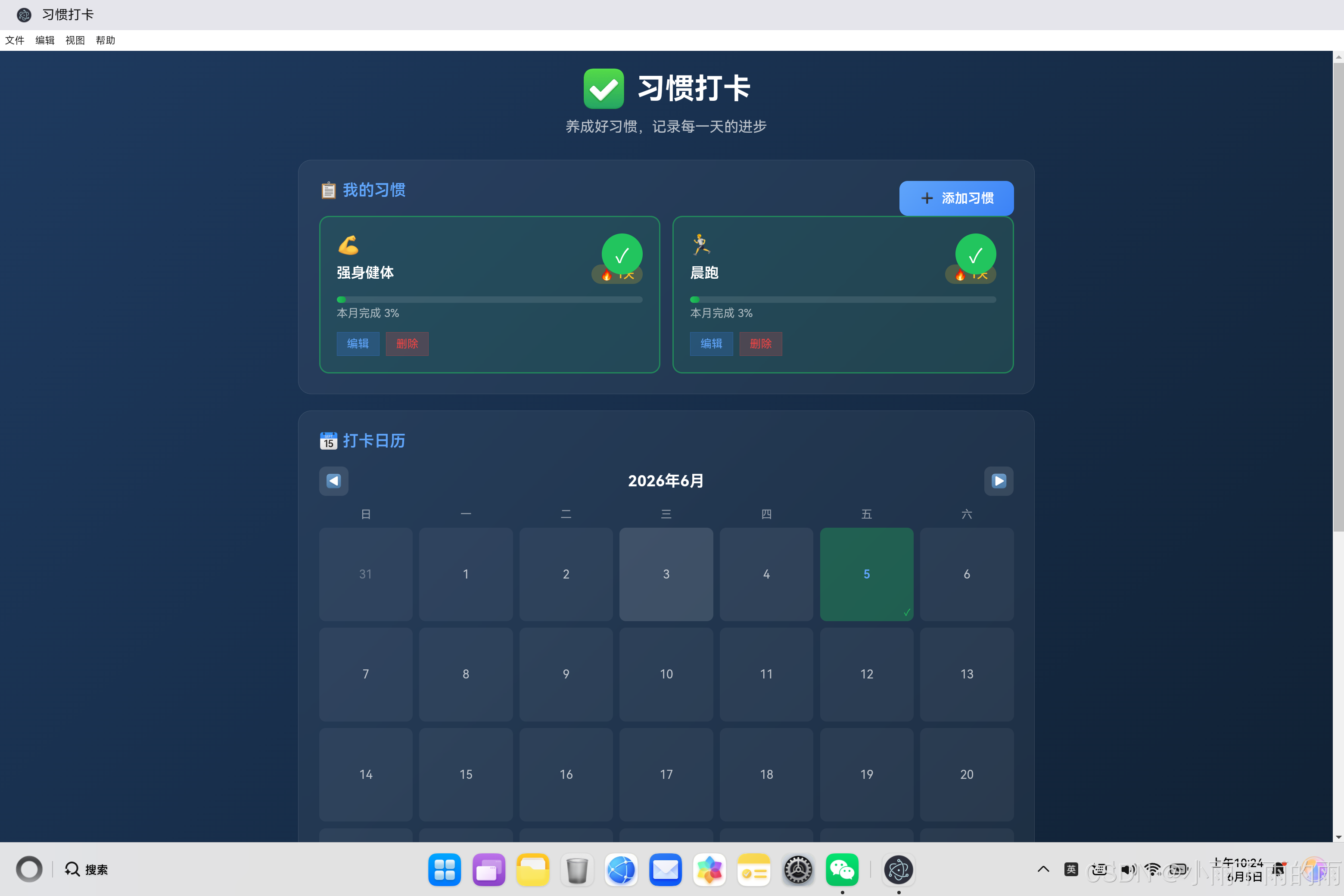
本项目实现了一个功能丰富的习惯打卡应用,主要特性包括:
- 习惯管理:添加、编辑、删除习惯,支持图标选择
- 每日打卡:一键打卡,支持取消,连续天数追踪
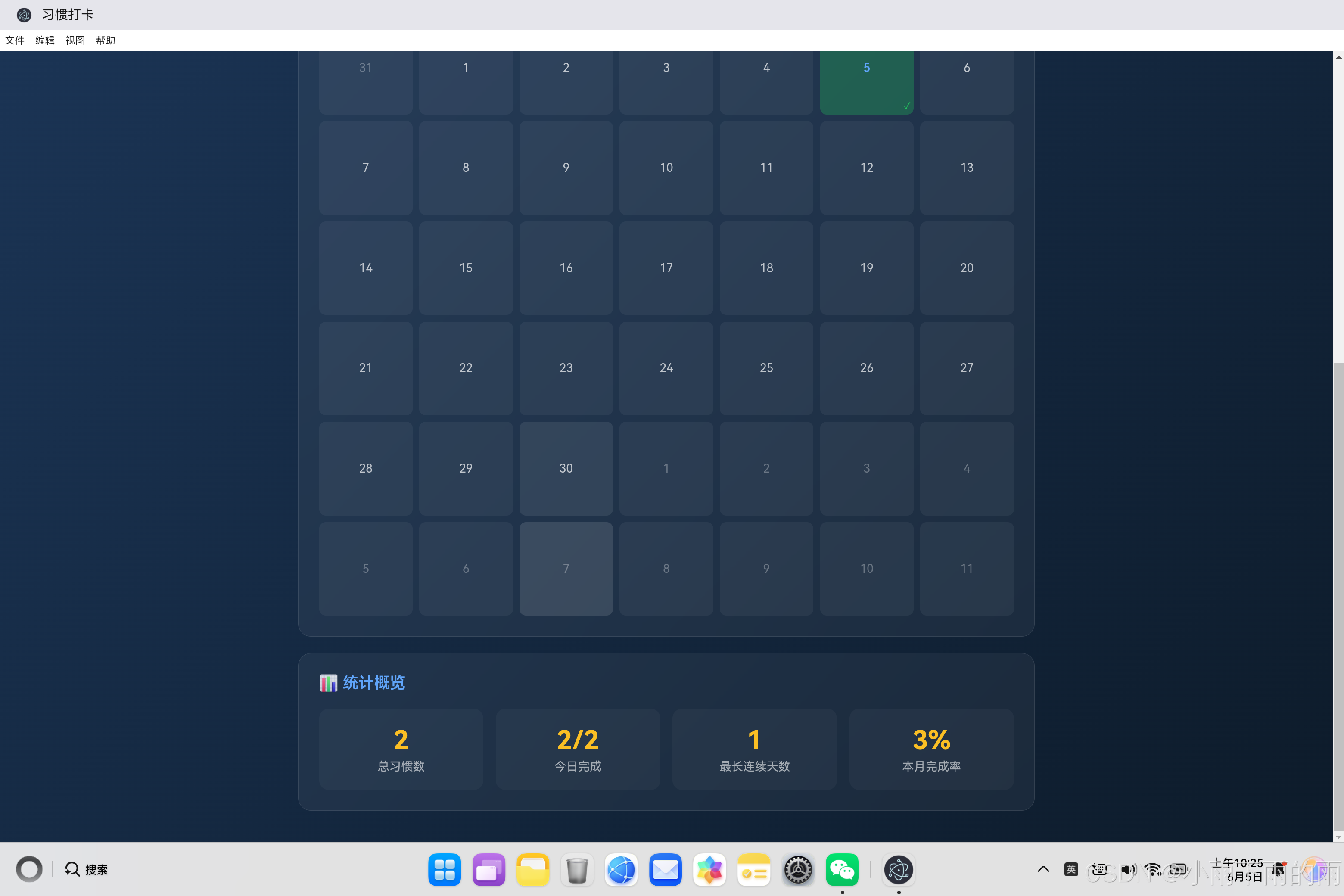
- 统计分析:总习惯数、今日完成、最长连续天数、本月完成率
- 打卡日历:可视化历史打卡记录,支持月份切换
- 数据持久化:使用localStorage本地存储
2. 架构设计
2.1 整体架构
┌─────────────────────────────────────────────────────┐
│                      Electron主进程                   │
├─────────────────────────────────────────────────────┤
│  main.js                                            │
│  ├── 创建BrowserWindow                              │
│  ├── 加载HTML页面                                   │
│  └── 菜单与快捷键管理                                │
└─────────────────────────────────────────────────────┘
                            │
                            ▼
┌─────────────────────────────────────────────────────┐
│                      渲染进程                        │
├─────────────────────────────────────────────────────┤
│  habit_tracker.html                                │
│  ├── 习惯列表层(卡片展示、打卡按钮)                 │
│  ├── 日历展示层(月份浏览、打卡标记)                 │
│  ├── 统计概览层(统计卡片)                         │
│  └── 弹窗层(添加/编辑习惯)                         │
├─────────────────────────────────────────────────────┤
│  habit_tracker.js                                  │
│  ├── HabitTracker类(核心控制器)                   │
│  ├── 习惯管理模块(CRUD操作)                       │
│  ├── 打卡逻辑模块(打卡/取消)                      │
│  ├── 统计模块(连续天数、完成率)                    │
│  └── 日历模块(日历生成、渲染)                     │
└─────────────────────────────────────────────────────┘
2.2 核心组件职责
| 组件 | 职责 | 关键方法 |
|---|---|---|
| HabitTracker | 主控制器,协调整体逻辑 | constructor, updateUI, saveHabits |
| 习惯管理 | 添加、编辑、删除习惯 | saveHabit, deleteHabit, openEditModal |
| 打卡逻辑 | 打卡和取消打卡 | toggleHabit, isHabitCompletedToday |
| 统计模块 | 连续天数、完成率计算 | getStreak, calculateLongestStreak, getMonthCompletion |
| 日历模块 | 日历生成和渲染 | updateCalendar, isDateCompleted |
2.3 数据模型
// 习惯数据结构
{
    id: 1705315200000,        // 唯一标识(时间戳)
    name: "早起跑步",           // 习惯名称
    icon: "🏃",                // 图标
    createdAt: "2024-01-15",   // 创建日期
    completedDates: [           // 完成日期列表
        "2024-01-15",
        "2024-01-16",
        "2024-01-17"
    ]
}
3. 核心代码实现
3.1 主入口HTML结构
HTML页面采用分层设计,包含习惯列表、打卡日历和统计概览三个主要区域。
<!DOCTYPE html>
<html lang="zh-CN">
<head>
    <meta charset="UTF-8">
    <meta name="viewport" content="width=device-width, initial-scale=1.0">
    <title>习惯打卡</title>
    <style>
        body {
            font-family: 'Segoe UI', Tahoma, Geneva, Verdana, sans-serif;
            background: linear-gradient(135deg, #1e3a5f 0%, #0d1b2a 100%);
            min-height: 100vh;
            padding: 20px;
        }

        .container {
            max-width: 900px;
            margin: 0 auto;
        }

        .card {
            background: rgba(255, 255, 255, 0.05);
            backdrop-filter: blur(10px);
            border-radius: 16px;
            padding: 25px;
            margin-bottom: 20px;
            border: 1px solid rgba(255, 255, 255, 0.1);
        }

        .habits-grid {
            display: grid;
            grid-template-columns: repeat(auto-fit, minmax(280px, 1fr));
            gap: 15px;
        }

        .habit-card {
            background: rgba(255, 255, 255, 0.05);
            border-radius: 12px;
            padding: 20px;
            border: 2px solid transparent;
            transition: all 0.3s ease;
            position: relative;
        }

        .habit-card.completed {
            border-color: rgba(34, 197, 94, 0.5);
            background: rgba(34, 197, 94, 0.1);
        }

        .check-btn {
            width: 50px;
            height: 50px;
            border-radius: 50%;
            border: 2px dashed rgba(255, 255, 255, 0.3);
            background: transparent;
            color: #22c55e;
            font-size: 1.5rem;
            cursor: pointer;
            position: absolute;
            top: 20px;
            right: 20px;
        }

        .check-btn.checked {
            background: #22c55e;
            border-color: #22c55e;
            color: #fff;
        }

        .habit-streak {
            display: inline-flex;
            align-items: center;
            gap: 4px;
            background: rgba(251, 191, 36, 0.2);
            color: #fbbf24;
            padding: 4px 10px;
            border-radius: 20px;
            font-size: 0.85rem;
            font-weight: 600;
        }

        .calendar-grid {
            display: grid;
            grid-template-columns: repeat(7, 1fr);
            gap: 8px;
        }

        .calendar-day {
            aspect-ratio: 1;
            display: flex;
            align-items: center;
            justify-content: center;
            background: rgba(255, 255, 255, 0.05);
            border-radius: 8px;
            color: rgba(255, 255, 255, 0.7);
            cursor: pointer;
        }

        .calendar-day.completed {
            background: rgba(34, 197, 94, 0.3);
        }

        .calendar-day.today {
            background: rgba(96, 165, 250, 0.3);
            color: #60a5fa;
        }

        .stats-grid {
            display: grid;
            grid-template-columns: repeat(auto-fit, minmax(150px, 1fr));
            gap: 15px;
        }

        .stat-card {
            background: rgba(255, 255, 255, 0.03);
            border-radius: 12px;
            padding: 20px;
            text-align: center;
        }

        .stat-value {
            font-size: 2rem;
            font-weight: 700;
            color: #fbbf24;
        }
    </style>
</head>
<body>
    <div class="container">
        <div class="card">
            <h2>📋 我的习惯</h2>
            <div class="habits-grid" id="habits-container"></div>
        </div>

        <div class="card">
            <h2>📅 打卡日历</h2>
            <div class="calendar-grid" id="calendar-grid"></div>
        </div>

        <div class="card">
            <h2>📊 统计概览</h2>
            <div class="stats-grid" id="stats-grid"></div>
        </div>
    </div>
</body>
</html>
设计要点:
- 深色主题设计:使用深蓝渐变背景,营造专注的工具氛围
- 毛玻璃效果:通过
backdrop-filter: blur(10px)实现现代感 - 响应式布局:使用CSS Grid实现自适应列数
- 打卡按钮:圆形设计,打卡后变绿显示完成状态
- 连续天数徽章:橙色火焰图标,激励用户坚持
3.2 HabitTracker核心类实现
这是整个应用的核心控制器,负责管理数据、打卡逻辑和UI更新。
class HabitTracker {
    constructor() {
        this.habits = this.loadHabits();
        this.currentDate = new Date();
        this.editIndex = null;
        this.selectedIcon = '🏃';

        this.habitsContainer = document.getElementById('habits-container');
        this.calendarGrid = document.getElementById('calendar-grid');

        this.setupEventListeners();
        this.updateUI();
    }

    setupEventListeners() {
        // 绑定各种事件监听器
    }

    updateUI() {
        this.updateHabits();
        this.updateCalendar();
        this.updateStats();
    }

    saveHabits() {
        localStorage.setItem('habits', JSON.stringify(this.habits));
    }

    loadHabits() {
        const saved = localStorage.getItem('habits');
        return saved ? JSON.parse(saved) : [];
    }
}
核心属性说明:
| 属性 | 类型 | 说明 |
|---|---|---|
| habits | Array | 习惯列表数组 |
| currentDate | Date | 当前显示的日历日期 |
| editIndex | Number/null | 当前编辑的习惯索引 |
| selectedIcon | String | 当前选中的图标 |
3.3 连续天数算法
连续天数计算是习惯打卡应用的核心功能之一,用于追踪用户的坚持程度。
getStreak(habit) {
    if (habit.completedDates.length === 0) return 0;

    let streak = 0;
    const today = new Date();

    for (let i = 0; i < 365; i++) {
        const date = new Date(today);
        date.setDate(date.getDate() - i);
        const dateStr = this.formatDate(date);

        if (habit.completedDates.includes(dateStr)) {
            streak++;
        } else if (i > 0) {
            break;
        }
    }

    return streak;
}
算法原理:
┌──────────────────────────────────────────────────────┐
│ 连续天数计算流程                                     │
├──────────────────────────────────────────────────────┤
│ 输入: completedDates = ["2024-01-15", "2024-01-16", │
│                         "2024-01-17"]               │
│                                                    │
│ 步骤1: 从今天开始向前遍历                           │
│        i=0 → 今天 → 检查是否在列表中               │
│        i=1 → 昨天 → 检查是否在列表中               │
│        i=2 → 前天 → 检查是否在列表中               │
│                                                    │
│ 步骤2: 如果连续存在则计数+1                         │
│        如果某天不存在且i>0,则停止                   │
│                                                    │
│ 输出: streak = 3                                   │
└──────────────────────────────────────────────────────┘
边界情况处理:
- 如果没有完成记录,返回0
- 如果今天没有打卡但之前有连续记录,返回0
- 最多检查365天,避免无限循环
3.4 最长连续天数算法
计算用户历史上最长的连续打卡记录。
calculateLongestStreak(habit) {
    if (habit.completedDates.length === 0) return 0;

    const sortedDates = [...habit.completedDates].sort();
    let longest = 1;
    let current = 1;

    for (let i = 1; i < sortedDates.length; i++) {
        const prevDate = new Date(sortedDates[i - 1]);
        const currDate = new Date(sortedDates[i]);
        const diffDays = Math.floor((currDate - prevDate) / (1000 * 60 * 60 * 24));

        if (diffDays === 1) {
            current++;
            if (current > longest) longest = current;
        } else {
            current = 1;
        }
    }

    return longest;
}
算法原理:
┌──────────────────────────────────────────────────────┐
│ 最长连续天数计算流程                                 │
├──────────────────────────────────────────────────────┤
│ 输入: completedDates = ["2024-01-10", "2024-01-11", │
│                         "2024-01-12", "2024-01-15", │
│                         "2024-01-16"]               │
│                                                    │
│ 步骤1: 排序日期 → ["2024-01-10", "2024-01-11",     │
│                   "2024-01-12", "2024-01-15",     │
│                   "2024-01-16"]                    │
│                                                    │
│ 步骤2: 遍历计算相邻日期差                           │
│        10→11: diff=1 → current=2, longest=2       │
│        11→12: diff=1 → current=3, longest=3       │
│        12→15: diff=3 → current=1, longest=3       │
│        15→16: diff=1 → current=2, longest=3       │
│                                                    │
│ 输出: longest = 3                                  │
└──────────────────────────────────────────────────────┘
时间复杂度: O(n log n)(排序)+ O(n)(遍历)= O(n log n)
3.5 打卡逻辑实现
toggleHabit(index) {
    const habit = this.habits[index];
    const today = this.formatDate(new Date());

    const dateIndex = habit.completedDates.indexOf(today);
    if (dateIndex > -1) {
        habit.completedDates.splice(dateIndex, 1);
        this.showToast(`已取消「${habit.name}」今日打卡`);
    } else {
        habit.completedDates.push(today);
        this.showToast(`「${habit.name}」打卡成功!`);
    }

    this.saveHabits();
    this.updateUI();
}
实现逻辑:
- 获取今天的日期字符串
- 检查今天是否已经在完成列表中
- 如果存在,删除(取消打卡)
- 如果不存在,添加(完成打卡)
- 保存数据并更新UI
日期格式化方法:
formatDate(date) {
    const year = date.getFullYear();
    const month = String(date.getMonth() + 1).padStart(2, '0');
    const day = String(date.getDate()).padStart(2, '0');
    return `${year}-${month}-${day}`;
}
3.6 日历生成算法
动态生成日历网格,支持月份切换和打卡标记。
updateCalendar() {
    const year = this.currentDate.getFullYear();
    const month = this.currentDate.getMonth();

    const firstDay = new Date(year, month, 1);
    const lastDay = new Date(year, month + 1, 0);
    const today = new Date();
    const todayStr = this.formatDate(today);

    let calendarHTML = '';

    const startPadding = firstDay.getDay();
    for (let i = 0; i < startPadding; i++) {
        const prevMonthDate = new Date(year, month, -i);
        calendarHTML += `<div class="calendar-day other-month">${prevMonthDate.getDate()}</div>`;
    }

    for (let day = 1; day <= lastDay.getDate(); day++) {
        const date = new Date(year, month, day);
        const dateStr = this.formatDate(date);
        const isToday = dateStr === todayStr;
        const isCompleted = this.isDateCompleted(dateStr);

        let classes = 'calendar-day';
        if (isToday) classes += ' today';
        if (isCompleted) classes += ' completed';

        calendarHTML += `<div class="${classes}">${day}</div>`;
    }

    const remainingDays = 42 - (startPadding + lastDay.getDate());
    for (let i = 1; i <= remainingDays; i++) {
        calendarHTML += `<div class="calendar-day other-month">${i}</div>`;
    }

    this.calendarGrid.innerHTML = calendarHTML;
}
日历生成步骤:
┌──────────────────────────────────────────────────────┐
│ 日历生成流程                                         │
├──────────────────────────────────────────────────────┤
│ 1. 计算当月第一天是星期几                           │
│    startPadding = firstDay.getDay()                │
│                                                    │
│ 2. 填充上月空白                                     │
│    for i from 0 to startPadding-1                  │
│        显示上月日期                                 │
│                                                    │
│ 3. 生成当月日期                                     │
│    for day from 1 to lastDay.getDate()             │
│        检查是否今天                                 │
│        检查是否有打卡                               │
│        生成日期格子                                 │
│                                                    │
│ 4. 填充下月空白                                     │
│    remainingDays = 42 - (startPadding + daysInMonth)│
│    填充剩余格子显示下月日期                         │
│                                                    │
│ 5. 更新DOM                                         │
└──────────────────────────────────────────────────────┘
3.7 统计分析模块
计算各种统计指标并更新UI。
updateStats() {
    const totalHabits = this.habits.length;
    const todayCompleted = this.habits.filter(h => this.isHabitCompletedToday(h)).length;
    const longestStreak = this.getLongestStreak();
    const monthCompletion = this.getMonthCompletion();

    document.getElementById('total-habits').textContent = totalHabits;
    document.getElementById('today-completed').textContent = `${todayCompleted}/${totalHabits}`;
    document.getElementById('longest-streak').textContent = longestStreak;
    document.getElementById('month-completion').textContent = `${monthCompletion}%`;
}

getMonthCompletion() {
    if (this.habits.length === 0) return 0;

    const now = new Date();
    const currentMonth = now.getMonth();
    const currentYear = now.getFullYear();

    let totalPossible = 0;
    let totalCompleted = 0;

    this.habits.forEach(habit => {
        habit.completedDates.forEach(date => {
            const d = new Date(date);
            if (d.getMonth() === currentMonth && d.getFullYear() === currentYear) {
                totalCompleted++;
            }
        });
        totalPossible += new Date(currentYear, currentMonth + 1, 0).getDate();
    });

    return totalPossible > 0 ? Math.round((totalCompleted / totalPossible) * 100) : 0;
}
统计指标说明:
| 指标 | 计算方式 | 说明 |
|---|---|---|
| 总习惯数 | habits.length | 习惯列表长度 |
| 今日完成 | 过滤今日打卡的习惯 | 今天完成的习惯数量 |
| 最长连续天数 | 遍历所有习惯的最长连续 | 历史最高连续打卡记录 |
| 本月完成率 | 本月完成次数 / 本月可能次数 | 本月完成百分比 |
4. 用户交互设计
4.1 添加/编辑习惯弹窗
openAddModal() {
    this.modalTitle.textContent = '添加习惯';
    this.habitNameInput.value = '';
    this.selectedIcon = '🏃';
    this.iconPicker.querySelectorAll('.icon-option').forEach(opt => opt.classList.remove('selected'));
    this.iconPicker.querySelector('[data-icon="🏃"]').classList.add('selected');
    this.editIndex = null;
    this.modalOverlay.classList.add('show');
}

saveHabit() {
    const name = this.habitNameInput.value.trim();

    if (!name) {
        this.showToast('请输入习惯名称');
        return;
    }

    const habit = {
        id: Date.now(),
        name,
        icon: this.selectedIcon,
        createdAt: new Date().toISOString().split('T')[0],
        completedDates: []
    };

    if (this.editIndex !== null) {
        habit.completedDates = this.habits[this.editIndex].completedDates;
        this.habits[this.editIndex] = habit;
    } else {
        this.habits.push(habit);
    }

    this.saveHabits();
    this.closeModal();
    this.updateUI();
}
图标选择器设计:
<div class="icon-picker">
    <div class="icon-option" data-icon="🏃">🏃</div>
    <div class="icon-option" data-icon="📚">📚</div>
    <div class="icon-option" data-icon="💪">💪</div>
    <div class="icon-option" data-icon="🧘">🧘</div>
    <div class="icon-option" data-icon="💧">💧</div>
    <div class="icon-option" data-icon="🍎">🍎</div>
    <div class="icon-option" data-icon="💤">💤</div>
    <div class="icon-option" data-icon="✍️">✍️</div>
    <div class="icon-option" data-icon="🎯">🎯</div>
    <div class="icon-option" data-icon="📖">📖</div>
    <div class="icon-option" data-icon="🎨">🎨</div>
    <div class="icon-option" data-icon="🎵">🎵</div>
</div>
4.2 Toast提示
showToast(message) {
    const toast = document.getElementById('toast');
    toast.textContent = message;
    toast.classList.add('show');
    setTimeout(() => {
        toast.classList.remove('show');
    }, 2000);
}
Toast样式:
.toast {
    position: fixed;
    bottom: 30px;
    left: 50%;
    transform: translateX(-50%);
    background: rgba(0, 0, 0, 0.85);
    color: #60a5fa;
    padding: 15px 30px;
    border-radius: 10px;
    opacity: 0;
    visibility: hidden;
    transition: all 0.3s ease;
}

.toast.show {
    opacity: 1;
    visibility: visible;
}
5. 鸿蒙PC平台适配
5.1 窗口配置
const { app, BrowserWindow } = require('electron');

function createWindow() {
    mainWindow = new BrowserWindow({
        width: 900,
        height: 1000,
        minWidth: 600,
        minHeight: 800,
        title: '习惯打卡',
        webPreferences: {
            nodeIntegration: true,
            contextIsolation: false,
        },
    });

    mainWindow.loadFile('habit_tracker.html');
}

app.on('ready', createWindow);
5.2 平台特殊考虑
- 窗口尺寸:针对鸿蒙PC设备优化默认窗口大小(900x1000)
- 字体渲染:确保中文和图标在鸿蒙平台正确显示
- 响应式设计:使用CSS Grid实现自适应布局
- 触摸支持:按钮和输入框尺寸适合触摸操作
6. 代码优化建议
6.1 性能优化
// 当前实现:每次打卡都重新渲染所有UI
// 优化方案:只更新变化的部分

updateHabits() {
    // 优化:使用diff更新,只更新变化的卡片
    // 或者使用虚拟DOM库
}
6.2 数据验证增强
// 添加更严格的数据验证
validateHabit(name) {
    if (!name || name.trim().length === 0) {
        return '请输入习惯名称';
    }
    if (name.length > 50) {
        return '习惯名称不能超过50个字符';
    }
    if (this.habits.some(h => h.name === name.trim())) {
        return '该习惯已存在';
    }
    return null;
}
6.3 数据导出功能
// 添加数据导出功能
exportData() {
    const data = JSON.stringify(this.habits, null, 2);
    const blob = new Blob([data], { type: 'application/json' });
    const url = URL.createObjectURL(blob);
    const a = document.createElement('a');
    a.href = url;
    a.download = `habits_${new Date().toISOString().split('T')[0]}.json`;
    a.click();
    URL.revokeObjectURL(url);
}
7. 总结
本文详细介绍了基于Electron框架在鸿蒙PC平台上实现习惯打卡应用的完整方案。核心技术点包括:
- 连续天数算法:从今天向前遍历检测连续打卡
- 最长连续天数算法:排序后检测最长连续序列
- 日历生成:动态生成月份日历网格
- 统计分析:计算完成率和各种统计指标
- 数据持久化:使用localStorage本地存储
该实现不仅提供了实用的习惯管理功能,还具备良好的用户体验和现代化的UI设计,适合作为学习桌面应用开发和数据处理的参考项目。
附录:完整文件清单
| 文件路径 | 说明 |
|---|---|
habit_tracker.html | 主HTML页面 |
habit_tracker.js | 核心JavaScript逻辑 |
home.html | 应用中心入口(包含导航链接) |
main.js | Electron主进程配置 |

赋能鸿蒙PC开发者,共建全场景原生生态,共享一次开发多端部署创新价值。
更多推荐
 55
55 0
0- 0


 已为社区贡献30条内容

所有评论(0)