鸿蒙PC Electron框架零售库存管理系统 - 扫码、库存追踪、报表完整实现
Vue3 + TypeScript 零售库存管理系统 - 扫码、库存追踪、报表完整实现
欢迎加入开源鸿蒙PC社区:
https://harmonypc.csdn.net/
项目 Git 仓库:
https://atomgit.com/liboqian/harmonyOs_shop
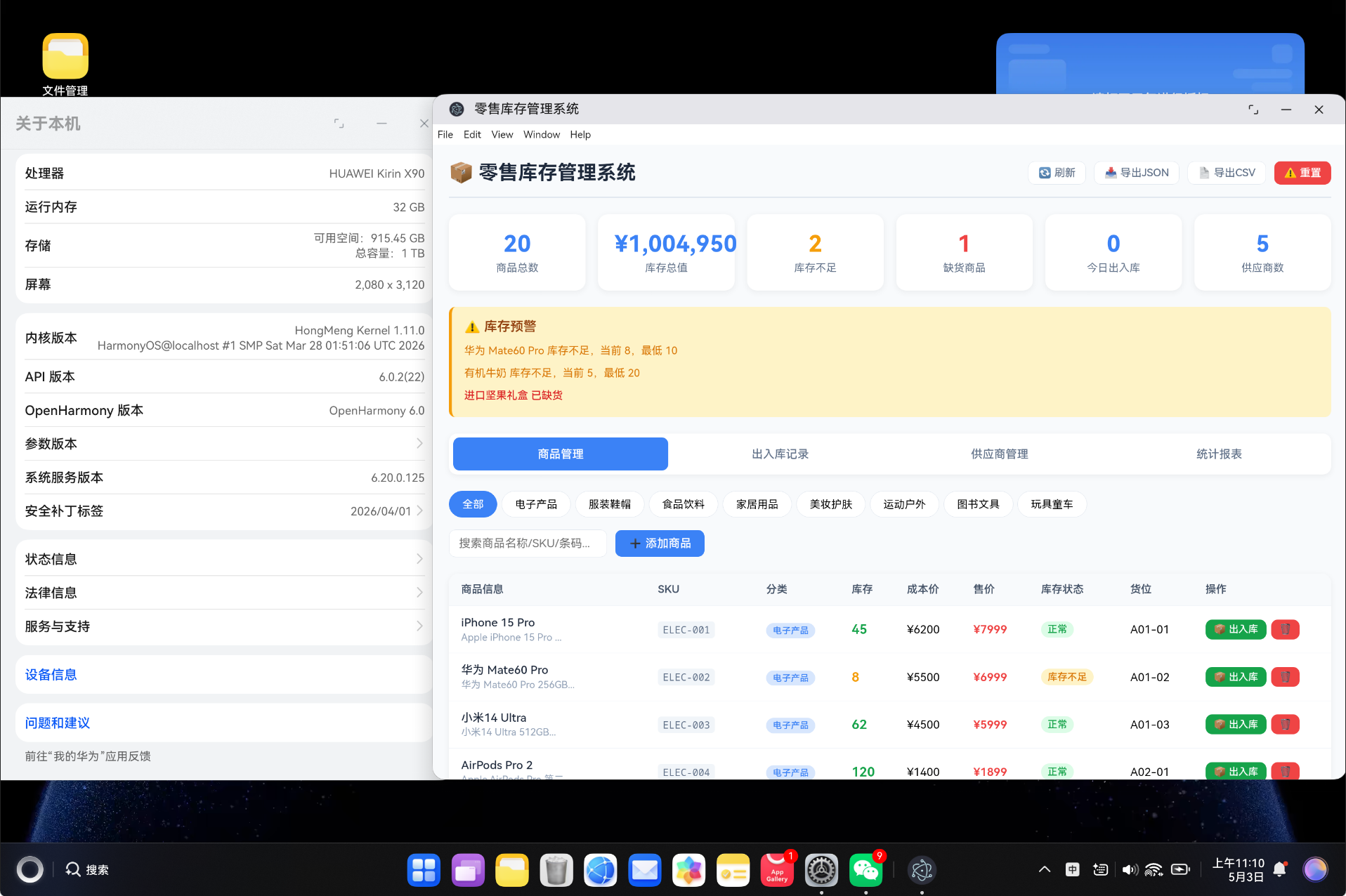
基于 Vue3 Composition API + TypeScript 构建的零售库存桌面端后台管理系统,支持商品管理、出入库操作、供应商管理、库存预警、统计报表等核心功能,采用 localStorage 实现数据持久化,可打包为 HarmonyOS 应用。
一、项目背景
零售行业的库存管理是企业运营的核心环节。传统的手工记账方式效率低下、容易出错,无法满足现代零售企业的需求。
1.1 业务痛点
- 库存数据不准确,账面库存与实际库存差异大
- 商品出入库记录混乱,追溯困难
- 缺货和积压现象频发,影响销售和资金周转
- 供应商管理分散,采购决策缺乏数据支撑
- 销售统计滞后,无法实时掌握经营状况
1.2 系统功能
| 模块 | 核心功能 | 说明 |
|---|---|---|
| 商品管理 | 增删改查、搜索、分类筛选 | 支持 SKU、条形码、多标签管理 |
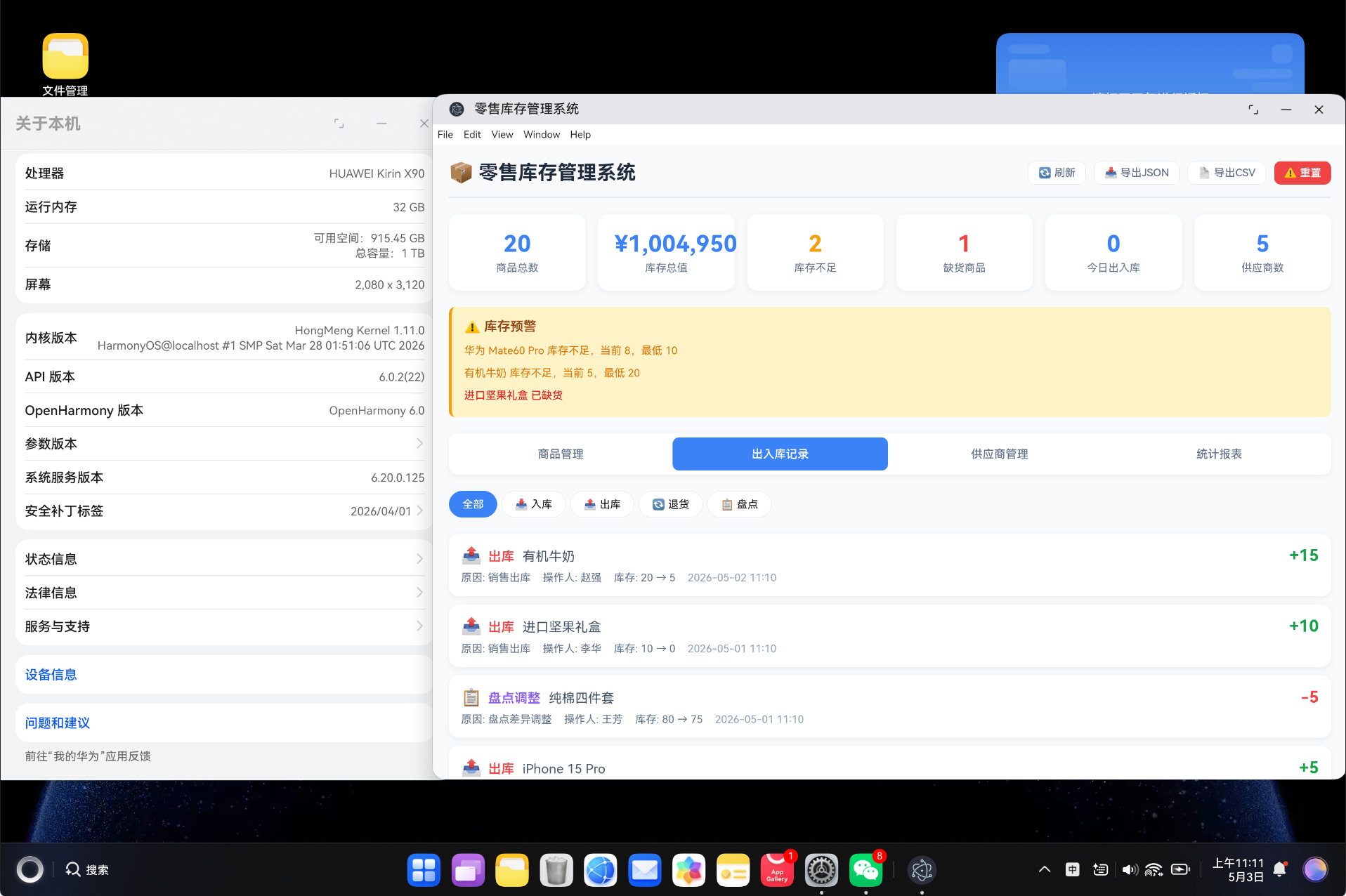
| 出入库记录 | 入库、出库、退货、盘点调整 | 完整记录库存变动历史 |
| 库存预警 | 缺货预警、低库存提醒、积压报警 | 自动检测库存状态 |
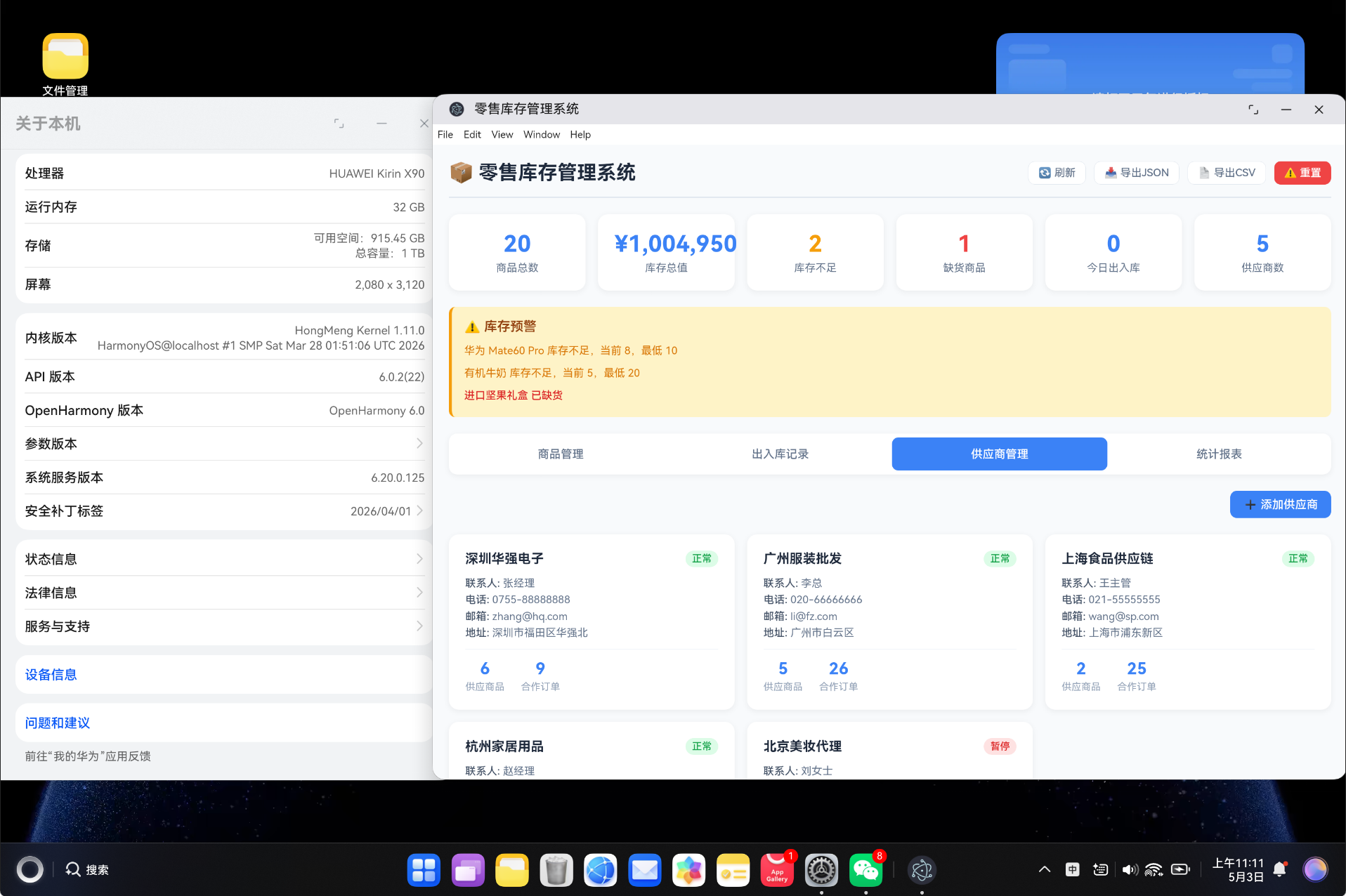
| 供应商管理 | 供应商信息、合作关系维护 | 关联商品与供应商 |
| 统计报表 | 分类库存、状态分布、低库存排行 | 多维度数据分析 |
1.3 技术特点
- 响应式 UI:清晰的表格与卡片布局,数据一目了然
- 库存状态自动判定:根据最低/最高库存自动标识状态
- 完整出入库追踪:每次变动都记录操作人、原因、时间
- 实时预警提醒:顶部预警栏实时展示库存异常
- 数据持久化:localStorage 存储,刷新不丢失
- HarmonyOS 兼容:可打包为鸿蒙应用部署
二、技术栈
2.1 核心技术
| 技术 | 版本 | 说明 |
|---|---|---|
| Vue3 | ^3.4.0 | 前端框架,使用 Composition API |
| TypeScript | ^5.3.0 | 类型安全的 JavaScript 超集 |
| Vue Router | ^4.6.4 | Vue 官方路由管理 |
| Vite | ^5.0.0 | 极速构建工具 |
| HarmonyOS | API 11+ | 鸿蒙操作系统 |
2.2 项目配置
{
  "name": "retail-inventory-system",
  "version": "1.0.0",
  "description": "零售库存管理系统 - 扫码、库存追踪、报表",
  "type": "module",
  "scripts": {
    "dev": "vite",
    "build": "vite build",
    "preview": "vite preview"
  }
}
💡 Vite 5 相比 Webpack 有 10-100 倍的构建速度提升,非常适合快速迭代开发。
三、项目架构
3.1 目录结构
vue-app/
├── src/
│   ├── types/
│   │   └── retail.ts              # 类型定义
│   ├── services/
│   │   └── RetailService.ts       # 业务逻辑层
│   ├── components/
│   │   └── RetailPanel.vue        # 主组件
│   ├── views/
│   │   └── RetailView.vue         # 视图组件
│   ├── router/
│   │   └── index.ts               # 路由配置
│   ├── styles/
│   │   └── global.css             # 全局样式
│   ├── App.vue                    # 根组件
│   └── main.ts                    # 入口文件
├── index.html                     # HTML 模板
├── package.json                   # 项目配置
├── vite.config.ts                 # Vite 配置
└── tsconfig.json                  # TypeScript 配置
3.2 架构分层
┌─────────────────────────────────────────────┐
│                  View 层                     │
│              RetailView.vue                  │
├─────────────────────────────────────────────┤
│                Component 层                  │
│             RetailPanel.vue                  │
│  ┌──────────┬──────────┬────────┬────────┐  │
│  │ 商品管理 │ 出入库记录│ 供应商 │ 统计报表│  │
│  └──────────┴──────────┴────────┴────────┘  │
├─────────────────────────────────────────────┤
│                Service 层                    │
│             RetailService.ts                │
│  ┌──────────┬──────────┬────────┬────────┐  │
│  │ 商品管理 │ 出入库管理│ 供应商 │ 报表统计│  │
│  └──────────┴──────────┴────────┴────────┘  │
├─────────────────────────────────────────────┤
│                Type 层                       │
│                retail.ts                    │
│  Product | StockMovement | Supplier | Alert │
├─────────────────────────────────────────────┤
│              数据存储层                       │
│              localStorage                    │
└─────────────────────────────────────────────┘
四、TypeScript 类型定义
4.1 枚举类型
// 商品分类
export type ProductCategory =
  | 'electronics'  // 电子产品
  | 'clothing'     // 服装鞋帽
  | 'food'         // 食品饮料
  | 'home'         // 家居用品
  | 'beauty'       // 美妆护肤
  | 'sports'       // 运动户外
  | 'books'        // 图书文具
  | 'toys'         // 玩具童车

// 库存状态
export type StockStatus =
  | 'normal'        // 正常
  | 'low'           // 库存不足
  | 'out_of_stock'  // 缺货
  | 'overstock'     // 库存积压

// 出入库类型
export type MovementType =
  | 'inbound'     // 入库
  | 'outbound'    // 出库
  | 'return'      // 退货
  | 'transfer'    // 调拨
  | 'adjustment'  // 盘点调整

// 供应商状态
export type SupplierStatus = 'active' | 'inactive' | 'suspended'
4.2 核心接口
// 商品接口
export interface Product {
  id: string              // 唯一标识
  name: string            // 商品名称
  sku: string             // SKU 编码
  barcode: string         // 条形码(支持扫码)
  category: ProductCategory  // 分类
  price: number           // 售价
  cost: number            // 成本价
  stockQuantity: number   // 当前库存
  minStock: number        // 最低库存
  maxStock: number        // 最高库存
  supplierId: string      // 供应商ID
  location: string        // 货位(如 A01-01)
  description: string     // 描述
  tags: string[]          // 标签
  createdAt: number       // 创建时间
  updatedAt: number       // 更新时间
}

// 出入库记录接口
export interface StockMovement {
  id: string           // 唯一标识
  productId: string    // 商品ID
  productName: string  // 商品名称
  type: MovementType   // 操作类型
  quantity: number     // 变动数量(正数为入库,负数为出库)
  beforeQuantity: number  // 变动前库存
  afterQuantity: number   // 变动后库存
  reason: string       // 原因
  operator: string     // 操作人
  createdAt: number    // 操作时间
}

// 供应商接口
export interface Supplier {
  id: string
  name: string
  contact: string
  phone: string
  email: string
  address: string
  status: SupplierStatus
  products: number      // 供应商品数
  totalOrders: number   // 合作订单数
  createdAt: number
}

// 库存预警接口
export interface StockAlert {
  id: string
  productId: string
  productName: string
  sku: string
  type: StockStatus     // 预警类型
  currentStock: number  // 当前库存
  threshold: number     // 阈值
  message: string       // 预警消息
  createdAt: number
}

// 仪表盘统计
export interface DashboardStats {
  totalProducts: number      // 商品总数
  totalStockValue: number    // 库存总值
  lowStockCount: number      // 库存不足数
  outOfStockCount: number    // 缺货数
  todayMovements: number     // 今日出入库数
  totalSuppliers: number     // 供应商数
}
4.3 配置常量
// 分类配置
export const CATEGORY_CONFIG: Record<ProductCategory, { label: string; color: string }> = {
  electronics: { label: '电子产品', color: '#3b82f6' },
  clothing: { label: '服装鞋帽', color: '#ec4899' },
  food: { label: '食品饮料', color: '#f59e0b' },
  home: { label: '家居用品', color: '#10b981' },
  beauty: { label: '美妆护肤', color: '#8b5cf6' },
  sports: { label: '运动户外', color: '#06b6d4' },
  books: { label: '图书文具', color: '#6366f1' },
  toys: { label: '玩具童车', color: '#ef4444' },
}

// 库存状态配置
export const STOCK_STATUS_CONFIG: Record<StockStatus, { label: string; color: string; bg: string }> = {
  normal: { label: '正常', color: '#16a34a', bg: '#dcfce7' },
  low: { label: '库存不足', color: '#d97706', bg: '#fef3c7' },
  out_of_stock: { label: '缺货', color: '#dc2626', bg: '#fee2e2' },
  overstock: { label: '库存积压', color: '#2563eb', bg: '#dbeafe' },
}

// 出入库类型配置
export const MOVEMENT_TYPE_CONFIG: Record<MovementType, { label: string; color: string; icon: string }> = {
  inbound: { label: '入库', color: '#16a34a', icon: '📥' },
  outbound: { label: '出库', color: '#ef4444', icon: '📤' },
  return: { label: '退货', color: '#f59e0b', icon: '🔄' },
  transfer: { label: '调拨', color: '#3b82f6', icon: '↔️' },
  adjustment: { label: '盘点调整', color: '#8b5cf6', icon: '📋' },
}
五、服务层实现
5.1 服务类初始化
const STORAGE_KEYS = {
  products: 'retail_products',
  movements: 'retail_movements',
  suppliers: 'retail_suppliers',
  lastUpdateDate: 'retail_last_update_date',
}

class _RetailService {
  private products: Product[] = []
  private movements: StockMovement[] = []
  private suppliers: Supplier[] = []

  constructor() {
    this.loadFromStorage()
    if (this.products.length === 0) {
      this.initDemoData()
    }
  }

  private loadFromStorage(): void {
    try {
      const products = localStorage.getItem(STORAGE_KEYS.products)
      const movements = localStorage.getItem(STORAGE_KEYS.movements)
      const supps = localStorage.getItem(STORAGE_KEYS.suppliers)
      if (products) this.products = JSON.parse(products)
      if (movements) this.movements = JSON.parse(movements)
      if (supps) this.suppliers = JSON.parse(supps)
    } catch {
      this.products = []
      this.movements = []
      this.suppliers = []
    }
  }

  private saveToStorage(): void {
    localStorage.setItem(STORAGE_KEYS.products, JSON.stringify(this.products))
    localStorage.setItem(STORAGE_KEYS.movements, JSON.stringify(this.movements))
    localStorage.setItem(STORAGE_KEYS.suppliers, JSON.stringify(this.suppliers))
  }
}
5.2 商品管理
getProducts(): Product[] {
  return [...this.products]
}

searchProducts(keyword: string): Product[] {
  const lower = keyword.toLowerCase()
  return this.products.filter(p =>
    p.name.toLowerCase().includes(lower) ||
    p.sku.toLowerCase().includes(lower) ||
    p.barcode.includes(lower) ||
    p.description.toLowerCase().includes(lower) ||
    p.tags.some(t => t.toLowerCase().includes(lower))
  )
}

addProduct(product: Omit<Product, 'id' | 'createdAt' | 'updatedAt'>): Product {
  const now = Date.now()
  const newProduct: Product = {
    ...product,
    id: generateId(),
    createdAt: now,
    updatedAt: now,
  }
  this.products.push(newProduct)
  // 自动记录入库
  this.recordMovement(newProduct.id, newProduct.name, 'inbound',
    product.stockQuantity, 0, product.stockQuantity, '新品入库', '系统')
  this.saveToStorage()
  return newProduct
}
5.3 出入库操作(核心)
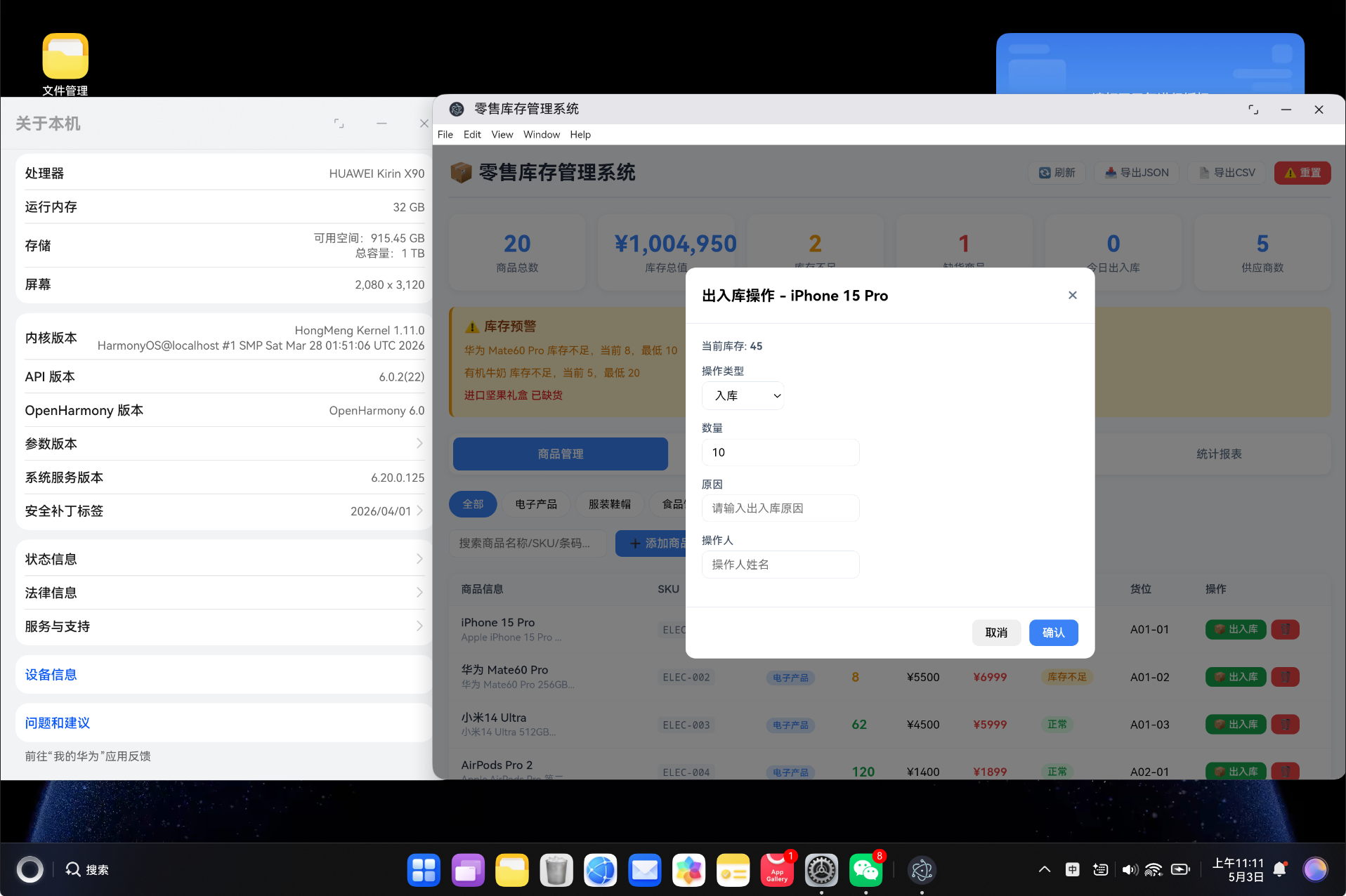
出入库操作是库存管理的核心功能,每次操作都会自动记录变动历史:
adjustStock(productId: string, quantity: number, type: MovementType, reason: string, operator: string): boolean {
  const product = this.products.find(p => p.id === productId)
  if (!product) return false

  const beforeQty = product.stockQuantity
  const afterQty = beforeQty + quantity
  if (afterQty < 0) return false  // 不能负库存

  product.stockQuantity = afterQty
  product.updatedAt = Date.now()

  // 记录出入库流水
  this.recordMovement(productId, product.name, type, quantity, beforeQty, afterQty, reason, operator)
  this.saveToStorage()
  return true
}

recordMovement(productId: string, productName: string, type: MovementType,
    quantity: number, beforeQty: number, afterQty: number, reason: string, operator: string): void {
  this.movements.push({
    id: generateId(),
    productId,
    productName,
    type,
    quantity,
    beforeQuantity: beforeQty,
    afterQuantity: afterQty,
    reason,
    operator,
    createdAt: Date.now(),
  })
}
出入库流程图:
操作请求 → 查找商品 → 计算新库存 → 检查合法性 → 更新库存 → 记录流水 → 保存
5.4 库存预警
getStockAlerts(): StockAlert[] {
  const alerts: StockAlert[] = []
  this.products.forEach(product => {
    if (product.stockQuantity === 0) {
      alerts.push({
        id: generateId(),
        productId: product.id,
        productName: product.name,
        sku: product.sku,
        type: 'out_of_stock',
        currentStock: 0,
        threshold: product.minStock,
        message: `${product.name} 已缺货`,
        createdAt: Date.now(),
      })
    } else if (product.stockQuantity < product.minStock) {
      alerts.push({
        type: 'low',
        message: `${product.name} 库存不足,当前 ${product.stockQuantity},最低 ${product.minStock}`,
        // ... 其他字段
      })
    } else if (product.stockQuantity > product.maxStock) {
      alerts.push({
        type: 'overstock',
        message: `${product.name} 库存积压,当前 ${product.stockQuantity},最高 ${product.maxStock}`,
        // ... 其他字段
      })
    }
  })
  return alerts
}

getStockStatus(product: Product): StockStatus {
  if (product.stockQuantity === 0) return 'out_of_stock'
  if (product.stockQuantity < product.minStock) return 'low'
  if (product.stockQuantity > product.maxStock) return 'overstock'
  return 'normal'
}
5.5 统计分析
getStats(): DashboardStats {
  const totalProducts = this.products.length
  const totalStockValue = this.products.reduce((sum, p) => sum + p.cost * p.stockQuantity, 0)
  const lowStockCount = this.products.filter(p => p.stockQuantity > 0 && p.stockQuantity < p.minStock).length
  const outOfStockCount = this.products.filter(p => p.stockQuantity === 0).length

  const today = new Date()
  today.setHours(0, 0, 0, 0)
  const todayMovements = this.movements.filter(m => m.createdAt >= today.getTime()).length

  return { totalProducts, totalStockValue, lowStockCount, outOfStockCount, todayMovements, totalSuppliers: this.suppliers.length }
}

getCategoryStats(): Record<string, { label: string; count: number; value: number; color: string }> {
  const stats = {}
  this.products.forEach(p => {
    if (!stats[p.category]) {
      stats[p.category] = {
        label: CATEGORY_CONFIG[p.category].label,
        count: 0, value: 0, color: CATEGORY_CONFIG[p.category].color,
      }
    }
    stats[p.category].count++
    stats[p.category].value += p.cost * p.stockQuantity
  })
  return stats
}
六、核心功能实现
6.1 商品管理模块
商品列表以表格形式展示,支持分类筛选和多条件搜索。
<div class="products-table">
  <table>
    <thead>
      <tr>
        <th>商品信息</th>
        <th>SKU</th>
        <th>分类</th>
        <th>库存</th>
        <th>成本价</th>
        <th>售价</th>
        <th>库存状态</th>
        <th>货位</th>
        <th>操作</th>
      </tr>
    </thead>
    <tbody>
      <tr v-for="product in filteredProducts" :key="product.id">
        <td class="product-info">
          <div class="product-name">{{ product.name }}</div>
          <div class="product-desc">{{ product.description.slice(0, 20) }}...</div>
        </td>
        <td><code>{{ product.sku }}</code></td>
        <td>
          <span class="tag" :style="{ backgroundColor: CATEGORY_CONFIG[product.category].color + '33' }">
            {{ CATEGORY_CONFIG[product.category].label }}
          </span>
        </td>
        <td>
          <span class="stock-qty" :class="`stock-${getStockStatus(product)}`">
            {{ product.stockQuantity }}
          </span>
        </td>
        <td>¥{{ product.cost }}</td>
        <td class="price">¥{{ product.price }}</td>
        <td>
          <span class="status-badge" :style="{ backgroundColor: STOCK_STATUS_CONFIG[getStockStatus(product)].bg }">
            {{ STOCK_STATUS_CONFIG[getStockStatus(product)].label }}
          </span>
        </td>
        <td>{{ product.location }}</td>
        <td>
          <button class="btn btn-xs btn-success" @click="showStockModal(product)">📦 出入库</button>
          <button class="btn btn-xs btn-danger" @click="deleteProduct(product.id)">🗑️</button>
        </td>
      </tr>
    </tbody>
  </table>
</div>
搜索功能说明:
| 搜索维度 | 字段 | 说明 |
|---|---|---|
| 名称搜索 | product.name | 支持模糊匹配 |
| SKU搜索 | product.sku | 精确匹配编码 |
| 条码搜索 | product.barcode | 支持扫码输入 |
| 描述搜索 | product.description | 描述内容匹配 |
| 标签搜索 | product.tags[] | 标签数组遍历 |
6.2 出入库记录
出入库记录展示所有库存变动历史,支持按类型筛选:
<div class="movements-list">
  <div v-for="mv in filteredMovements" :key="mv.id" class="movement-card">
    <div class="movement-header">
      <div>
        <span class="movement-icon">{{ MOVEMENT_TYPE_CONFIG[mv.type].icon }}</span>
        <span class="movement-type">{{ MOVEMENT_TYPE_CONFIG[mv.type].label }}</span>
        <span class="movement-product">{{ mv.productName }}</span>
      </div>
      <div class="movement-qty" :class="mv.quantity > 0 ? 'qty-in' : 'qty-out'">
        {{ mv.quantity > 0 ? '+' : '' }}{{ mv.quantity }}
      </div>
    </div>
    <div class="movement-details">
      <span>原因: {{ mv.reason }}</span>
      <span>操作人: {{ mv.operator }}</span>
      <span>库存: {{ mv.beforeQuantity }} → {{ mv.afterQuantity }}</span>
      <span class="movement-time">{{ formatTime(mv.createdAt) }}</span>
    </div>
  </div>
</div>
出入库类型说明:
| 类型 | 图标 | 数量符号 | 说明 |
|---|---|---|---|
| 入库 | 📥 | 正数 (+) | 采购入库、新品入库 |
| 出库 | 📤 | 负数 (-) | 销售出库、领用出库 |
| 退货 | 🔄 | 正数 (+) | 客户退货退库 |
| 调拨 | ↔️ | 可正可负 | 仓库间调拨 |
| 盘点调整 | 📋 | 可正可负 | 盘点差异调整 |
6.3 库存状态自动判定
系统根据 minStock 和 maxStock 自动判定库存状态:
stockQuantity = 0          → 缺货 (out_of_stock)
stockQuantity < minStock   → 库存不足 (low)
minStock ≤ stockQuantity ≤ maxStock → 正常 (normal)
stockQuantity > maxStock   → 库存积压 (overstock)
状态颜色标识:
| 状态 | 背景色 | 文字色 | 说明 |
|---|---|---|---|
| 正常 | #dcfce7 | #16a34a | 绿色,库存健康 |
| 不足 | #fef3c7 | #d97706 | 橙色,需要补货 |
| 缺货 | #fee2e2 | #dc2626 | 红色,紧急状态 |
| 积压 | #dbeafe | #2563eb | 蓝色,需要促销 |
6.4 统计报表
统计报表提供四个维度的数据可视化:
<div class="reports-grid">
  <!-- 分类库存统计 -->
  <div class="report-section">
    <h3>分类库存统计</h3>
    <div class="category-stat-row" v-for="(data, cat) in categoryStats" :key="cat">
      <span class="cat-dot" :style="{ backgroundColor: data.color }"></span>
      <span class="cat-name">{{ data.label }}</span>
      <span class="cat-count">{{ data.count }}种</span>
      <div class="cat-bar">
        <div class="cat-bar-fill" :style="{ width: getCategoryPercentage(data.value) + '%' }"></div>
      </div>
      <span class="cat-value">¥{{ data.value.toLocaleString() }}</span>
    </div>
  </div>

  <!-- 库存状态分布 -->
  <div class="report-section">
    <h3>库存状态分布</h3>
    <div class="status-item" v-for="(config, status) in STOCK_STATUS_CONFIG" :key="status">
      <span class="status-label">{{ config.label }}</span>
      <span class="status-count">{{ getStockStatusCount(status) }}</span>
      <div class="status-bar">
        <div class="status-bar-fill" :style="{ width: getStockStatusPercentage(status) + '%' }"></div>
      </div>
    </div>
  </div>

  <!-- 低库存预警 TOP10 -->
  <div class="report-section">
    <h3>低库存预警 TOP10</h3>
    <div class="low-stock-row" v-for="(product, index) in lowStockProducts" :key="product.id">
      <span class="rank" :class="{ 'rank-top3': index < 3 }">{{ index + 1 }}</span>
      <span class="product-name">{{ product.name }}</span>
      <span class="stock-num">{{ product.stockQuantity }}</span>
      <span class="min-stock">最低: {{ product.minStock }}</span>
    </div>
  </div>

  <!-- 出入库趋势 -->
  <div class="report-section">
    <h3>出入库趋势</h3>
    <div class="trend-summary">
      <span class="trend-num">{{ totalInbound }}</span>  <!-- 入库总量 -->
      <span class="trend-num">{{ totalOutbound }}</span>  <!-- 出库总量 -->
      <span class="trend-num">{{ totalInbound - totalOutbound }}</span>  <!-- 净变化 -->
    </div>
  </div>
</div>
七、响应式数据管理
7.1 组合式 API
import { ref, computed, onMounted } from 'vue'

const activeTab = ref('products')
const selectedCategory = ref('all')
const selectedMovementType = ref('all')
const searchKeyword = ref('')
const showAddModal = ref(false)
const showStockModalData = ref<Product | null>(null)
const toastMessage = ref('')
const toastType = ref('success')

const products = ref<Product[]>([])
const movements = ref<StockMovement[]>([])
const suppliers = ref<any[]>([])
const alerts = ref<any[]>([])
const stats = ref({ totalProducts: 0, totalStockValue: 0, lowStockCount: 0, outOfStockCount: 0, todayMovements: 0, totalSuppliers: 0 })
7.2 计算属性
const filteredProducts = computed(() => {
  let result = products.value
  if (selectedCategory.value !== 'all')
    result = result.filter(p => p.category === selectedCategory.value)
  if (searchKeyword.value) {
    const kw = searchKeyword.value.toLowerCase()
    result = result.filter(p =>
      p.name.toLowerCase().includes(kw) || p.sku.toLowerCase().includes(kw) ||
      p.barcode.includes(kw) || p.description.toLowerCase().includes(kw)
    )
  }
  return result
})

const lowStockProducts = computed(() =>
  [...products.value]
    .filter(p => p.stockQuantity <= p.minStock)
    .sort((a, b) => (a.stockQuantity / a.minStock) - (b.stockQuantity / b.minStock))
    .slice(0, 10)
)

const totalInbound = computed(() =>
  movements.value.filter(m => m.quantity > 0).reduce((sum, m) => sum + m.quantity, 0)
)

const totalOutbound = computed(() =>
  movements.value.filter(m => m.quantity < 0).reduce((sum, m) => sum + Math.abs(m.quantity), 0)
)
八、样式设计
8.1 库存数量样式
.stock-qty { font-weight: 600; font-size: 16px; }
.stock-normal { color: #16a34a; }
.stock-low { color: #f59e0b; }
.stock-out_of_stock { color: #dc2626; }
.stock-overstock { color: #2563eb; }
8.2 出入库数量样式
.movement-qty { font-size: 20px; font-weight: 700; }
.qty-in { color: #16a34a; }   /* 绿色表示入库 */
.qty-out { color: #ef4444; }  /* 红色表示出库 */
8.3 预警栏样式
.alert-bar {
  background: #fef3c7;
  border-left: 4px solid #f59e0b;
  border-radius: 8px;
  padding: 15px;
  margin-bottom: 20px;
}

.alert-out_of_stock { color: #dc2626; font-weight: 500; }
.alert-low { color: #d97706; }
.alert-overstock { color: #2563eb; }
九、构建与部署
9.1 构建命令
# 清理缓存
Remove-Item -Recurse -Force "dist" -ErrorAction SilentlyContinue
Remove-Item -Recurse -Force ".hvigor" -ErrorAction SilentlyContinue

# 构建
npm run build
9.2 构建输出
✓ 37 modules transformed.
../dist/index.html                       0.63 kB │ gzip:  0.47 kB
../dist/assets/index-CBgsX6DZ.css        0.21 kB │ gzip:  0.19 kB
../dist/assets/RetailView-CYjZWCAP.css  10.33 kB │ gzip:  2.30 kB
../dist/assets/RetailView-BG0ml3g4.js   31.64 kB │ gzip: 10.10 kB
../dist/assets/index-QA81rV61.js        91.45 kB │ gzip: 35.85 kB
✓ built in 633ms
9.3 产物分析
| 文件 | 大小 | Gzip 后 | 说明 |
|---|---|---|---|
| index.html | 0.63 KB | 0.47 KB | HTML 入口 |
| index.css | 0.21 KB | 0.19 KB | 全局样式 |
| RetailView.css | 10.33 KB | 2.30 KB | 组件样式 |
| RetailView.js | 31.64 KB | 10.10 KB | 业务逻辑 |
| index.js | 91.45 KB | 35.85 KB | Vue + Router |
| 总计 | 134.26 KB | 48.91 KB | - |
十、核心亮点
10.1 出入库流水追踪
每次库存变动都会记录完整的流水信息:
interface StockMovement {
  productId: string        // 哪个商品
  type: MovementType       // 什么操作
  quantity: number         // 变动多少
  beforeQuantity: number   // 变动前是多少
  afterQuantity: number    // 变动后是多少
  reason: string           // 为什么变动
  operator: string         // 谁操作的
  createdAt: number        // 什么时候变的
}
设计优势:
- 完整追溯:可以追溯任意时间点的库存状态
- 责任到人:每次操作都记录操作人
- 原因明确:每次变动都有原因说明
- 数据分析:支持按类型、时间、操作人等多维度分析
10.2 库存状态自动判定
系统自动根据阈值判定库存状态:
getStockStatus(product: Product): StockStatus {
  if (product.stockQuantity === 0) return 'out_of_stock'
  if (product.stockQuantity < product.minStock) return 'low'
  if (product.stockQuantity > product.maxStock) return 'overstock'
  return 'normal'
}
💡 当商品
minStock = 10,maxStock = 100时:库存为 5 显示"不足",库存为 0 显示"缺货",库存为 150 显示"积压"。
10.3 预警自动刷新
每次数据刷新时自动检测库存状态并生成预警:
function refreshData(): void {
  products.value = RetailService.getProducts()
  movements.value = RetailService.getMovements()
  suppliers.value = RetailService.getSuppliers()
  alerts.value = RetailService.getStockAlerts()   // 自动检测
  stats.value = RetailService.getStats()
}
十一、常见问题解答
11.1 如何实现扫码入库?
将 searchProducts 方法与扫描输入绑定即可:
// 扫描枪输入条形码后自动搜索
function onBarcodeScanned(barcode: string): void {
  const products = RetailService.searchProducts(barcode)
  if (products.length === 1) {
    showStockModal(products[0])
  }
}
11.2 如何对接真实后端?
修改 RetailService 中的方法,将 localStorage 操作替换为 API 调用:
async adjustStock(productId: string, quantity: number, type: string, reason: string, operator: string): Promise<boolean> {
  await fetch(`/api/stock/adjust`, {
    method: 'POST',
    body: JSON.stringify({ productId, quantity, type, reason, operator })
  })
  // 刷新数据
  return true
}
11.3 如何设置库存阈值?
在添加或编辑商品时设置 minStock 和 maxStock:
| 商品类型 | 建议 minStock | 建议 maxStock | 说明 |
|---|---|---|---|
| 热销品 | 50 | 500 | 高周转商品 |
| 常规品 | 20 | 200 | 正常周转 |
| 滞销品 | 5 | 50 | 低周转商品 |
| 季节性 | 按需 | 按需 | 根据季节调整 |
十二、总结
本项目基于 Vue3 + TypeScript 实现了一个功能完整的零售库存后台管理系统,主要特点包括:
- 完整的商品管理:支持 SKU、条形码、多标签、货位管理
- 出入库全追踪:入库、出库、退货、调拨、盘点五种操作类型
- 库存状态自动判定:根据阈值自动标识正常/不足/缺货/积压
- 实时预警提醒:顶部预警栏实时展示库存异常商品
- 供应商管理:关联商品与供应商,统计合作数据
- 统计报表:分类库存、状态分布、低库存排行、出入库趋势
- 数据导出:支持 JSON 和 CSV 格式导出
- 类型安全:完整的 TypeScript 类型定义
- 响应式设计:Vue3 Composition API,逻辑清晰可维护
项目代码结构清晰,遵循分层架构设计,可直接打包为 HarmonyOS 应用部署到鸿蒙设备。
十三、参考资料
- Vue3 官方文档
- TypeScript 官方文档
- Vite 构建工具
- Vue Router 路由
- HarmonyOS 开发文档
- localStorage API
- CSDN 博客质量分标准
- Composition API 最佳实践
- TypeScript 类型系统

赋能鸿蒙PC开发者,共建全场景原生生态,共享一次开发多端部署创新价值。
更多推荐
 9
9 0
0- 0


 已为社区贡献29条内容

所有评论(0)