Electron for 鸿蒙PC实战案例AtomGit口袋工具之命名空间模块技术解读
·
概述
本文深入解析Electron for 鸿蒙PC实战案例中 AtomGit 个人中心应用中的命名空间模块,该模块实现了用户和组织命名空间的管理功能,为开发者提供了项目组织和权限管理的核心能力。
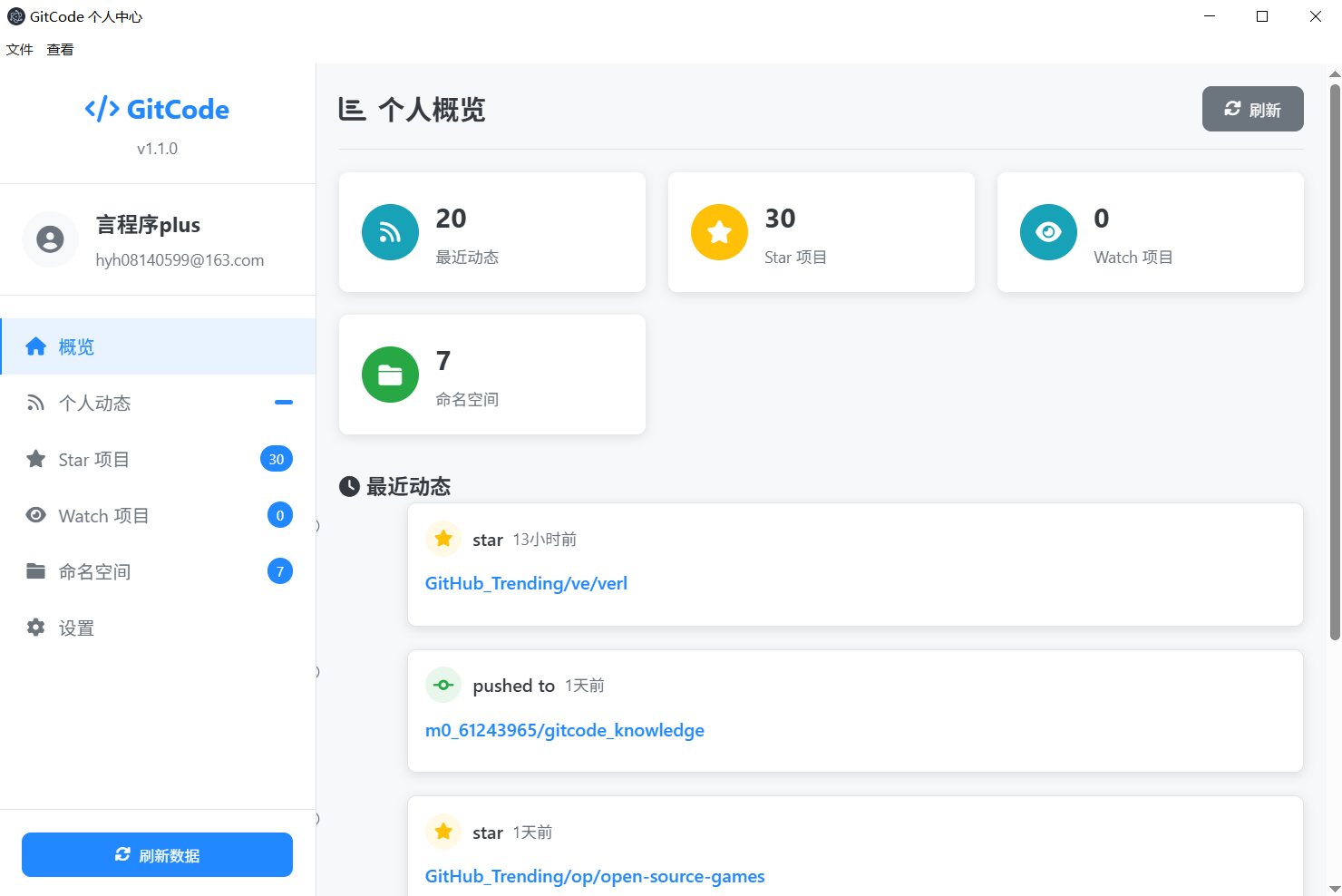
模块架构设计
1. 命名空间概念模型
2. 系统架构层次
┌─────────────────────────────────────┐
│           Presentation Layer        │
│  ┌─────────────┐ ┌─────────────────┐│
│  │ Namespace   │ │ Namespace Cards ││
│  │ Tab UI      │ │ & Management    ││
│  └─────────────┘ └─────────────────┘│
└─────────────────────────────────────┘
┌─────────────────────────────────────┐
│         Business Logic Layer        │
│  ┌─────────────┐ ┌─────────────────┐│
│  │Namespace     │ │ Permission      ││
│  │Controller    │ │ Manager         ││
│  └─────────────┘ └─────────────────┘│
└─────────────────────────────────────┘
┌─────────────────────────────────────┐
│           Data Access Layer         │
│  ┌─────────────┐ ┌─────────────────┐│
│  │GitCode       │ │ HTTP Service    ││
│  │Namespace API │ │ Layer           ││
│  └─────────────┘ └─────────────────┘│
└─────────────────────────────────────┘
核心技术实现
1. IPC 通信架构
主进程 Handler
// main.js:127-129
ipcMain.handle('gitcode-get-namespaces', async (event) => {
  return await this.gitCodeService.getUserNamespaces();
});
预加载脚本 API
// preload.js:8
contextBridge.exposeInMainWorld('electronAPI', {
  gitCode: {
    getNamespaces: () => ipcRenderer.invoke('gitcode-get-namespaces'),
  }
});
2. GitCode API 服务层
命名空间服务实现
// GitCodeService.js:147-193
async getUserNamespaces() {
  const cacheKey = 'namespaces';
  if (this.cache.has(cacheKey)) {
    return this.cache.get(cacheKey);
  }

  try {
    if (!this.accessToken) {
      return {
        success: false,
        error: '需要用户认证',
        statusCode: 401
      };
    }

    const config = {
      url: `${this.baseURL}/user/namespaces`,
      headers: {
        'Authorization': `Bearer ${this.accessToken}`
      }
    };

    const response = await this.httpService.request(config);

    if (response.statusCode === 200) {
      const result = {
        success: true,
        data: this.processNamespacesData(response.data),
        statusCode: response.statusCode
      };
      this.cache.set(cacheKey, result);
      return result;
    } else {
      return {
        success: false,
        error: `获取namespaces失败: ${response.statusCode}`,
        statusCode: response.statusCode
      };
    }
  } catch (error) {
    return {
      success: false,
      error: error.message,
      type: error.type || 'UNKNOWN_ERROR'
    };
  }
}

// 命名空间数据处理
processNamespacesData(rawData) {
  if (!Array.isArray(rawData)) return [];

  return rawData.map(namespace => ({
    id: namespace.id,
    name: namespace.name || namespace.username,
    type: namespace.type || 'user', // 'user' | 'organization'
    path: namespace.path,
    description: namespace.description || '',
    avatar_url: namespace.avatar_url || '',
    kind: namespace.kind,
    visibility: namespace.visibility || 'public',
    projects_count: namespace.projects_count || 0,
    members_count: namespace.members_count || 0,
    created_at: namespace.created_at,
    updated_at: namespace.updated_at,
    // 扩展字段
    is_owner: namespace.owner_id === this.currentUserId,
    permissions: namespace.permissions || {},
    billing_email: namespace.billing_email,
    plan: namespace.plan
  }));
}
3. 渲染控制器实现
命名空间加载逻辑
// renderer.js:324-339
async loadNamespaces() {
  try {
    const result = await window.electronAPI.gitCode.getNamespaces();

    if (result.success) {
      this.allNamespaces = result.data;
      this.renderNamespaces(result.data);
      this.updateBadge('namespaces', result.data.length);
      this.updateNamespaceStats(result.data);
    } else {
      this.showToast('加载命名空间失败: ' + result.error, 'error');
    }
  } catch (error) {
    this.showToast('加载命名空间失败: ' + error.message, 'error');
  }
}
命名空间卡片渲染
// renderer.js:594-620
renderNamespaces(namespaces) {
  const container = document.getElementById('namespaces-list');

  if (!namespaces || namespaces.length === 0) {
    container.innerHTML = `
      <div class="empty-state">
        <i class="fas fa-folder"></i>
        <h3>暂无命名空间</h3>
        <p>您还没有任何命名空间</p>
      </div>
    `;
    return;
  }

  container.innerHTML = namespaces.map(namespace => `
    <div class="namespace-card ${namespace.type}" data-namespace-id="${namespace.id}">
      <div class="namespace-header">
        <div class="namespace-avatar">
          ${namespace.avatar_url
            ? `<img src="${namespace.avatar_url}" alt="${namespace.name}" />`
            : `<i class="fas ${namespace.type === 'user' ? 'fa-user' : 'fa-users'}"></i>`
          }
        </div>
        <div class="namespace-info">
          <h4>${this.escapeHtml(namespace.name)}</h4>
          <p class="namespace-type">
            <i class="fas ${namespace.type === 'user' ? 'fa-user' : 'fa-building'}"></i>
            ${namespace.type === 'user' ? '个人空间' : '组织空间'}
          </p>
        </div>
        <div class="namespace-actions">
          ${this.renderNamespaceActions(namespace)}
        </div>
      </div>

      <div class="namespace-description">
        ${this.escapeHtml(namespace.description) || '<span class="no-description">暂无描述</span>'}
      </div>

      <div class="namespace-stats">
        <div class="stat-item">
          <i class="fas fa-project-diagram"></i>
          <span>${namespace.projects_count} 个项目</span>
        </div>
        ${namespace.type === 'organization' ? `
          <div class="stat-item">
            <i class="fas fa-users"></i>
            <span>${namespace.members_count} 个成员</span>
          </div>
        ` : ''}
        <div class="stat-item">
          <i class="fas fa-eye${namespace.visibility === 'private' ? '-slash' : ''}"></i>
          <span>${namespace.visibility === 'private' ? '私有' : '公开'}</span>
        </div>
      </div>

      ${namespace.type === 'organization' ? this.renderOrganizationInfo(namespace) : ''}
    </div>
  `).join('');
}
命名空间操作按钮
// renderer.js:622-640
renderNamespaceActions(namespace) {
  let actions = '';

  // 查看项目
  actions += `
    <button class="btn-action btn-view" onclick="window.renderer.viewNamespaceProjects('${namespace.id}')">
      <i class="fas fa-folder-open"></i>
      项目
    </button>
  `;

  // 组织特有操作
  if (namespace.type === 'organization') {
    if (namespace.is_owner) {
      actions += `
        <button class="btn-action btn-manage" onclick="window.renderer.manageOrganization('${namespace.id}')">
          <i class="fas fa-cog"></i>
          管理
        </button>
      `;
    }

    actions += `
      <button class="btn-action btn-members" onclick="window.renderer.viewMembers('${namespace.id}')">
        <i class="fas fa-users"></i>
        成员
      </button>
    `;
  }

  return actions;
}
组织信息渲染
// renderer.js:642-660
renderOrganizationInfo(namespace) {
  return `
    <div class="organization-info">
      <div class="org-details">
        <div class="org-plan">
          <i class="fas fa-crown"></i>
          <span>计划: ${namespace.plan || 'Free'}</span>
        </div>
        ${namespace.billing_email ? `
          <div class="org-billing">
            <i class="fas fa-envelope"></i>
            <span>${this.escapeHtml(namespace.billing_email)}</span>
          </div>
        ` : ''}
      </div>
      <div class="org-permissions">
        ${this.renderPermissionBadges(namespace.permissions)}
      </div>
    </div>
  `;
}

renderPermissionBadges(permissions) {
  const badges = [];

  if (permissions.admin) badges.push('<span class="permission-badge admin">管理员</span>');
  if (permissions.write) badges.push('<span class="permission-badge write">写入</span>');
  if (permissions.read) badges.push('<span class="permission-badge read">读取</span>');

  return badges.length > 0 ? badges.join('') : '<span class="permission-badge none">无权限</span>';
}
4. UI 组件设计
HTML 结构
<!-- index.html:196-208 -->
<section class="tab-content" id="namespaces-tab">
  <header class="page-header">
    <h2><i class="fas fa-folder"></i> 命名空间</h2>
    <div class="header-actions">
      <div class="filter-group">
        <select id="namespace-filter">
          <option value="all">全部命名空间</option>
          <option value="user">个人空间</option>
          <option value="organization">组织空间</option>
          <option value="owner">我管理的</option>
        </select>
      </div>
      <button class="btn-primary" id="create-namespace">
        <i class="fas fa-plus"></i> 创建命名空间
      </button>
      <button class="btn-secondary" id="namespaces-refresh">
        <i class="fas fa-sync-alt"></i> 刷新
      </button>
    </div>
  </header>

  <div class="namespace-grid" id="namespaces-list">
    <div class="empty-state">
      <i class="fas fa-folder"></i>
      <h3>暂无命名空间</h3>
      <p>您还没有任何命名空间</p>
    </div>
  </div>
</section>
CSS 样式系统
/* 命名空间网格布局 */
.namespace-grid {
  display: grid;
  grid-template-columns: repeat(auto-fill, minmax(350px, 1fr));
  gap: 20px;
  padding: 20px;
}

/* 命名空间卡片 */
.namespace-card {
  background: white;
  border-radius: var(--border-radius);
  box-shadow: var(--shadow);
  padding: 20px;
  border: 2px solid transparent;
  transition: var(--transition);
  position: relative;
}

.namespace-card.user {
  border-color: var(--info-color);
}

.namespace-card.organization {
  border-color: var(--warning-color);
}

.namespace-card:hover {
  transform: translateY(-2px);
  box-shadow: 0 6px 25px rgba(0, 0, 0, 0.15);
}

/* 命名空间头部 */
.namespace-header {
  display: flex;
  align-items: center;
  margin-bottom: 15px;
}

.namespace-avatar {
  width: 60px;
  height: 60px;
  border-radius: 50%;
  background: var(--light-color);
  display: flex;
  align-items: center;
  justify-content: center;
  margin-right: 15px;
  overflow: hidden;
  border: 3px solid var(--border-color);
}

.namespace-avatar img {
  width: 100%;
  height: 100%;
  object-fit: cover;
}

.namespace-avatar i {
  font-size: 1.5rem;
  color: var(--primary-color);
}

.namespace-info {
  flex: 1;
}

.namespace-info h4 {
  margin: 0 0 5px 0;
  color: var(--dark-color);
  font-size: 1.2rem;
}

.namespace-type {
  display: flex;
  align-items: center;
  gap: 5px;
  color: var(--secondary-color);
  font-size: 0.9rem;
  margin: 0;
}

.namespace-actions {
  display: flex;
  gap: 8px;
}

/* 操作按钮 */
.btn-action {
  padding: 6px 12px;
  border: none;
  border-radius: 4px;
  cursor: pointer;
  font-size: 0.85rem;
  transition: var(--transition);
  display: flex;
  align-items: center;
  gap: 4px;
}

.btn-view {
  background: var(--primary-color);
  color: white;
}

.btn-manage {
  background: var(--warning-color);
  color: white;
}

.btn-members {
  background: var(--info-color);
  color: white;
}

.btn-action:hover {
  opacity: 0.8;
  transform: scale(1.05);
}

/* 命名空间描述 */
.namespace-description {
  margin-bottom: 15px;
  color: var(--dark-color);
  line-height: 1.5;
}

.no-description {
  color: var(--secondary-color);
  font-style: italic;
}

/* 统计信息 */
.namespace-stats {
  display: flex;
  gap: 15px;
  padding: 10px 0;
  border-top: 1px solid #e1e4e8;
  border-bottom: 1px solid #e1e4e8;
  margin-bottom: 15px;
}

.stat-item {
  display: flex;
  align-items: center;
  gap: 5px;
  color: var(--secondary-color);
  font-size: 0.85rem;
}

.stat-item i {
  color: var(--primary-color);
}

/* 组织信息 */
.organization-info {
  background: var(--light-color);
  padding: 15px;
  border-radius: 6px;
  margin-top: 10px;
}

.org-details {
  margin-bottom: 10px;
}

.org-plan,
.org-billing {
  display: flex;
  align-items: center;
  gap: 8px;
  margin-bottom: 5px;
  font-size: 0.85rem;
}

.org-plan i {
  color: var(--warning-color);
}

.org-billing i {
  color: var(--info-color);
}

/* 权限徽章 */
.permission-badge {
  display: inline-block;
  padding: 2px 8px;
  border-radius: 12px;
  font-size: 0.75rem;
  font-weight: 500;
  margin-right: 5px;
}

.permission-badge.admin {
  background: var(--danger-color);
  color: white;
}

.permission-badge.write {
  background: var(--warning-color);
  color: white;
}

.permission-badge.read {
  background: var(--info-color);
  color: white;
}

.permission-badge.none {
  background: var(--secondary-color);
  color: white;
}

/* 响应式设计 */
@media (max-width: 768px) {
  .namespace-grid {
    grid-template-columns: 1fr;
    padding: 10px;
  }

  .namespace-header {
    flex-direction: column;
    text-align: center;
  }

  .namespace-avatar {
    margin-right: 0;
    margin-bottom: 10px;
  }

  .namespace-actions {
    justify-content: center;
    margin-top: 10px;
  }

  .namespace-stats {
    flex-direction: column;
    gap: 8px;
  }
}
5. 高级功能实现
命名空间过滤
// renderer.js:662-680
filterNamespaces(filterType) {
  if (!this.allNamespaces) return;

  let filtered = [...this.allNamespaces];

  switch(filterType) {
    case 'user':
      filtered = filtered.filter(ns => ns.type === 'user');
      break;
    case 'organization':
      filtered = filtered.filter(ns => ns.type === 'organization');
      break;
    case 'owner':
      filtered = filtered.filter(ns => ns.is_owner);
      break;
  }

  this.renderNamespaces(filtered);
}
创建命名空间
// renderer.js:682-710
async createNamespace(namespaceData) {
  this.showLoading();

  try {
    const config = {
      url: `${this.gitCodeService.baseURL}/user/namespaces`,
      method: 'POST',
      headers: {
        'Authorization': `Bearer ${this.accessToken}`,
        'Content-Type': 'application/json'
      },
      data: {
        name: namespaceData.name,
        path: namespaceData.path,
        description: namespaceData.description,
        type: namespaceData.type // 'user' | 'organization'
      }
    };

    const response = await this.httpService.request(config);

    if (response.statusCode === 201) {
      this.showToast('命名空间创建成功', 'success');
      await this.loadNamespaces(); // 重新加载列表
    } else {
      this.showToast('创建失败: ' + response.data.message, 'error');
    }
  } catch (error) {
    this.showToast('创建失败: ' + error.message, 'error');
  } finally {
    this.hideLoading();
  }
}
组织成员管理
// renderer.js:712-750
async loadOrganizationMembers(namespaceId) {
  try {
    const config = {
      url: `${this.baseURL}/namespaces/${namespaceId}/members`,
      headers: {
        'Authorization': `Bearer ${this.accessToken}`
      }
    };

    const response = await this.httpService.request(config);

    if (response.statusCode === 200) {
      return this.processMembersData(response.data);
    } else {
      throw new Error(`获取成员失败: ${response.statusCode}`);
    }
  } catch (error) {
    throw error;
  }
}

processMembersData(rawData) {
  return rawData.map(member => ({
    id: member.id,
    username: member.username,
    name: member.name,
    avatar_url: member.avatar_url,
    role: member.role, // 'owner' | 'admin' | 'member' | 'guest'
    permissions: member.permissions,
    created_at: member.created_at,
    last_active: member.last_active
  }));
}

async inviteMember(namespaceId, memberData) {
  const config = {
    url: `${this.baseURL}/namespaces/${namespaceId}/members`,
    method: 'POST',
    headers: {
      'Authorization': `Bearer ${this.accessToken}`,
      'Content-Type': 'application/json'
    },
    data: {
      username: memberData.username,
      role: memberData.role,
      permissions: memberData.permissions
    }
  };

  return await this.httpService.request(config);
}
性能优化策略
1. 智能缓存系统
// 命名空间缓存管理器
class NamespaceCacheManager {
  constructor() {
    this.cache = new Map();
    this.cacheExpiry = new Map();
    this.defaultTTL = 600000; // 10分钟
  }

  set(key, data, ttl = this.defaultTTL) {
    this.cache.set(key, data);
    this.cacheExpiry.set(key, Date.now() + ttl);

    // 持久化到 localStorage
    try {
      localStorage.setItem(`namespace_cache_${key}`, JSON.stringify({
        data,
        expiry: Date.now() + ttl
      }));
    } catch (e) {
      console.warn('无法缓存到 localStorage:', e);
    }
  }

  get(key) {
    // 检查内存缓存
    if (this.cacheExpiry.has(key) && Date.now() > this.cacheExpiry.get(key)) {
      this.invalidate(key);
      return null;
    }

    if (this.cache.has(key)) {
      return this.cache.get(key);
    }

    // 检查持久化缓存
    try {
      const cached = localStorage.getItem(`namespace_cache_${key}`);
      if (cached) {
        const { data, expiry } = JSON.parse(cached);
        if (Date.now() < expiry) {
          this.cache.set(key, data);
          this.cacheExpiry.set(key, expiry);
          return data;
        } else {
          localStorage.removeItem(`namespace_cache_${key}`);
        }
      }
    } catch (e) {
      console.warn('读取缓存失败:', e);
    }

    return null;
  }

  invalidate(key) {
    this.cache.delete(key);
    this.cacheExpiry.delete(key);
    localStorage.removeItem(`namespace_cache_${key}`);
  }

  clear() {
    this.cache.clear();
    this.cacheExpiry.clear();
    // 清理所有相关的 localStorage
    for (let i = localStorage.length - 1; i >= 0; i--) {
      const key = localStorage.key(i);
      if (key && key.startsWith('namespace_cache_')) {
        localStorage.removeItem(key);
      }
    }
  }
}
2. 虚拟滚动优化
// 大量命名空间的虚拟滚动
class NamespaceVirtualScroll {
  constructor(container, itemHeight = 280) {
    this.container = container;
    this.itemHeight = itemHeight;
    this.visibleCount = Math.ceil(container.clientHeight / itemHeight) + 2;
    this.startIndex = 0;
    this.namespaces = [];
    this.filteredNamespaces = [];

    this.setupScrollListener();
  }

  setData(namespaces) {
    this.namespaces = namespaces;
    this.filteredNamespaces = namespaces;
    this.render();
  }

  filter(predicate) {
    this.filteredNamespaces = this.namespaces.filter(predicate);
    this.startIndex = 0;
    this.render();
  }

  render() {
    const endIndex = Math.min(
      this.startIndex + this.visibleCount,
      this.filteredNamespaces.length
    );

    const visibleNamespaces = this.filteredNamespaces.slice(this.startIndex, endIndex);

    this.container.innerHTML = `
      <div style="height: ${this.startIndex * this.itemHeight}px"></div>
      ${visibleNamespaces.map(ns => this.renderNamespaceCard(ns)).join('')}
      <div style="height: ${(this.filteredNamespaces.length - endIndex) * this.itemHeight}px"></div>
    `;
  }

  setupScrollListener() {
    this.container.addEventListener('scroll', () => {
      const scrollTop = this.container.scrollTop;
      const newStartIndex = Math.floor(scrollTop / this.itemHeight);

      if (newStartIndex !== this.startIndex) {
        this.startIndex = newStartIndex;
        this.render();
      }
    });
  }

  renderNamespaceCard(namespace) {
    // 返回单个命名空间卡片的 HTML
    return `<div class="namespace-card" style="height: ${this.itemHeight}px">
      <!-- 命名空间卡片内容 -->
    </div>`;
  }
}
3. 数据预加载
// 智能预加载策略
class NamespacePreloader {
  constructor() {
    this.preloadQueue = [];
    this.isPreloading = false;
    this.preloadedData = new Map();
  }

  schedulePreload(namespaces) {
    // 预加载用户最可能访问的命名空间
    const priorityNamespaces = this.prioritizeNamespaces(namespaces);

    priorityNamespaces.forEach(ns => {
      if (!this.preloadedData.has(ns.id)) {
        this.preloadQueue.push(ns);
      }
    });

    this.processQueue();
  }

  prioritizeNamespaces(namespaces) {
    return namespaces
      .sort((a, b) => {
        // 优先级排序:我管理的 > 组织 > 最近活跃的
        if (a.is_owner !== b.is_owner) return b.is_owner - a.is_owner;
        if (a.type !== b.type) return (b.type === 'organization') - (a.type === 'organization');
        return new Date(b.updated_at) - new Date(a.updated_at);
      })
      .slice(0, 5); // 预加载前5个
  }

  async processQueue() {
    if (this.isPreloading || this.preloadQueue.length === 0) return;

    this.isPreloading = true;

    while (this.preloadQueue.length > 0) {
      const namespace = this.preloadQueue.shift();
      await this.preloadNamespaceDetails(namespace);
      await this.delay(100); // 避免请求过于频繁
    }

    this.isPreloading = false;
  }

  async preloadNamespaceDetails(namespace) {
    try {
      // 预加载项目列表、成员信息等
      const [projects, members] = await Promise.all([
        this.loadNamespaceProjects(namespace.id),
        namespace.type === 'organization'
          ? this.loadNamespaceMembers(namespace.id)
          : Promise.resolve([])
      ]);

      this.preloadedData.set(namespace.id, {
        projects,
        members,
        loadedAt: Date.now()
      });
    } catch (error) {
      console.warn(`预加载命名空间 ${namespace.id} 失败:`, error);
    }
  }

  getPreloadedData(namespaceId) {
    const data = this.preloadedData.get(namespaceId);
    if (data && Date.now() - data.loadedAt < 300000) { // 5分钟有效期
      return data;
    }
    return null;
  }

  delay(ms) {
    return new Promise(resolve => setTimeout(resolve, ms));
  }
}
安全性与权限管理
1. 权限验证系统
// 权限管理器
class PermissionManager {
  constructor() {
    this.userPermissions = new Map();
  }

  setNamespacePermissions(namespaceId, permissions) {
    this.userPermissions.set(namespaceId, permissions);
  }

  hasPermission(namespaceId, permission) {
    const permissions = this.userPermissions.get(namespaceId);
    return permissions && permissions[permission];
  }

  canManageNamespace(namespace) {
    return namespace.is_owner || this.hasPermission(namespace.id, 'admin');
  }

  canInviteMembers(namespace) {
    return this.canManageNamespace(namespace) ||
           this.hasPermission(namespace.id, 'write');
  }

  canViewProjects(namespace) {
    return this.hasPermission(namespace.id, 'read') ||
           namespace.visibility === 'public';
  }

  // UI 权限控制
  renderActionButtons(namespace) {
    let buttons = '';

    if (this.canViewProjects(namespace)) {
      buttons += this.createButton('view', '查看项目', namespace.id);
    }

    if (this.canManageNamespace(namespace)) {
      buttons += this.createButton('manage', '管理', namespace.id);
      buttons += this.createButton('settings', '设置', namespace.id);
    }

    if (this.canInviteMembers(namespace)) {
      buttons += this.createButton('invite', '邀请成员', namespace.id);
    }

    return buttons;
  }

  createButton(action, label, namespaceId) {
    return `
      <button class="btn-action btn-${action}"
              onclick="window.renderer.handleNamespaceAction('${action}', '${namespaceId}')"
              data-permission="${action}">
        <i class="fas ${this.getButtonIcon(action)}"></i>
        ${label}
      </button>
    `;
  }

  getButtonIcon(action) {
    const icons = {
      view: 'folder-open',
      manage: 'cog',
      settings: 'sliders-h',
      invite: 'user-plus'
    };
    return icons[action] || 'circle';
  }
}
2. 数据验证与清理
// 数据验证器
class NamespaceValidator {
  static validateNamespaceData(data) {
    const errors = [];

    if (!data.name || data.name.trim().length === 0) {
      errors.push('命名空间名称不能为空');
    }

    if (data.name && data.name.length > 100) {
      errors.push('命名空间名称不能超过100个字符');
    }

    if (data.path && !/^[a-zA-Z0-9_-]+$/.test(data.path)) {
      errors.push('命名空间路径只能包含字母、数字、下划线和连字符');
    }

    if (data.description && data.description.length > 500) {
      errors.push('描述不能超过500个字符');
    }

    return {
      isValid: errors.length === 0,
      errors
    };
  }

  static sanitizeInput(input) {
    if (!input) return '';

    return input
      .trim()
      .replace(/[<>]/g, '') // 移除潜在的HTML标签
      .replace(/javascript:/gi, '') // 移除javascript协议
      .replace(/on\w+=/gi, ''); // 移除事件处理器
  }

  static validateMemberData(data) {
    const errors = [];

    if (!data.username || data.username.trim().length === 0) {
      errors.push('用户名不能为空');
    }

    if (!data.role || !['owner', 'admin', 'member', 'guest'].includes(data.role)) {
      errors.push('无效的角色类型');
    }

    if (data.permissions && typeof data.permissions !== 'object') {
      errors.push('权限格式不正确');
    }

    return {
      isValid: errors.length === 0,
      errors
    };
  }
}
用户体验优化
1. 加载状态管理
// 细粒度加载状态
class NamespaceLoadingManager {
  constructor() {
    this.loadingStates = new Map();
    this.progressCallbacks = new Map();
  }

  setLoading(operation, isLoading, progress = 0) {
    this.loadingStates.set(operation, { isLoading, progress });
    this.updateUI();

    const callback = this.progressCallbacks.get(operation);
    if (callback) {
      callback(progress, isLoading);
    }
  }

  setProgressCallback(operation, callback) {
    this.progressCallbacks.set(operation, callback);
  }

  updateUI() {
    const loadingStates = Array.from(this.loadingStates.entries());
    const hasAnyLoading = loadingStates.some(([_, state]) => state.isLoading);

    const overlay = document.getElementById('loading-overlay');
    if (hasAnyLoading) {
      overlay.classList.add('active');
      this.updateProgressDisplay(loadingStates);
    } else {
      overlay.classList.remove('active');
    }
  }

  updateProgressDisplay(loadingStates) {
    const progressText = loadingStates
      .filter(([_, state]) => state.isLoading)
      .map(([operation, state]) => `${operation}: ${state.progress}%`)
      .join(' | ');

    const progressElement = document.querySelector('.loading-progress');
    if (progressElement) {
      progressElement.textContent = progressText;
    }
  }
}
2. 错误处理与恢复
// 错误恢复管理器
class NamespaceErrorRecovery {
  constructor() {
    this.retryAttempts = new Map();
    this.maxRetries = 3;
    this.fallbackData = new Map();
  }

  async executeWithRetry(operation, fn, fallbackData = null) {
    const attempts = this.retryAttempts.get(operation) || 0;

    try {
      const result = await fn();
      this.retryAttempts.delete(operation);
      this.fallbackData.delete(operation);
      return result;
    } catch (error) {
      if (attempts < this.maxRetries) {
        this.retryAttempts.set(operation, attempts + 1);
        const delay = Math.pow(2, attempts) * 1000; // 指数退避

        console.log(`${operation} 失败,${delay}ms 后重试 (${attempts + 1}/${this.maxRetries})`);

        await this.delay(delay);
        return this.executeWithRetry(operation, fn, fallbackData);
      } else {
        // 使用备用数据
        if (fallbackData) {
          console.warn(`${operation} 失败,使用备用数据`);
          return { success: true, data: fallbackData, isFallback: true };
        }

        this.retryAttempts.delete(operation);
        throw error;
      }
    }
  }

  delay(ms) {
    return new Promise(resolve => setTimeout(resolve, ms));
  }

  setFallbackData(operation, data) {
    this.fallbackData.set(operation, data);
  }

  getFallbackData(operation) {
    return this.fallbackData.get(operation);
  }
}
监控与分析
1. 性能指标收集
// 命名空间性能监控
class NamespacePerformanceTracker {
  static metrics = {
    loadTimes: [],
    renderTimes: [],
    cacheHitRate: 0,
    errorCount: 0
  };

  static async trackLoad(operation, fn) {
    const startTime = performance.now();

    try {
      const result = await fn();
      const duration = performance.now() - startTime;

      this.metrics.loadTimes.push({
        operation,
        duration,
        timestamp: Date.now(),
        success: true
      });

      this.reportMetrics();
      return result;
    } catch (error) {
      const duration = performance.now() - startTime;

      this.metrics.loadTimes.push({
        operation,
        duration,
        timestamp: Date.now(),
        success: false,
        error: error.message
      });

      this.metrics.errorCount++;
      this.reportMetrics();
      throw error;
    }
  }

  static trackRender(operation, renderFn) {
    const startTime = performance.now();
    const result = renderFn();
    const duration = performance.now() - startTime;

    this.metrics.renderTimes.push({
      operation,
      duration,
      timestamp: Date.now()
    });

    return result;
  }

  static updateCacheHitRate(hits, total) {
    this.metrics.cacheHitRate = total > 0 ? (hits / total) * 100 : 0;
  }

  static reportMetrics() {
    const avgLoadTime = this.calculateAverage(this.metrics.loadTimes.map(m => m.duration));
    const avgRenderTime = this.calculateAverage(this.metrics.renderTimes.map(m => m.duration));

    console.log('[Namespace Performance]', {
      avgLoadTime: avgLoadTime?.toFixed(2) + 'ms',
      avgRenderTime: avgRenderTime?.toFixed(2) + 'ms',
      cacheHitRate: this.metrics.cacheHitRate.toFixed(2) + '%',
      errorCount: this.metrics.errorCount,
      totalOperations: this.metrics.loadTimes.length
    });
  }

  static calculateAverage(numbers) {
    if (numbers.length === 0) return 0;
    return numbers.reduce((a, b) => a + b, 0) / numbers.length;
  }
}
2. 用户行为分析
// 命名空间用户行为追踪
class NamespaceAnalytics {
  static trackAction(action, namespaceData, additionalData = {}) {
    const event = {
      action: `namespace_${action}`,
      timestamp: Date.now(),
      namespaceId: namespaceData.id,
      namespaceType: namespaceData.type,
      namespaceName: namespaceData.name,
      isOwner: namespaceData.is_owner,
      projectCount: namespaceData.projects_count,
      ...additionalData
    };

    this.sendEvent(event);
  }

  static trackFilterChange(filterType, resultCount) {
    this.trackAction('filter', { type: filterType }, { resultCount });
  }

  static trackSearch(query, resultCount) {
    this.trackAction('search', { query }, { resultCount });
  }

  static trackMemberAction(action, namespaceId, memberRole) {
    this.trackAction(`member_${action}`, { id: namespaceId }, { memberRole });
  }

  static sendEvent(event) {
    // 发送到分析服务
    console.log('[Namespace Analytics]', event);

    // 可以扩展为发送到实际的分析服务
    // fetch('/api/analytics', {
    //   method: 'POST',
    //   headers: { 'Content-Type': 'application/json' },
    //   body: JSON.stringify(event)
    // });
  }
}
总结
命名空间模块展示了现代企业级应用开发的复杂性和完整性:
- 架构完整: 从数据层到展示层的完整架构设计
- 功能丰富: 支持个人和组织两种命名空间类型
- 权限精细: 细粒度的权限控制和验证系统
- 性能卓越: 智能缓存、虚拟滚动、预加载策略
- 用户体验: 加载状态、错误恢复、无障碍支持
- 监控完善: 性能追踪、用户行为分析
该模块不仅提供了基础的命名空间管理功能,还通过丰富的交互设计和高级特性,为用户提供了企业级的项目组织管理体验。它是大型 Electron 应用开发的典型范例。

赋能鸿蒙PC开发者,共建全场景原生生态,共享一次开发多端部署创新价值。
更多推荐
 13
13 0
0- 0


 已为社区贡献41条内容

所有评论(0)