QT错误集合
目录
3、Cannot queue arguments of type
4、error: invalid use of incomplete type
5、error: cannot open output file debug\xxx.exe: Permission denied
6、QThread: Destroyed while thread is still running
9、terminate called after throwing an instance of 'std::bad_alloc'
10、Cannot queue arguments of type
11、Cannot send events to objects owned by a different thread
12、Cannot queue arguments of type 'QVector&'
14、Critical error detected c0000374
16、QSocketNotifier: Socket notifiers cannot be enabled or disabled from another thread
17、QObject::connect(Antenna, Unknown): invalid null parameter
1、no match for 'operator=='
error: no match for 'operator==' (operand types are 'ConfigINI_CPP' and 'const ConfigINI_CPP')
if (n->t() == t)
该错误提示可能是因为你在不需要的地方调用了比较操作符(比如 QList 内部需要进行查找、删除或者排序操作时)。如果你不需要比较 ConfigINI_CPP 对象的内容,考虑是否有必要进行这类操作,或者使用其他方法来处理。
重载 operator== 时避免误用:
2、std::bad_alloc
std::bad_alloc 是 C++ 标准库中的异常,通常表示 动态内存分配失败。当 new 或 std::malloc 无法分配所需的内存时,就会抛出 std::bad_alloc。
可能是 数组过大,或者有大量的动态分配,但没有及时释放。
3、Cannot queue arguments of type
QObject::connect: Cannot queue arguments of type 'QList<DiscernResult*>'
(Make sure 'QList<DiscernResult*>' is registered using qRegisterMetaType().)
个错误是由于 Qt 的信号和槽机制在默认情况下无法处理某些类型的参数(如 QList<DiscernResult*>)进行队列连接时所导致的。具体来说,当信号在不同线程之间传递时,Qt 会自动将参数放入事件队列(即使用 Qt::QueuedConnection),但是默认情况下 QList<DiscernResult*> 类型没有被注册为元类型,因此 Qt 无法正确处理它。
解决方法:
// 注册 QList<DiscernResult*> 类型
qRegisterMetaType<QList<DiscernResult*>>("QList<DiscernResult*>");4、error: invalid use of incomplete type
error: invalid use of incomplete type 'struct PulseExtraChara_CPP'
return data()[i]; }
~~~~~~^
你遇到的错误 invalid use of incomplete type 'struct PulseExtraChara_CPP' 通常是由于尝试访问未完全定义的类型或结构体导致的。在 C++ 中,如果你在使用某个类型时该类型的声明不完整(即只有前向声明而没有完整定义),编译器就会无法推断该类型的具体内容,从而报出这个错误。
解决方法:
头部文件引入,或前向声明
5、error: cannot open output file debug\xxx.exe: Permission denied
:-1: error: cannot open output file debug\xxx.exe: Permission denied
6、QThread: Destroyed while thread is still running
7、QSplitter最大化问题
最大化问题,使用分割器QSplitter,添加组件deviceControl、collectControl 和 controlSpectrum,当我最大化controlSpectrum,需要执行两次才能最大化。
因为 QSplitter 会强制分配空间给其子控件(deviceControl、collectControl 和 controlSpectrum),即使你尝试最大化窗口,QSplitter 仍然会保持其布局比例。
目前的解决方案是不使用QSplitter,使用普通的水平垂直布局。没找到使用QSplitter布局的解决方案。
8、QMainWindow状态栏不见问题
状态栏不见:大小策略
ui->stackedWidget->setSizePolicy(QSizePolicy::Expanding, QSizePolicy::Ignored); // 垂直策略改成Ignored忽略大小调整解决切换界面超过屏幕导致状态栏不见问题
9、terminate called after throwing an instance of 'std::bad_alloc'
1、第一个情况
// size 读取错误,导致超大 std::vector 分配 terminate called after throwing an instance of 'std::bad_alloc'
what(): std::bad_alloc
std::vector<double> vec(size);size太大,多半是size读取异常导致过大
2、第二个情况
std::vector<double> res(phd.size() - wn); 原因是phd.size() - wn为负数、
总结:就是size异常大或者负数
10、Cannot queue arguments of type
QtConcurrent::run(myTableView, &PdwRawView::showSelectData, selectDataX);
报错:
QObject::connect: Cannot queue arguments of type 'QItemSelection'
(Make sure 'QItemSelection' is registered using qRegisterMetaType().)
QObject::connect: Cannot queue arguments of type 'QItemSelection'
(Make sure 'QItemSelection' is registered using qRegisterMetaType().)
QObject::connect: Cannot queue arguments of type 'QItemSelection'
(Make sure 'QItemSelection' is registered using qRegisterMetaType().)
QObject::connect: Cannot queue arguments of type 'QVector<int>&'
(Make sure 'QVector<int>&' is registered using qRegisterMetaType().)
这个错误是因为你在使用 QtConcurrent::run() 时,尝试跨线程传递 QItemSelection 或 QVector<int>& 类型的参数,但 Qt 的信号槽机制要求这些类型必须先在 Qt 的元对象系统中注册(使用 qRegisterMetaType()),否则无法跨线程传递。
解放方法:
注册自定义类型(推荐)
在调用 QtConcurrent::run() 之前,先注册 QItemSelection 和 QVector<int>:
// 在 main.cpp 或初始化代码中注册类型
qRegisterMetaType<QItemSelection>("QItemSelection");
qRegisterMetaType<QVector<int>>("QVector<int>");

// 如果是引用类型,改为值传递
QtConcurrent::run(myTableView, &PdwRawView::showSelectData, selectDataX);  // 确保 selectDataX 是值类型
11、Cannot send events to objects owned by a different thread
QtConcurrent::run(SpectrumRF, &LDrawSpectrum::showSelectData, selectDataX);
报错:
ASSERT failure in QCoreApplication::sendEvent: "Cannot send events to objects owned by a different thread. Current thread 0x0x4c2f01e0. Receiver 'MainWindow' (of type 'MainWindow') was created in thread 0x0x7f72030", file kernel\qcoreapplication.cpp, line 577
原因:
是 Qt 明确阻止你从子线程访问 GUI 对象,并在调试模式下触发了 ASSERT 崩溃。
SpectrumRF->showSelectData(selectDataX) 在子线程中执行。
但是你的 SpectrumRF(或其内部的 MainWindow/视图控件)是 GUI 对象,只能在主线程访问!
showSelectData方法中有直接操作GUI的操作,所以报错。
Qt 的 GUI 对象(包括 QWidget、QMainWindow、QTableView 等)必须只能由主线程操作。
你这么干就是“跨线程碰 GUI”,Qt 不允许,直接炸。
QtConcurrent::run,不能直接操作 GUI(需通过xxx)
解放方案:
    QtConcurrent::run([=]() {
        // 耗时操作放在子线程中,但是原本在子线程操作GUI的代码需要回到主线程
        qDebug() << "Current thread name1:" << QThread::currentThread()->objectName() << QTime::currentTime();
        QVector<double> selectDataY;
        for (int i = 0; i < selectDataX.size(); ++i) {
            selectDataY.append(SpectrumRF->mPlsData[selectDataX[i]]);
        }

        // 2. 回到主线程更新图形GUI
        QMetaObject::invokeMethod(SpectrumRF, [=]() {
            qDebug() << "Current thread name2:" << QThread::currentThread()->objectName();
            SpectrumRF->updatePlot(selectDataX, selectDataY);
        }, Qt::QueuedConnection);
    });
12、Cannot queue arguments of type 'QVector<int>&'
QtConcurrent::run(myTableView, &PdwRawView::showSelectData, selectDataX);

showSelectData方法中:
qDebug()<<"table select1";
emit tableViewSelectSignal(selectPosX1,selectPosX2);
qDebug()<<"table select2";

qDebug()<<"table select2";有执行,但是tableViewSelectSignal对应的槽函数没有执行
控制台输出:
table select1
QObject::connect: Cannot queue arguments of type 'QVector<int>&'
(Make sure 'QVector<int>&' is registered using qRegisterMetaType().)
table select2
原因:
表示 Qt 无法跨线程使用引用类型参数传信号。即使你注册了这个类型,也不推荐这么做!
在子线程showSelectData中,发送信号emit tableViewSelectSignal(selectPosX1,selectPosX2);
void tableViewSelectSignal(QVector<int>& selectDataX1, QVector<int>& selectDataX2);
🧠 为什么引用类型会出问题?
Qt 的跨线程信号槽机制是通过 事件队列 + 参数拷贝 来实现的。
但引用类型不能被拷贝,所以传递失败,槽函数根本不会被调用。
connect(myTableView, &PdwRawView::tableViewSelectSignal, SpectrumIF, &LDrawSpectrum::showSelectIFdata);//显示中频数据
void tableViewSelectSignal(QVector<int>& selectDataX1, QVector<int>& selectDataX2);

QtConcurrent::run(myTableView, &PdwRawView::showSelectData, selectDataX);

showSelectData方法中:
qDebug()<<"table select1";
emit tableViewSelectSignal(selectPosX1,selectPosX2);
qDebug()<<"table select2";


myTableView和SpectrumIF不在同一个线程中,使用事件队列+参数拷贝来异步调用槽函数,确保线程安全。

流程如下:
1、emit 发出信号(在子线程中)。
2、Qt 会构造一个事件(QMetaCallEvent),把信号参数拷贝一份,存进事件队列中。
3、Qt 主线程的事件循环处理这个事件,调用槽函数,并传入拷贝后的参数。

这个参数类型是 QVector<int>&,是引用,不能拷贝构造。
所以 Qt 试图把 selectX 拷贝进事件队列时,就失败了!
但 Qt 不会报错崩溃,只是悄悄跳过这个槽函数

总结:如果跨线程操作信号和槽,信号和槽的参数类型如果是引用类型会导致参数拷贝失败,
从而导致槽函数调用失败。
13、ASSERT failure in QPersistentModelIndex::~QPersistentModelIndex: "persistent model indexes corrupted"
ASSERT failure in QPersistentModelIndex::~QPersistentModelIndex: "persistent model indexes corrupted", file itemmodels\qabstractitemmodel.cpp, line 644
错误原因:
Qt 的模型视图框架中 QPersistentModelIndex 出了严重问题,表示有某些索引(QModelIndex)在模型变动或释放后仍然在被访问或使用,导致 Qt 检测到“持久索引损坏”
存在 模型索引生命周期管理问题
14、Critical error detected c0000374
15、组件异常显示
    QHBoxLayout* l2 = new QHBoxLayout();
    l2->addWidget(new QLabel("垂直112:", this));
    l2->addWidget(scanVerticallineSt);
    l2->addWidget(new QLabel("--", this));
    l2->addWidget(scanVerticallineEd);
    l2->addWidget(scanVerticalButton);


    ltl->addLayout(l1);
    /*ltl->addLayout(l2);*/
没有把l2布局添加到任何布局中,垂直112还是在界面中显示了。这是因为new QLabel("垂直112:", this)指定了它的父类是this。在 Qt 中,如果你创建了一个小部件但没有将其添加到任何布局中,它可能会出现在this父窗口的左上角。
验证:去掉this就不显示。
16、QSocketNotifier: Socket notifiers cannot be enabled or disabled from another thread
由于我在 非主线程(worker thread)中 启用或禁用 QSocketNotifier,即对 socket 的读写、连接、监听等操作,但是socket又是在主线程创建的。Qt 中的 socket 相关对象(如 QTcpSocket, QUdpSocket, QSocketNotifier 等)默认只能在创建它的线程中使用,否则就会报这个错。
解决方法:
Q_INVOKABLE void horizonMove(float angle);

QMetaObject::invokeMethod(deviceAntenna,"horizonMove",
                          Qt::QueuedConnection,Q_ARG(float,pos));
系统会将这个调用加入事件队列,在
deviceAntenna所在线程的事件循环中执行。
17、QObject::connect(Antenna, Unknown): invalid null parameter
connect(this,&Antenna::stayHorizonSignal,angleWorker,&AngleWorker::stayHorizon,Qt::QueuedConnection);connect() 的接收者(angleWorker)是空指针(nullptr)
18、打包后的异常情况
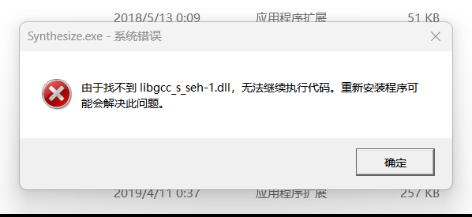
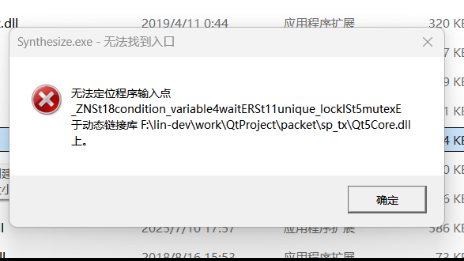
打包后,双击exe文件后,弹出错误,但是在其他机器上打包就正常。所以排除代码问题,应该是机器的环境问题,暂时的解决方式是从正常打包的机器复制所有的dll文件替换有问题机器上的的dll文件。
19、对齐方式导致的错误
#pragma pack(push, 1)  // 禁用结构体对齐
struct ScanCmd {
    uint16_t Head;  // 2 bytes
    float cmd;      // 4 bytes
    float st;       // 4 bytes
    // ...
};

#pragma pack(pop)
#pragma pack(push, 1) 和 #pragma pack(pop) 是 编译器指令,用于控制 结构体的内存对齐方式。
如果是默认对齐方式的话,Head两个字节后面会有2个字节的填充,总大小 = Head(2) + padding(2) + cmd(4) + st(4) + ...
比实际数据多 2 字节填充(这就是为什么有时要用 #pragma pack(1) 禁用对齐)。
20、默认int计算溢出错误
// 错误方式:
uint64_t AvailSpace = 450 * 1024 * 1024 * 1024;


// 正确方式:
uint64_t AvailSpace = 450ULL * 1024 * 1024 * 1024;
ULL 后缀表示 Unsigned Long Long,确保编译器将其视为 uint64_t 类型。
450 * 1024 * 1024 * 1024 的计算是在 int 类型下进行的,溢出已经发生,就算后面再赋值给 uint64_t,计算过程已经错误了。
在 C/C++ 中,如果一个整数没有后缀(如 450),它的类型默认是 int(32 位系统下通常是 int32_t),所以在计算过程中 450 * 1024 * 1024 * 1024就会超出int的范围,就会报错。 而加上ULL后,整个计算就会在64位无符号整数uint64中计算,不会溢出范围。
21、主线程阻塞导致事件循环未处理事件
std::vector<uint8_t> VFD_Control::TransferCmd(std::vector<uint8_t>& SendCmd,TcpClientTool* tcpClient)
{
    qDebug() << "TransferCmd Thread ID:" << QThread::currentThreadId();

//    lock_guard()
    std::lock_guard<std::mutex> lock(globalLock);  // 加锁,确保线程安全

    // ....一些代码

    // 阻塞式接收数据
    uint8_t buf[128];
    auto ret = tcpClient->Recv((char*)buf, sizeof(buf), 10000); // 5秒超时
}


int TcpClientTool::Recv(char* buffer, int maxSize, int timeoutMs)
{

    QEventLoop loop;
    QTimer timer;
    timer.setSingleShot(true);

    QByteArray receivedData;
    connect(this, &TcpClientTool::dataReceived, &loop, [&](const QByteArray &data) {
        receivedData = data;
        loop.quit();
        qInfo()<<"dataReceived loop.quit()";
    });
    connect(&timer, &QTimer::timeout, &loop, &QEventLoop::quit);

    timer.start(timeoutMs);
    loop.exec();

    qDebug() << "Recv Thread ID:" << QThread::currentThreadId();

    // 复制数据到调用者的缓冲区
    int bytesToCopy = qMin(maxSize, receivedData.size());
    memcpy(buffer, receivedData.constData(), bytesToCopy);
    qInfo()<<"Recv:"<<receivedData.toHex(' ');
    return receivedData.size();
}
连续两次执行TransferCmd方法,第二次执行导致主线程阻塞住了
原因:
第一次执行TransferCmd的时候,loop.exec();开启一个事件循环,直到调用 loop.quit() 或 loop.exit()。
但由于一直没有收到数据,只能靠timer超时来终止loop.
此时globalLock是还没有释放的,然后又执行一次TransferCmd的时候,由于globalLock还没有释放,所以只能一直等待,
此时主线程里已经在执行按钮槽函数了(等待globalLock释放),
导致Qt 主线程的原始事件循环没能去处理 QTimer 的事件!就死锁了。
解决方案:在进入Recv前释放锁,缩小锁的范围。
22、terminate called after throwing an instance of 'std::system_error'
terminate called after throwing an instance of 'std::system_error'
what(): Invalid argument
    collectDataThread = new std::thread([&]{ doCollect();});
    collectDataThread->detach();

    // 再次调用报错
    collectDataThread->detach();
23、ASSERT failure in QWidget: "Widgets must be created in the GUI thread
ASSERT failure in QWidget: "Widgets must be created in the GUI thread.", file kernel\qwidget.cpp, line 1145
09:19:03: 程序异常结束。
Widgets对象的创建只能在GUI线程中。
所有 QWidget(包括 QDialog、QMessageBox)必须在 GUI 主线程创建和使用
解决方法:
    QMetaObject::invokeMethod(qApp, [=]() {
        FloatingLabel::showSuccess("查询成功");
    }, Qt::QueuedConnection);
qApp是 QCoreApplication / QApplication 的全局指针 一定属于 GUI 主线程
使用QMetaObject::invokeMethod将lambda函数投递到qApp所在线程执行。使用Qt::QueuedConnection会到qApp所在线程的事件队列中排队执行。
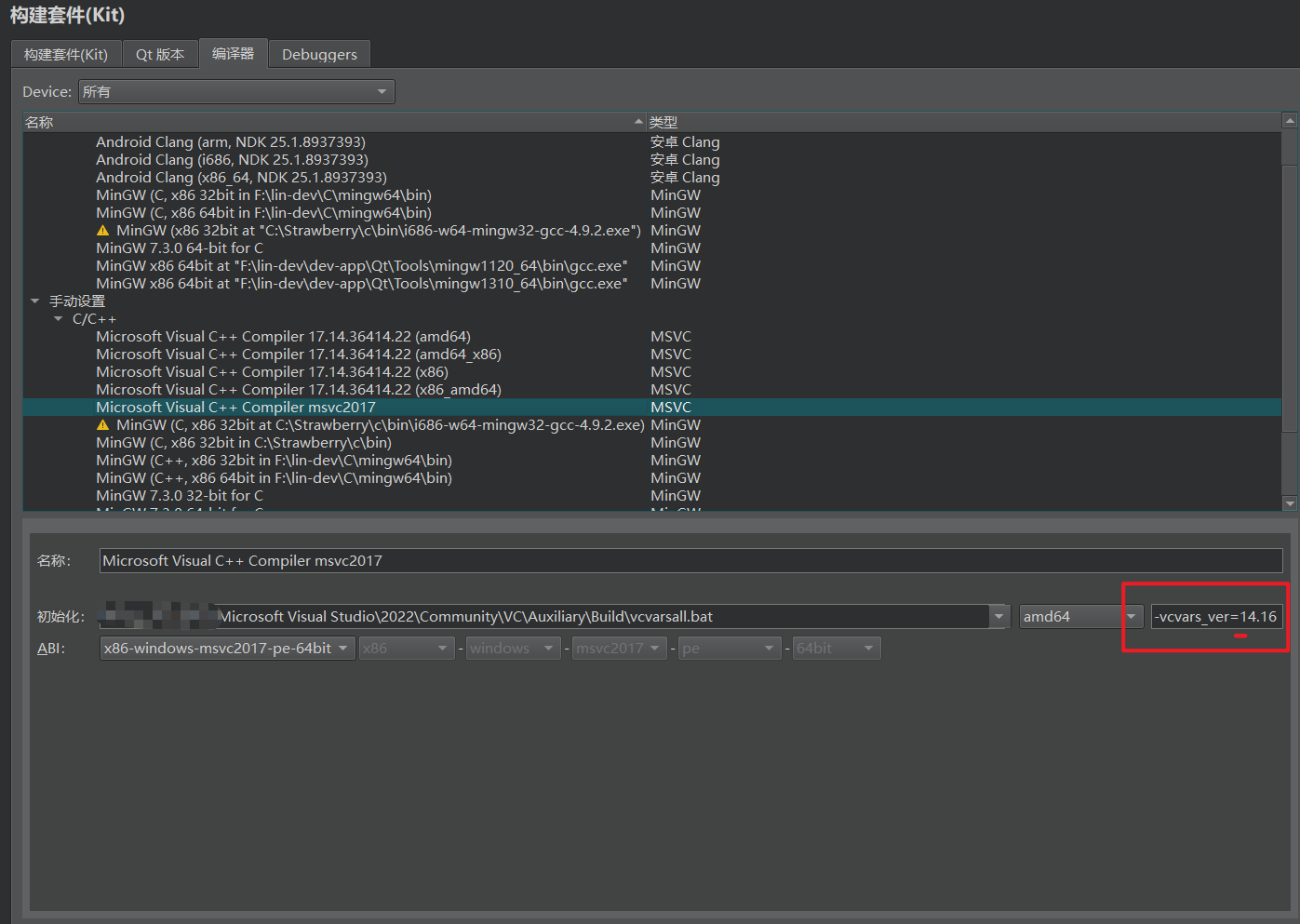
24、项目要求 Qt 5.12.3 msvc2017_64,但 Kit 配置的编译器与 Qt 库不匹配。
项目要求 msvc2017_64 的 Qt 库
↓
Kit 里编译器用的是 VS2022 x86(位数和版本都不对)
↓
ABI 不兼容,编译失败Qt 5.12.3 msvc2017_64用这个版本的话,qt自带的库也是用这个编译,所以编写的代码也要用这个版本编译,保持一致。
解决过程:
| 步骤 | 操作 |
|---|---|
| 1 | 在 VS Installer 里勾选安装 MSVC v141 工具集(MSVC2017的编译器) |
| 2 | Qt Creator 没有自动识别,手动在编译器标签添加 MSVC |
| 3 | 初始化路径指定 vcvarsall.bat,下拉选 amd64 |
| 4 | ABI 手动改为 x86-windows-msvc2017-pe-64bit |
| 5 | 发现还是报错,命令行测试发现需要加 -vcvars_ver=14.16 才能让 vcvarsall.bat 调用 v141 而不是默认的 v143 |
| 6 | 在编译器配置第三个输入框填入 -vcvars_ver=14.16,问题解决 |
关键知识点
为什么需要 -vcvars_ver=14.16?
VS2022 装了多个工具集时,vcvarsall.bat 默认初始化最新版(v143/VS2022),不会自动选 v141。必须显式指定版本号才能切换到 MSVC2017 工具集:
vcvarsall.bat amd64 -vcvars_ver=14.16  → MSVC2017 (19.16.x)
vcvarsall.bat amd64 -vcvars_ver=14.29  → MSVC2019 (19.29.x)
vcvarsall.bat amd64                    → 默认最新 MSVC2022
25、Cannot move to target thread
报错内容:
QObject::moveToThread: Current thread (0x2dd77b50) is not the object's thread (0x27872f40).
Cannot move to target thread (0x2dd77bd0)
原因:
moveToThread(targetThread); == this->moveToThread(targetThread);
要求必须在当前对象this所在的线程调用才行,否则 Qt 拒绝迁移并打印这条警告。- this对象 0x27872f40 归属 GUI 主线程
- runSignalSourceMode 跑在后台 std::thread(0x2dd77b50),它调用 connectTcp() → 在 std::thread 里执行 moveToThread(0x2dd77bd0) → 违反约束 → 报错
- 手动点卡片时是在 GUI 线程调用,所以正常
解决方案:
使用QMetaObject::invokeMethod将有moveThread操作调回this对象中执行
26、我用的是qt5.14.2 程序运行报错::-1: error: collect2.exe: error: ld returned 1 exit status
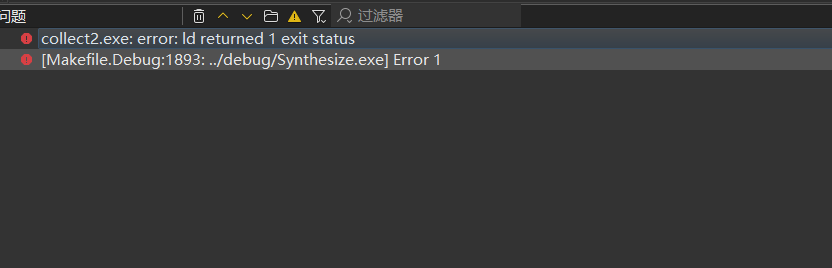
原因是*.exe程序还没关掉,又启动就报错。
27、:-1: error: undefined reference to `AISDatabaseWorker::staticMetaObject'
完整报错:
AISDatabase.cpp:-1: error: undefined reference to `AISDatabaseWorker::staticMetaObject'
AISDatabase.cpp:-1: error: undefined reference to `AISDatabaseWorker::statusChanged(QString const&)'
AISDatabase.cpp:-1: error: undefined reference to `AISDatabaseWorker::connected(bool, QString const&)'
AISDatabase.cpp:-1: error: undefined reference to `vtable for AISDatabaseWorker'
:-1: error: collect2.exe: error: ld returned 1 exit status
:-1: error: [Makefile.Debug:1918: ../debug/Synthesize.exe] Error 1
错误原因:
1. Q_OBJECT 只声明,不实现
类里写 Q_OBJECT 宏,它展开后只是声明了一堆东西,比如:static const QMetaObject staticMetaObject; // 只有声明 virtual const QMetaObject *metaObject() const; static void *qt_metacast(const char *); int qt_metacall(...);但没有实现。staticMetaObject 的定义、vtable、信号函数(connected()、statusChanged())的函数体,全部由 moc 工具根据类的信号/槽/属性声明自动生成。QObject 的子类缺了这些实现就无法实例化。
2. moc 的两种输出
moc 扫描所有 .h 和 .cpp,发现 Q_OBJECT 就生成元对象代码。qmake 生成的 Makefile 会这样处理:①当 moc 处理头文件
AISDatabase.h会输出moc_AISDatabase.cpp文件,这个cpp包含了Q_OBJECT声明后产生的定义的实现。qmake 自动把这个 moc_AISDatabase.cpp 加到 SOURCES,交给编译器编译,链接进去,解决你那个 undefined reference to staticMetaObject。
moc AISDatabase.h -o moc_AISDatabase.cpp②moc 处理 AISDatabase.cpp 生成AISDatabase.moc,里面包含了AISDatabaseWorker的Q_OBJECT定义实现,但是AISDatabase.moc不会自动编译,所以AISDatabaseWorker找不到、无法引用Q_OBJECT的定义实现。
所以 AISDatabase 的元对象代码自动就链接进去了;而 AISDatabaseWorker 的 moc 输出 AISDatabase.moc 只是被生成在构建目录里,不参与编译。
解决方案:
在AISDatabase.cpp末尾加上#include "AISDatabase.moc"
#include 的本质是文本替换:预处理器把这行替换成 AISDatabase.moc 的完整内容,即把 moc 生成的 AISDatabaseWorker 元对象代码原样粘贴进 AISDatabase.cpp
1. 编译:粘贴进来的代码随 AISDatabase.cpp 一起被 g++ 编译进 AISDatabase.o,staticMetaObject、信号函数体、虚表都有了实体;
2. 链接:ld 在 AISDatabase.o 里找到了之前缺失的符号,undefined reference 全部消失。
这个 include 把 moc 为 .cpp 生成的代码复制进当前翻译单元,让它们跟着 AISDatabase.cpp 一起编译成 .o。于是 AISDatabaseWorker::staticMetaObject、vtable、信号函数体都有了实体,链接器就能找到。

赋能鸿蒙PC开发者,共建全场景原生生态,共享一次开发多端部署创新价值。
更多推荐
 10
10 0
0- 0


 已为社区贡献1条内容

所有评论(0)